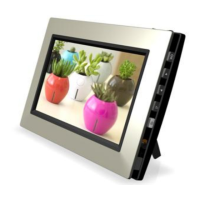
Need help?
Do you have a question about the GiiNii GN-818 and is the answer not in the manual?
Connect the power adapter and turn on the device.
Details the functions of all buttons on the device.
Learn to zoom, pan, and play pictures in slideshow mode.
Navigating and viewing months in the calendar.
Select different clock skins and view the clock in full screen.
Browse photos and play them individually or in slideshow.
Access features like color effects, contrast, brightness, and rotation.
Select photo sources and configure device settings like date and time.
Customize slideshow behavior and general device preferences.
Explore different collage modes for displaying photos.
View device info and instructions for software updates.
Solutions for common problems like power issues and memory card recognition.
Technical details on display, card reader, connectivity, and overall features.
Information regarding FCC rules and compliance for the device.
Details of the product's limited warranty coverage, terms, and exclusions.
 General
| Display Size | 8 inches |
|---|---|
| Resolution | 800 x 600 pixels |
| Aspect Ratio | 4:3 |
| Memory Card Support | SD, MMC, MS, xD |
| Image Formats | JPEG |
| Slideshow Function | Yes |
| Clock and Calendar | Yes |
| USB Port | Yes |
| Supported Media Formats | JPEG |
| Power Source | AC Adapter |
| Connectivity | USB |

 To Next Page