29
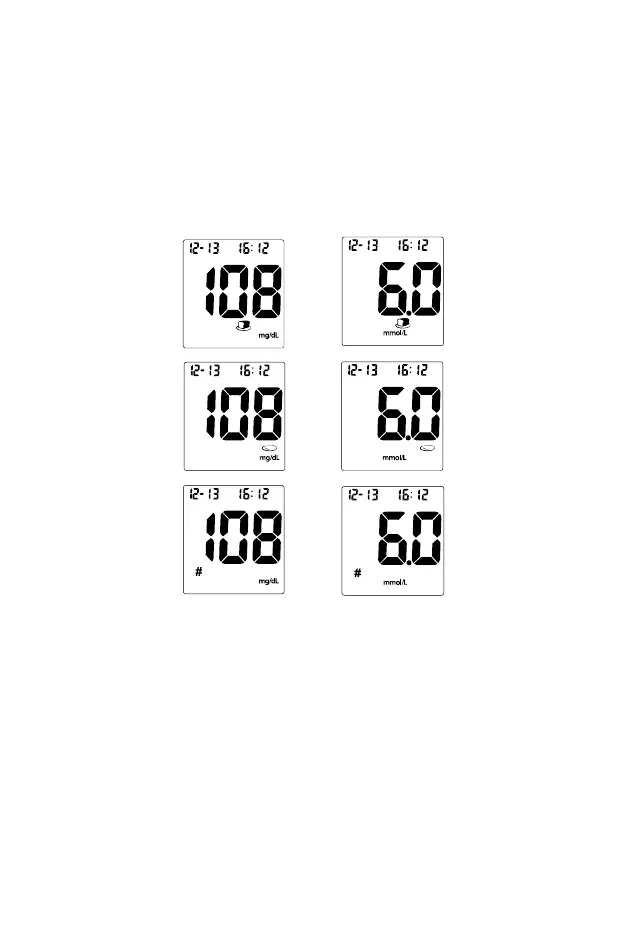
Press the ▼or▲ button again to display the pound sign (#), indicating an
invalid result.
Press the ▼or▲ button again then none of the above markers will be
displayed for the result.
After deciding the selection, press the OK to confirm the selection as either
“before meal marker”, “after meal marker”, “invalid result” with pound sign (#)
or none of these three symbols. If an invalid result is marked, run the test
again with a new test strip.
If an error message appears on the display, refer to the Troubleshooting
Guide on page 40. If a “HI” or “LO” error appears on the display, refer to “HI”
and “LO” messages below.
5. After inspection, record valid results in your logbook with the date and time,
and compare them to the target goals set by your diabetes healthcare
professional. Refer to Suggested Testing Times and Target Goals on page
38 for more details on your target blood glucose concentration goals.
6. Slide forward the strip ejector to discard the used test strip.
OR
OR
OR


 To Next Page