EasyManua.ls Logo

Gionee S7 - 2 Learn about the Phone; Overview; Function Keys

Gionee S7
22 pages
Print Icon
To Next Page IconTo Next Page
To Previous Page IconTo Previous Page
Loading...
2
2. Learn about the phone
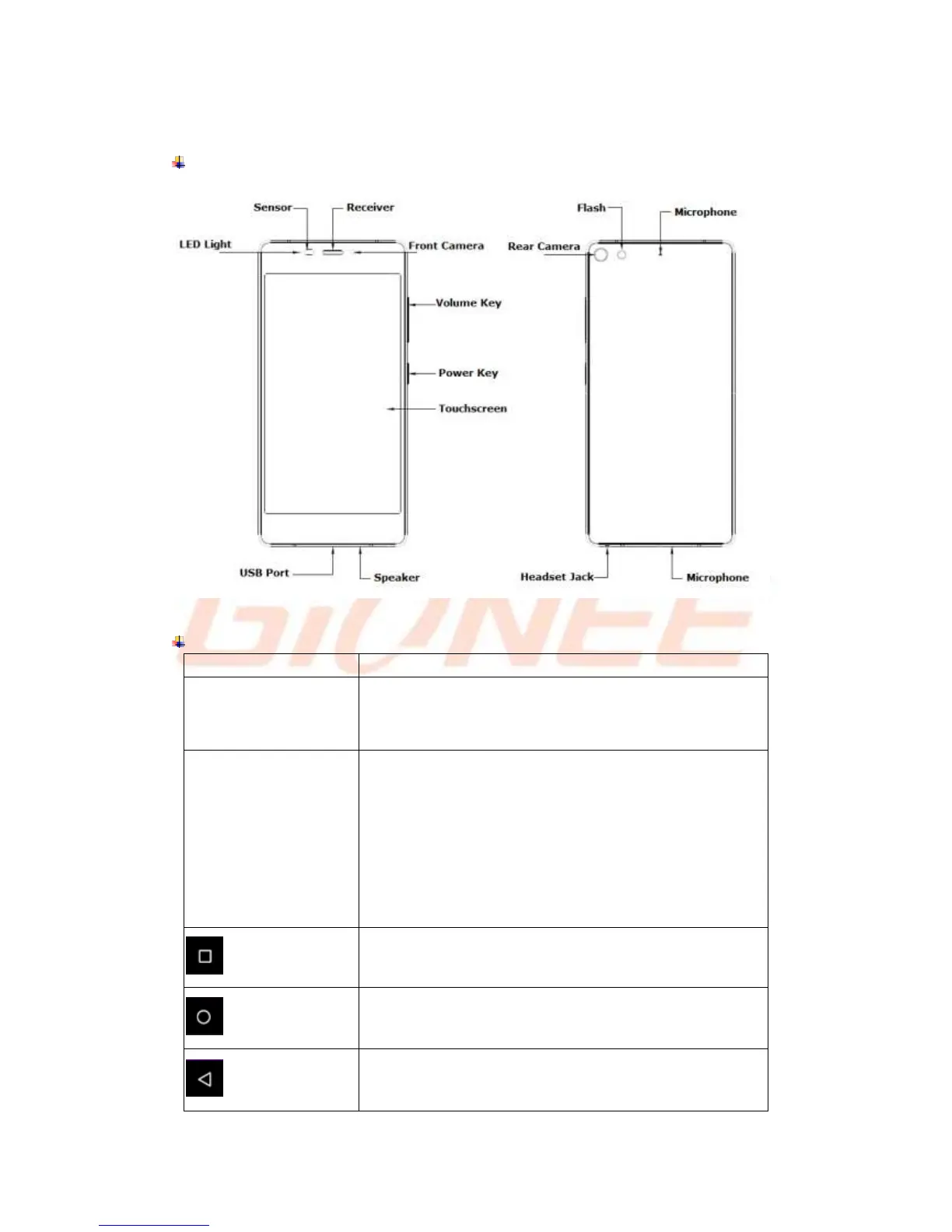
Overview
Function Keys
Keys
Function
Power key
(Right side of the phone)
a) Press to Turns on/off the screen.
b) Press and Hold to power off or reboot the phone.
Volume key
(Right side of the phone)
a) Press when call is in progress, increase or decrease the
volume, when the phone is ringing, silences the ringer. On
the home screen when no call in progress, increase or
decrease the ringtone volume or sets the phone to the silent
instead of ringing. In other applications, controls the volume
of music, spoken directions and other audio.

b) Press and hold to quickly increasing ringtone volume to
maximum or minimum.
Recent task key
Tap to open the list of recent used apps.
Home key
Tap to return to Home screen.
Back key
Tap to return to the previous screen.

Related product manuals