Replacement Service Parts
7.1 Battery Replacement
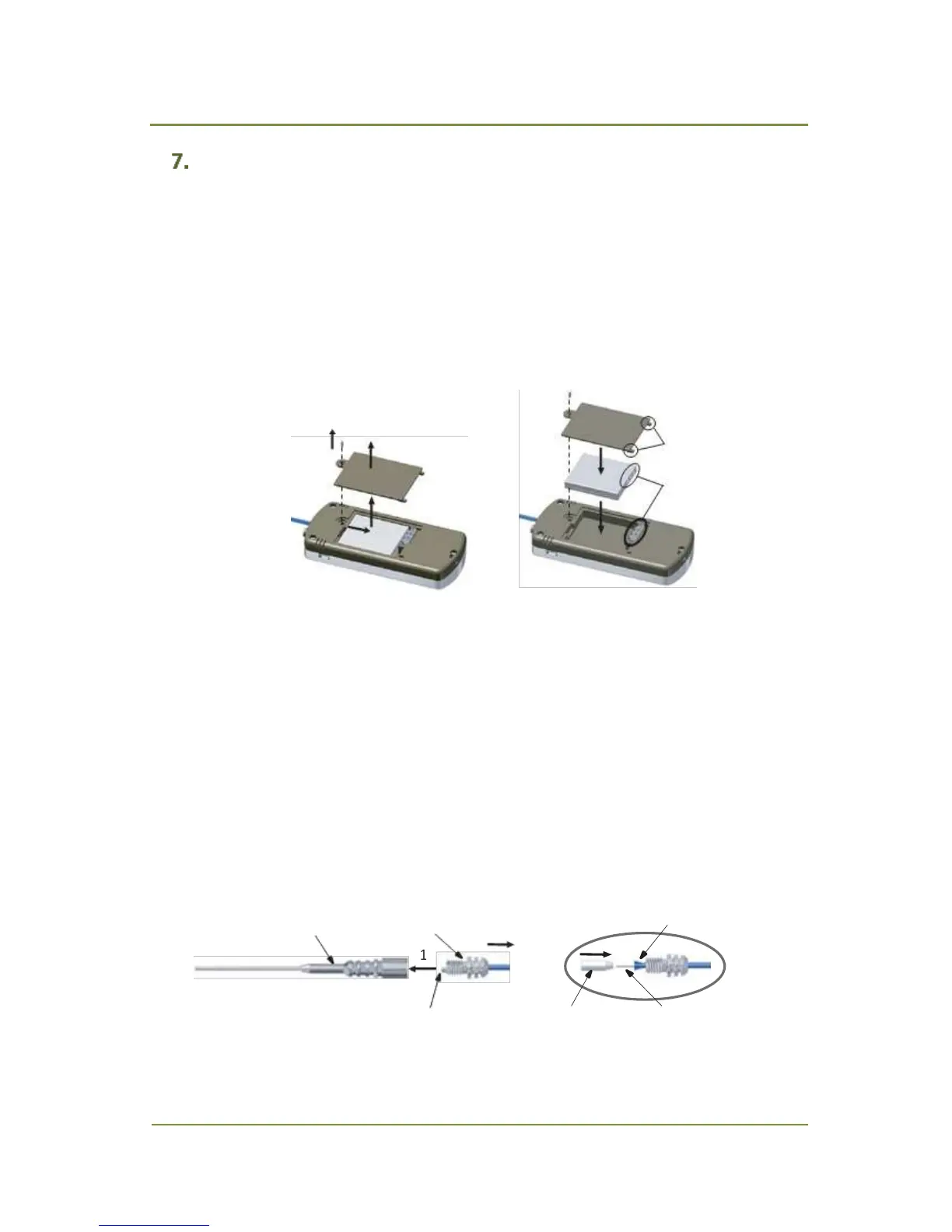
To replace the battery (Fig. 7.1 ):
1. Unscrew a screw using a small cross head Philips screw driver, size 0. Note that the screw is
very small and can be easily lost.
2. Remove the battery cover.
3. Remove the battery by pushing it in the arrow direction.
4. Install a new battery (p/no 2702-19341) and place the battery cover back.
Fig. 7.1 Battery Replacement
7.2 Replacement of Sample Probe Filter
To replace the sample probe filter (Fig. 7.2):
1. Unscrew the probe cap counterclockwise and remove the probe from the probe cap. The
sample filter is attached to the probe cap.
2. Remove the old sample filter from the probe cap. If the sample filter is stuck to the probe
cap, use long-nose pliers to remove it.
3. Insert the end of the PTFE tubing into a new sample filter (p/no 2702-19333) and attach it
tightly to the protective tubing.
4. Screw the probe onto the probe cap tightly.
Fig. 7.2 Sample Probe Filter Replacement


 To Next Page