(,
Set the remole eontrol
/tooch
prnel
ltarget
nod€) to enter
lhe
"Find
and Bind" mode to search for
"Bind
lnitialo/'.
Please ref€r to the manual olthe.orespo5dirg
remo!e ltouch
panel
@ "Find
and Aind" is complet€d, the remot€
/ tcu.h
panel
shall
Nowthe dev.e thali
be
r€mote.ontol/to!.h
panel.ontrollable.
4.
Pairing with 2.4GHz RF Remote control
/
Touch Panel
l-'
Orhepa,,.rsw,trbetimeoutafrer4secords
O*r-*"ot
when rhe oelice
powered
on.
=
,,
O
The
pair.ng
w:l' be dole successlurry by oressjng
any
,
:9tl
zone On" k€y ol the 2..G RF Remote
or touch
panel.
t
_t
I
O
rhe
righr srr;! will
btink 3 times.
"*n
o*Y*
(Power
on ihe device, dhin &)
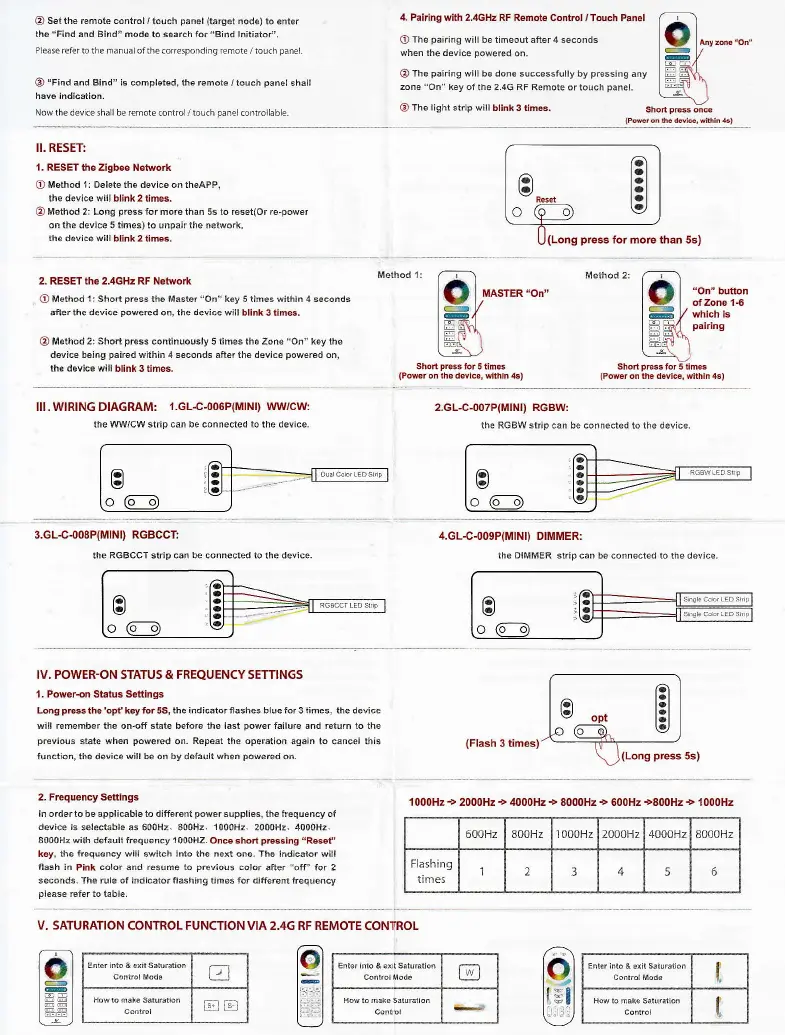
il. RESET
1. RESET
the Zigbee Network
(r)
Method 1i Delete the device on theAPp.
the devico wi,l blink 2 times.
@
Method 2: Long
p.e66
for more than 5s to reset(Or re-power
on ihe device 5 limeg) lo unpalr the network,
lll.WR|NG DIAGRAMi
l.GL.c-006P(MlNl) wwcw:
the W/CW srip can be connected to the device.
(Long
press
for more than 5s)
2. RESET the 2.4GHz RF Netuork
O
Method 1: Sho(
press
the Master "On" key 5 t;nes within 4 seconds
,fter lhe dev;ce
powered
o!, the dev:ce will blink
3 times,
O
Merhod 2: Shod
press
continuously 5 times the Zone
"On"
key the
devic€ bejng
paired
within 4 seconds after ih€ device
powered
on,
Method 1i
MASTER
"On"
Shod
press
for 5 lines
(Power
on rhe devier within
4s)
rvlerhoJ
2:
f----\
lO ]
","1"':r."
ll.....- /..--
I
gP
,f
whrcn rs
|
-
-i'l
parflng
I=FY\
|
-=1'
I
.*,:
Shod
press
for 5 times
(Poweron
the device, withln4s)
2.GL-C-007P(MrNr) RGBW:
the RGBWstrip can be conn€cted lo the daviDe-
ra
lsl
o
--===
E
o@
ra-
l-l
l.L.
l.L
t,
3.GL-C-008P(MrND RCBCCT:
!h€ RGBCCT strip can be corr€cted to the device.
4.GL-C-009P(MrNr)
DTMMER:
the DIMMER slrip can be connected to ahe devace-
IV. POWER-ON STATUS & FREQUENCY SETTINGS
l. Powercn Slatus Se*ings
Long
pEs
the'opf,
hy tor
55,
the indicator flashes bl!e for 3 limes, the device
will remember the on-otr slate before the last
power
failure and return !o the
p.eviaus
slate
*hen
powered
on.
Repea! lhe ope.ation
again to aaBcel tiis
frnction, $e d€vice
w:ll
be on
by
defarlt
whefi
powe.ed
on.
2. Frequency Settings
ln ordertobe applicableto ditrerentpowersrppl:es, lhe frequrn.y ot
device is
sele.table as 60092. 800H2.
1C00Hz.
2000H2. 4000H2.
8e00Hz
with
default lrequency
100SHZ.
Once
shoi
pre$ing
"Re*t"
koy,
lhe freqdency siia
swllch
irlo
the ned one. The indicator wili
tlash in
Pink.olor:nd
reslme to
p.ev;ous
color
afrer "off'lor 2
seconds. rhe rule of irdicator flashing t,aes fo. diffe.ert
f.eqrency
pl€as€
referto lable.
(Flash
3
press
5s)
1000H2
->
2000H2
+
4000H2
+
8000H2
+
600H2
+800H2 +
l000Hz
500H2 800H2 I 00CHz 2000H2 4AACHz 8000H2
Flashing
tlmes
2
J
4
5
V. SATURATION
CONTROL FUNCTION VIA 2.4G RF REMOTE CONTROL
E.!.r i.1. t ext Srrurd:ln
ial
Ho!10
nr!.
SatlBti.n
l:(i il
lr0
t
I
61
l-l
l.l
l.l
t,
61
Itl
th€ device will
blink 3 times,
ra
-
O
a
a
!,
1
o
['9
t6t
=P
==
[trt'-]
ro
l=l
t_l


 To Previous Page
 Loading...