12
105569
BLUE FLAME PROPANE/LP GAS HEATER
NON-THERMOSTAT MODELS
FB-20BB, FB-30BB AND
FGH-30LPB
A. This appliance has a pilot which must
be lighted by hand. When lighting the
pilot, follow these instructions exactly.
B. BEFORE LIGHTING smell all
around the appliance area for gas. Be
sure to smell next to the floor because
some gas is heavier than air and will
settle on the floor.
WHAT TO DO IF YOU SMELL
GAS
• Do not try to light any appliance.
• Do not touch any electric switch; do
not use any phone in your building.
• Immediately call your gas supplier
from a neighbor’s phone. Follow
the gas supplier’s instructions.
• If you cannot reach your gas sup-
plier, call the fire department.
C. Use only your hand to push in or turn
the gas control knob. Never use tools.
If the knob will not push in or turn
by hand, don’t try to repair it, call a
qualified service technician or gas
supplier. Force or attempted repair
may result in a fire or explosion.
D. Do not use this appliance if any part
has been under water. Immediately
call a qualified service technician to
inspect the appliance and to replace
any part of the control system and
any gas control which has been un-
der water.
WARNING: If you do not fol-
low these instructions exactly, a
fire or explosion may result caus-
ing property damage, personal
injury or loss of life.
FOR YOUR SAFETY
READ BEFORE
LIGHTING
TO TURN OFF GAS
TO APPLIANCE
1. Remove front panel (see Figure 6,
page 8).
2. Follow steps 1 through 5 under Light-
ing Instructions, page 11 and 12.
3. With control knob pressed in, strike
match. Hold match to pilot until pi-
lot lights.
4. Keep control knob pressed in for 30
seconds after lighting pilot. After 30
seconds, release control knob.
5. Replace front panel.
Shutting Off Heater
1. Turn control knob clockwise
to the OFF position.
2. Turn off all electric power to the ap-
pliance if service is to be performed.
Shutting Off Burner Only
(pilot stays lit)
Turn control knob clockwise to
the PILOT position.
THERMOSTAT
CONTROL
OPERATION
The thermostatic control used on these
models differs from standard thermo-
stats. Standard thermostats simply turn
on and off the burner. The thermostat
used on this heater senses the room tem-
perature. The thermostat adjusts the
amount of gas flow to the burner. This
increases or decreases the burner flame
height. At times the room may exceed the
set temperature. If so, the burner will
shut off. The burner will cycle back on
when room temperature drops below the
set temperature. The control knob can be
set to any heat level between HI and LO.
Selecting the HI setting will cause the
burner to remain fully on without modu-
lating down in most cases.
Note:
The thermostat sensing bulb mea-
sures the temperature of air near the
heater cabinet. This may not always agree
with room temperature (depending on
housing construction, installation loca-
tion, room size, open air temperatures,
etc.). Frequent use of your heater will let
you determine your own comfort levels.
MANUAL LIGHTING
PROCEDURE
CAUTION: Do not try to adjust
heating levels by using the
manual shutoff valve.
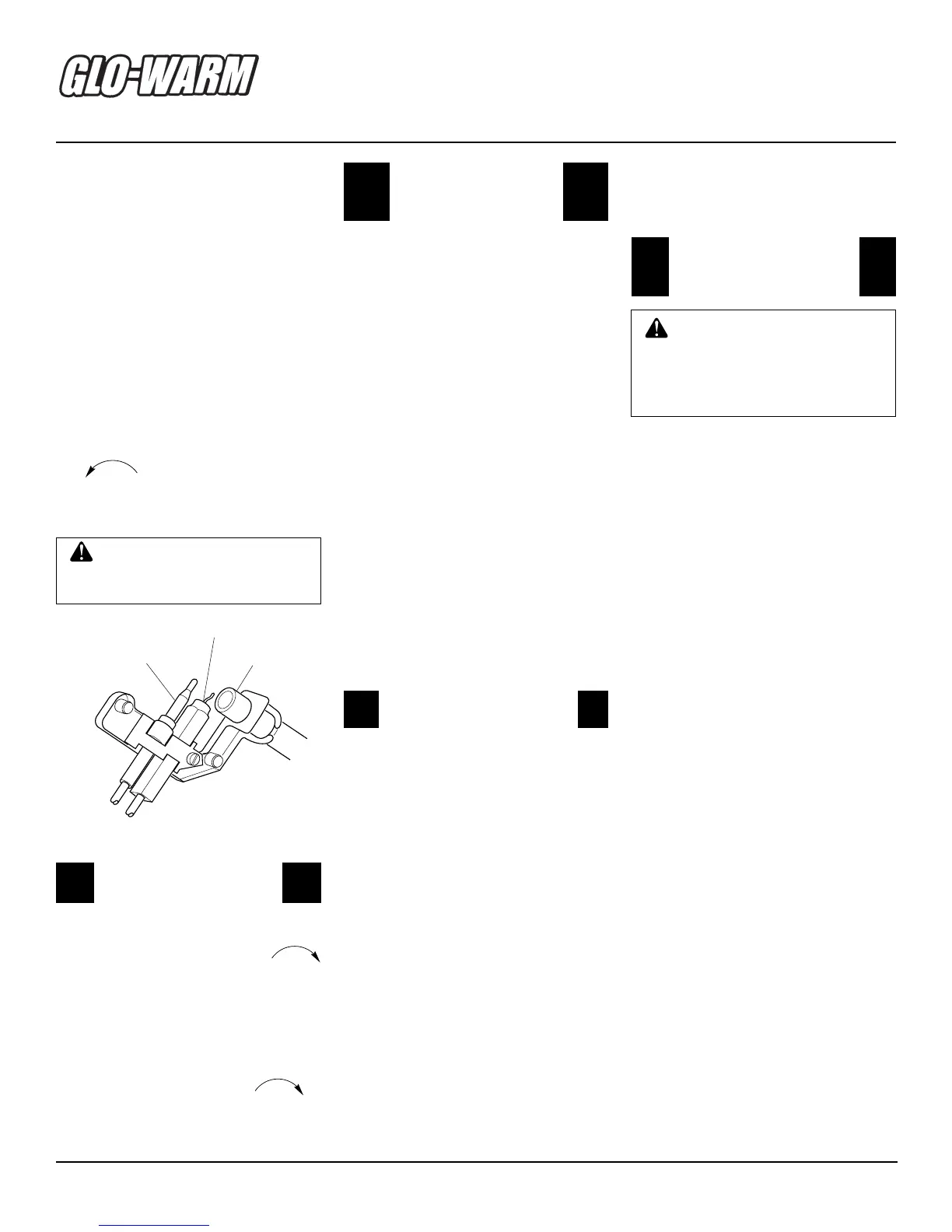
Figure 17 - Pilot
7. Keep control knob pressed in for 30
seconds after lighting pilot. After 30
seconds, release control knob.
• If control knob does not pop up when
released, contact a qualified service
person or gas supplier for repairs.
Note:
If pilot goes out, repeat steps
3 through 7. This heater has a safety
interlock system. Wait one (1) minute
before lighting pilot again.
8. Turn control knob counterclockwise
to desired heating level. The
main burner should light. Set control
knob to any heat level between HI
and LO.
Thermocouple
Ignitor Electrode
Pilot Burner
OPERATING
HEATER
Continued


 To Next Page