Arrange Your Print
Sign In
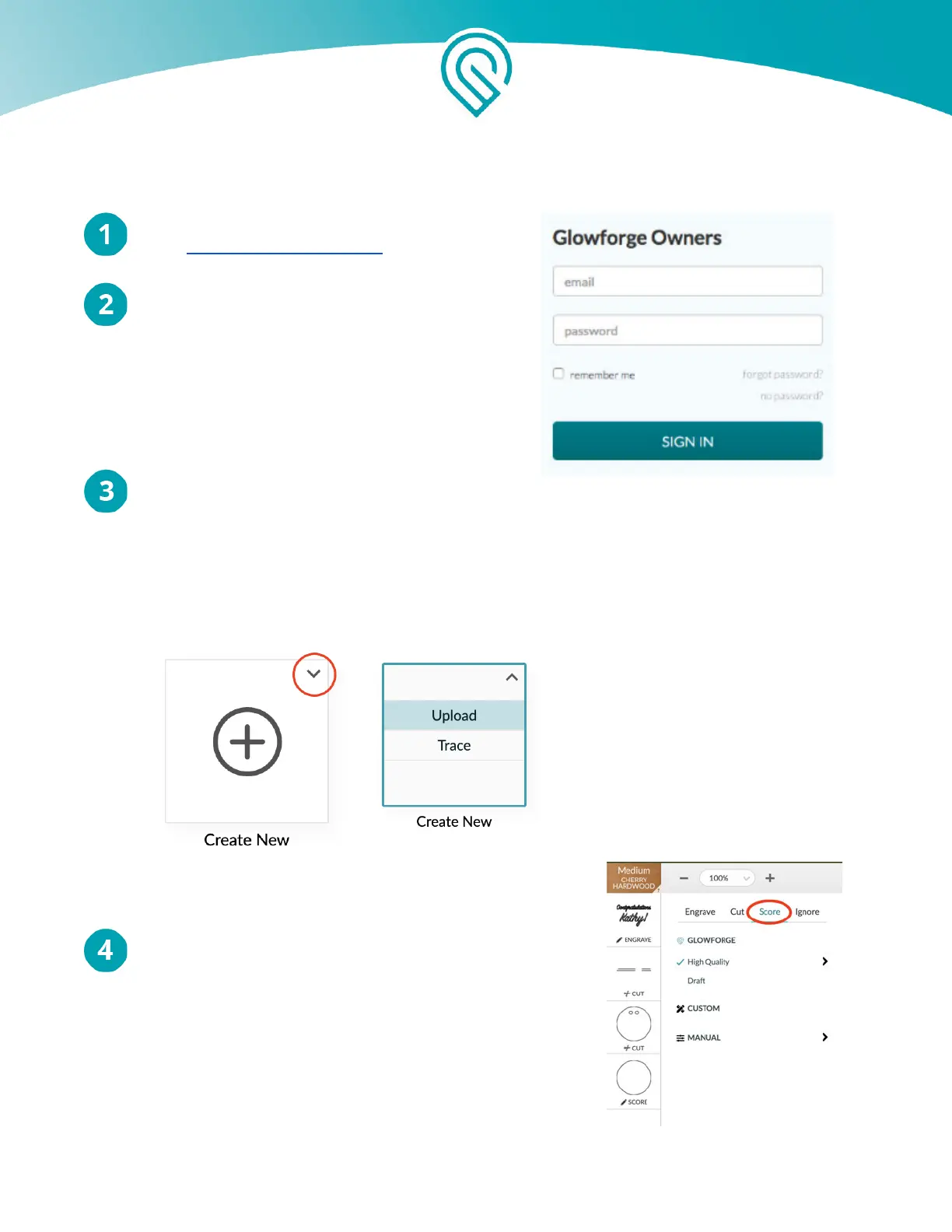
Go to https://app.glowforge.com and sign in.
Place Material in the Bed of Your Glowforge
The remaining hardwood you used for your
Founder Ruler would be perfect. Make sure the
barcode is whole and visible. (If it’s not, you can
select the material manually after you upload your
file - just click “Unknown” at the top left of the
screen.)
Upload Your File
Go to app.glowforge.com to get to the Dashboard. Then click on the arrow at the top right of the
“Create New” box, and click the “Upload” button. Choose the file you saved.
Your design will open in the Workspace. Each color in your drawing will appear as a separate
print step on the left side of the screen.
Select A Step
Click on the step showing the single circle (the one that
was pink).
Copyright Glowforge, Inc. 2020 77



 To Next Page