START-UP EC 65
12/09 12
8. Getting the device ready
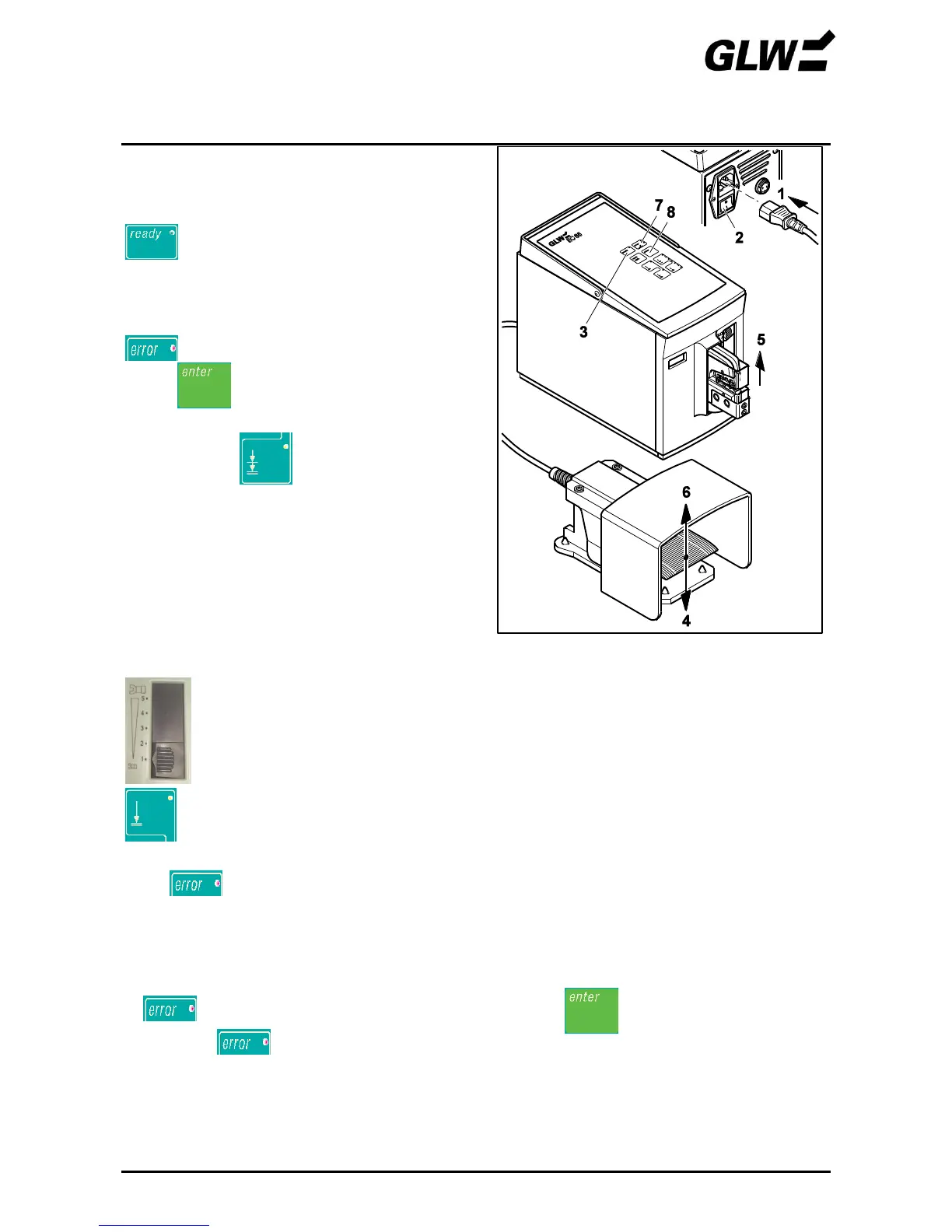
Connect the mains plug (1).
Switch on the power switch (2) (press I).
lights up (3).
Press the foot switch (4).
The crimp die (5) opens automatically, the foot
switch (6) can be released.
lights up (7).
Press (8).
The device is ready.
Mode 2 is set.
Check mode before using.
9. Set optimum force range
Push force range adjusting slide to position 1.
Set mode 1.
Perform crimping without crimp contact inserted by pressing the foot switch.
If lights up, check the adjustment of the dies (see steps 6 and 7).
Perform crimping with wire and crimp contact inserted.
Pay attention to correct cross section according to the company supplementary
sheet.
If lights up, push up the slide one step and press .
Repeat until no longer lights.
To compensate for any material tolerances, push the setting slide up another step.
Figure 9 Getting the device ready


 To Next Page