OPERATION EC 65
12/09 14
One-step crimping
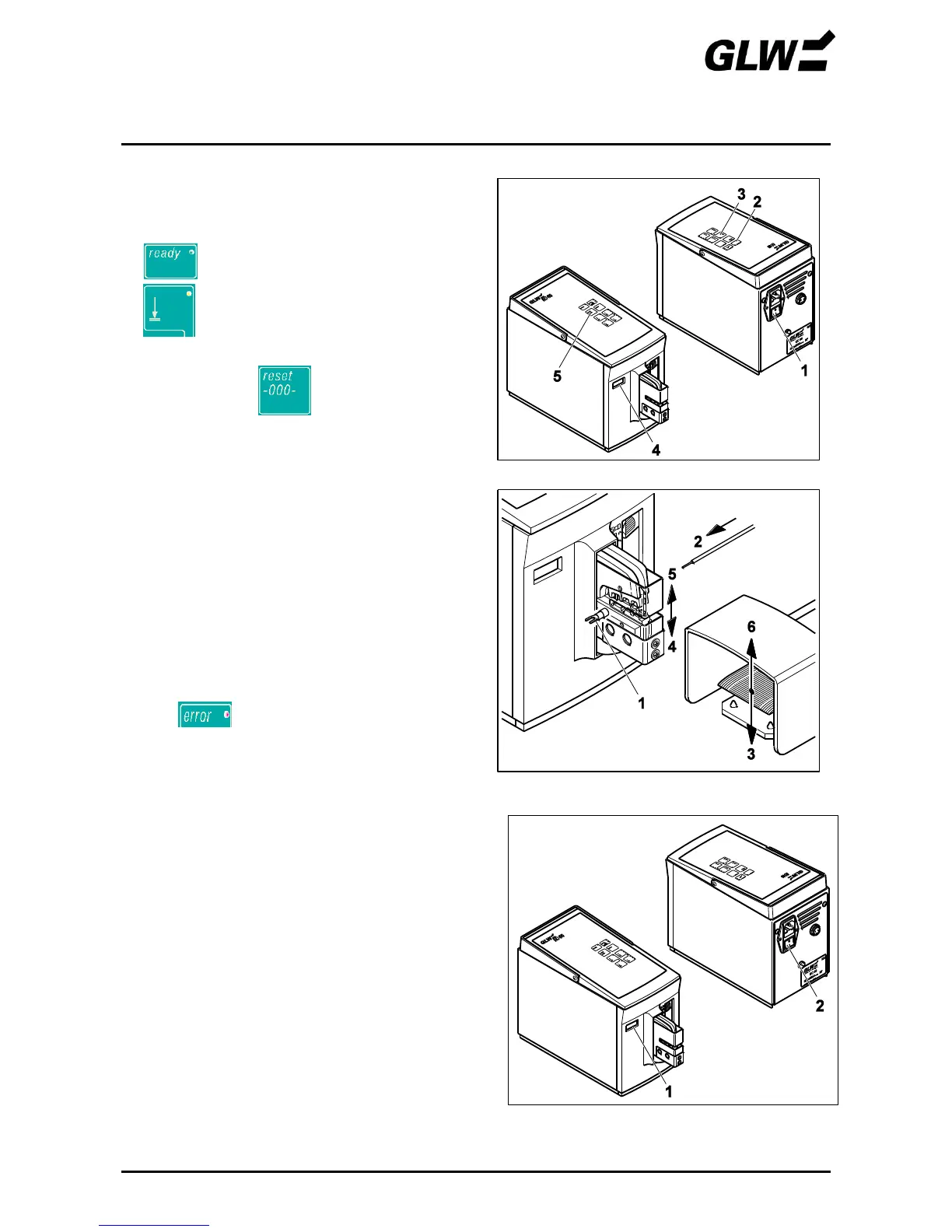
1. Set mode 1
Switch on the EC 65 at the power switch (1)
(press I).
lights up (2).
Set mode 1 (3).
Read counter (4) if necessary and
reset to 0 with (5).
2. Crimp crimp contact
Centre the crimp contact (1) on the bottom die.
Insert wire (2) in the crimp contact.
Pay attention to correct cross section
according to the company
supplementary sheet.
Press the foot switch (3) until the crimp die is fully
closed (4).
The crimp die (5) opens automatically, the foot
switch (6) can be released.
Remove the crimp contact with crimped wire (7).
lights up in the case of
defective crimping. Consult the
FAULTS chapter.
3. Taking out of operation
Read counter (1) if necessary.
Switch off the EC 65 at the power switch (2)
(press 0).
Figure 11 Crimp crimp contact
Figure 12 Taking out of operation


 To Next Page