R 22MAR23
PART No.
SHEET
ALL INFORMATION WITHIN ABOVE
BORDER TO BE PRINTED EXACTLY
AS SHOWN ON 8.5 x 11 WHITE 16
POUND
NON-BOND RECYCLABLE
PAPER.
PRINT ON BOTH SIDES,
EXCLUDING TEMPLATES. TO BE
UNITED IN ACCORDANCE
WITH
GMCCA SPECIFICATIONS.
Date Revision Auth DR
Title
Ultium PowerUP Charge Station
User Manual
13DEC22 Fourth Re l SAR
MB
22MAR23
Fifth Re l
SAR
MB
84922762
29NOV22
Third Re l
SAR
AH
12
EN
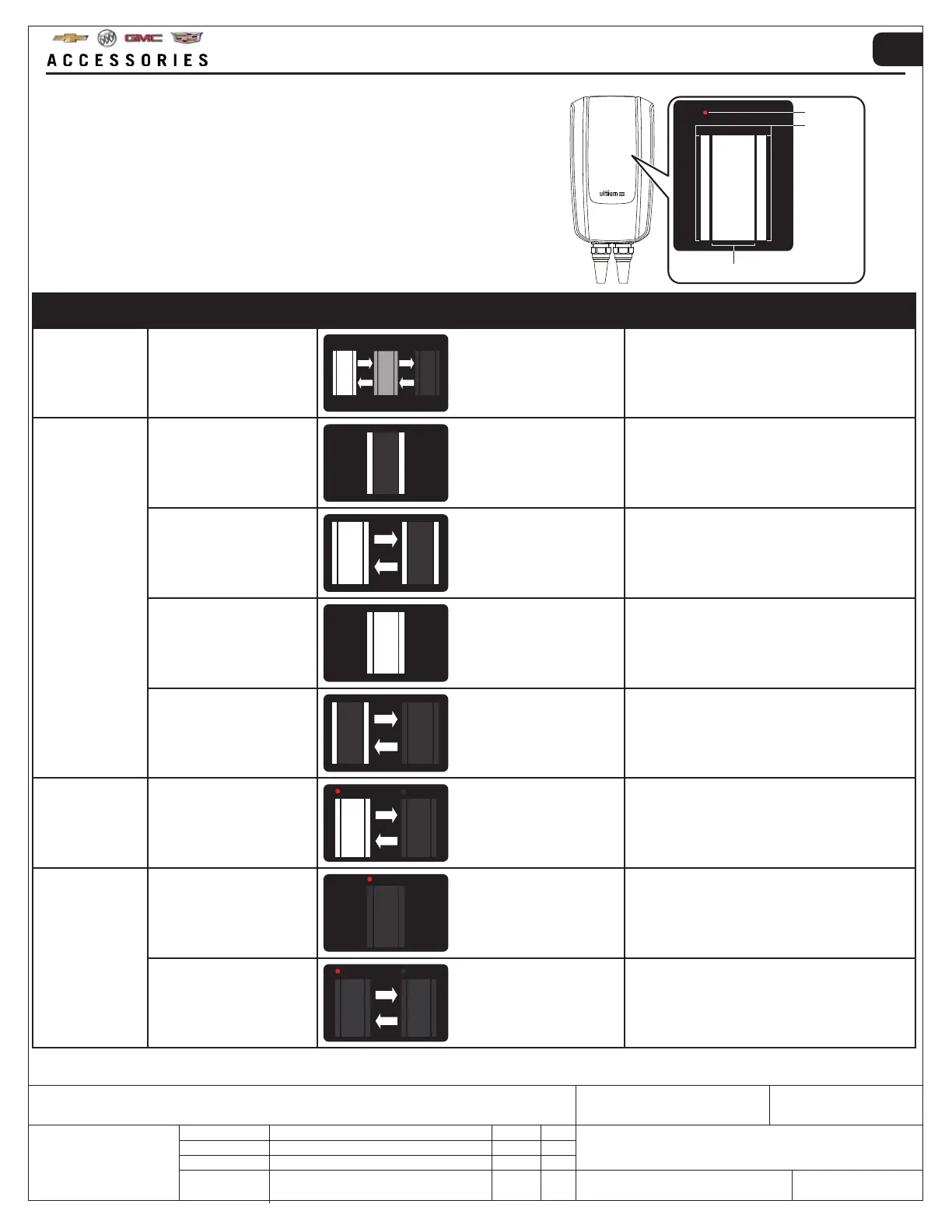
4. INDICATOR OVERVIEW
ZONE 1
ZONE 2
ZONE 3
The EV Charge Station is equipped with an indicator panel
located on the from of the unit.
The indicator panel displays charge status and errors.
FUNCTION DESCRIPTION INDICATION ACTION
POWER Power is on
ZONE 1: FADING
ZONE 2: FADING
No action required, device is functional
CHARGING
Charge cable correctly
connected
ZONE 2: SOLID LIGHT No action required, device is functional
Charging in progress
ZONE 1: FLASHING
ZONE 2: SOLID LIGHT
No action required, device is functional
Charging complete
ZONE 1: SOLID LIGHT
ZONE 2: SOLID LIGHT
Vehicle fully charged → charge cable can be
removed and stored
For more information, refer to:
OPERATING INSTRUCTIONS → STEP 10
Charging paused ZONE 2: FLASHING
Charging manually paused via the
Manufacturer App → Refer to App for further
information or to resume charging
UPDATE Software update ALL ZONES: FLASHING
A software update is in progress. For more
information, refer to:
TROUBLESHOOTING → SOFTWARE
ERRORS
Hazardous error ZONE 3: SOLID LIGHT
For more information, refer to:
TROUBLESHOOTING
Manually resettable error ZONE 3: FLASHING
For more information, refer to:
TROUBLESHOOTING



 To Next Page