Gocycle
®
Owner’s Manual for GS, August 2018
© Karbon Kinetics Limited. All Rights Reserved. 10
3 WARRANTY
Please view current warranty terms and conditions at the webstore you purchased your Gocycle
from. www.gocycle.com.
3.1
Warranty Registration and Setup
In the event that you wish to make a warranty claim, you must provide your original proof of
purchase (sales receipt or order confirmation). Keep this information in a safe place. Before we can
process a warranty claim, you must have registered your Gocycle via the Setup process on the
GocycleConnect App. Doing so will enable us to contact you with important product safety-related
information, should the need arise.
Please complete the Setup process on the GocycleConnect App to register your Gocycle for warranty
and in order to stay informed of important safety notices.
3.2
Gocycle Frame Number
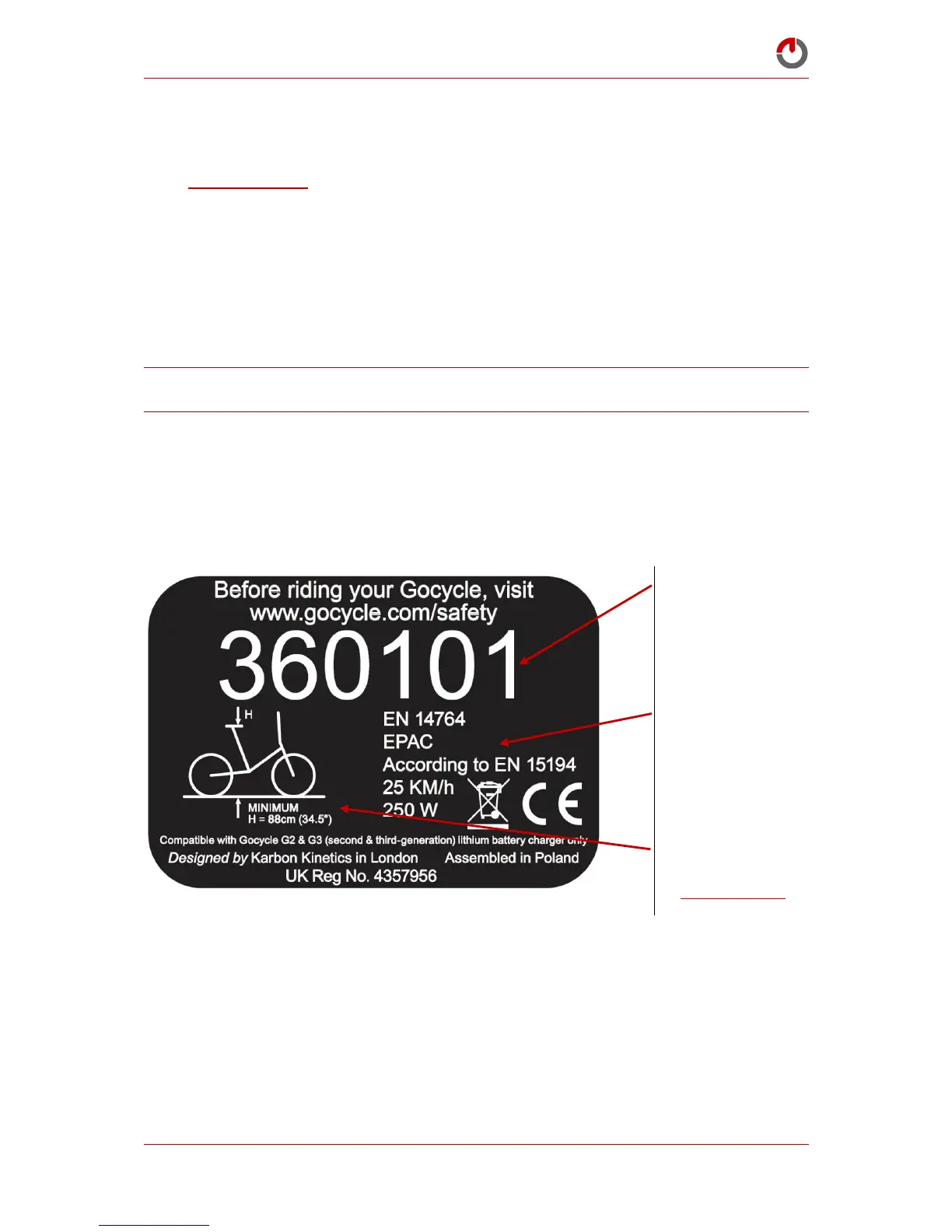
Your Gocycle comes with a unique identifier called a frame number, positioned on the rear of the
Gocycle. An example is shown below:
Your Gocycle frame number will be required when registering your Gocycle, making a warranty
claim or making contact with Karbon Kinetics Ltd.



 To Next Page