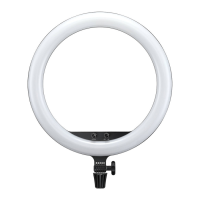
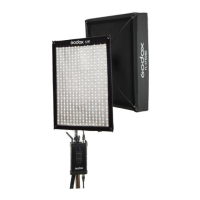
The Godox LED500 Video Light is a versatile and user-friendly lighting solution designed for both video and still photography. It features a panel of 504 high-quality LED bulbs, providing a wide spectrum of beautifully soft, even, and comfortable illumination without generating excessive heat. The light's efficiency is further enhanced by four reflective barndoors, which help maximize light output.
Function Description:
The LED500 series offers three distinct models to cater to various lighting needs:
- LED500W White Version: Emits light at a color temperature of 5600K, ideal for daylight-balanced shooting.
- LED500Y Yellow Version: Provides warm light at 3300K, suitable for creating specific moods or matching incandescent lighting.
- LED500C Changeable Version: Offers adjustable color temperature from 3300K to 5600K, providing maximum flexibility for different shooting environments.
Each model comes equipped with a dedicated remote control, enabling wireless adjustment of brightness and color temperature. This remote control also facilitates wireless grouping, allowing users to control up to six groups of LED lights across 16 channels, ensuring strong anti-interference capability and precise lighting setups. The light features a large LCD panel that displays current settings, and all parameters are automatically saved for convenience.
Usage Features:
The LED500 video light offers flexible power options, operating either with two SONY NP-F970 lithium batteries (purchased separately) or via a 13-16.8V DC power adapter (included). When using lithium batteries, the LCD panel displays the remaining battery level, with a blinking indicator signaling low power, prompting timely recharging to prevent unexpected shutdowns.
Setting up the light is straightforward:
- Mounting: The light can be securely mounted onto a light stand by screwing Knob C (14) to its highest point and inserting the stand into the Bracket Mounting Hole (16), then tightening Knob C (14).
- Powering On: Insert the lithium batteries or connect the DC power supply. Switch the ON/OFF power switch (04) to turn on the light. The power indicator (10) will illuminate, and the video light will begin to emit light.
- Light Control: The STOP/RUN button (05) allows users to toggle the video light on and off. The LCD panel (11) displays all current information.
Adjusting the light's output is intuitive:
- Brightness Adjustment: In normal operation, simply turn the Select Dial (06) to adjust the light brightness. The adjustable brightness range varies depending on the color temperature and model, typically from 10% to 100% for 3300K and 5600K, and 25% to 100% for color temperatures between 3400K and 5500K on the changeable version.
- Color Temperature Adjustment (for LED500C): Press the SET button (06) once, and the color temperature icon will blink. Then, turn the Select Dial (06) to adjust the color temperature within the 3300K to 5600K range. Note that the LED500W and LED500Y models have fixed color temperatures (5600K and 3300K, respectively), and their LCD panels will only display these fixed values.
Wireless remote control enhances operational flexibility:
- Channel/Group Adjustment (Light Unit): To set the channel and group on the LED light, press the CH/GRP button (07) once for group selection (A to F) or twice for channel selection (1 to 16). Turn the Select Dial (06) to choose the desired ID.
- Channel/Group Adjustment (Remote Control): Similarly, on the remote control, press the CH/GRP button once for group selection (A to F) or twice for channel selection (1 to 16). Use the "+" "-" buttons to choose the desired ID. Ensure both the light unit and remote control are set to the same channel and group for proper communication.
- Brightness/Color Temperature Adjustment (Remote Control): Use the "+" "-" buttons on the remote control to adjust light brightness. Press the SET button on the remote control once, and the color temperature icon will blink, allowing adjustment with the "+" "-" buttons.
- Remote Control Tips: When using the White Version (LED500W), set the remote control's color temperature to 5600K. For the Yellow Version (LED500Y), set it to 3300K. The remote control can turn on/off all LED groups or the current LED group (by pressing SET for 2 seconds). It also features an auto-off function after four hours of idle operation.
Maintenance Features:
The LED500 is designed for ease of maintenance, particularly regarding its color filters.
- Color Filter Replacement: To replace a color filter (02), gently pinch its edge and pull it upwards. Then, insert a new color filter and push it downwards until it is securely in position.
Safety Precautions:
- Always keep the product dry and avoid use in rain or damp conditions.
- Do not disassemble the product; repairs should only be performed by authorized personnel.
- Keep out of reach of children.
- The product is not waterproof; take precautions in rainy or damp environments.
- Avoid using or storing the product in ambient temperatures exceeding 50°C.
- Do not use the flash unit near flammable gases, chemicals, or other sensitive materials, as this could lead to fire or electromagnetic interference.
- Battery Handling: Do not put batteries into fire or apply direct heat. Remove batteries if the product will not be used for a long time or when they are fully discharged to prevent leakage and product damage. If battery liquid contacts skin or clothing, rinse immediately with fresh water.
The Godox LED500 is a robust and adaptable lighting tool, offering professional-grade illumination with convenient wireless control and user-friendly operation, making it an excellent choice for a wide range of photographic and videographic applications.

 Need help?
 General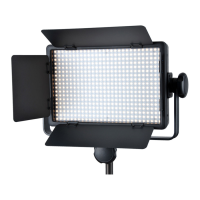

 To Next Page