19
CCT Mode
FX Mode
Press the MODE/ button briefly to switch modes. When the display screen shows "CCT," it indicates that the
current mode is the color temperature mode. Press the select dial briefly to select between CCT/Brightness.
When selecting CCT, scroll the select dial to adjust the CCT value. Scroll up once to increase CCT by 100k,and
scroll down once to decrease CCT by 100k.The CCT range is from 2800K to 6500K.
When selecting brightness, scroll the select dial to adjust the brightness value. Scroll up once to increase the
brightness by 1%, and scroll down onec to decrease the brightness by 1%.The brightness range is from 0% to
100%.
Press the MODE/ button briefly to switch modes. When the display shows "FX," it indicates that the current
mode is the FX Mode. Press the select dial briefly to select lighting effects/lighting effect parameters/
brightness.
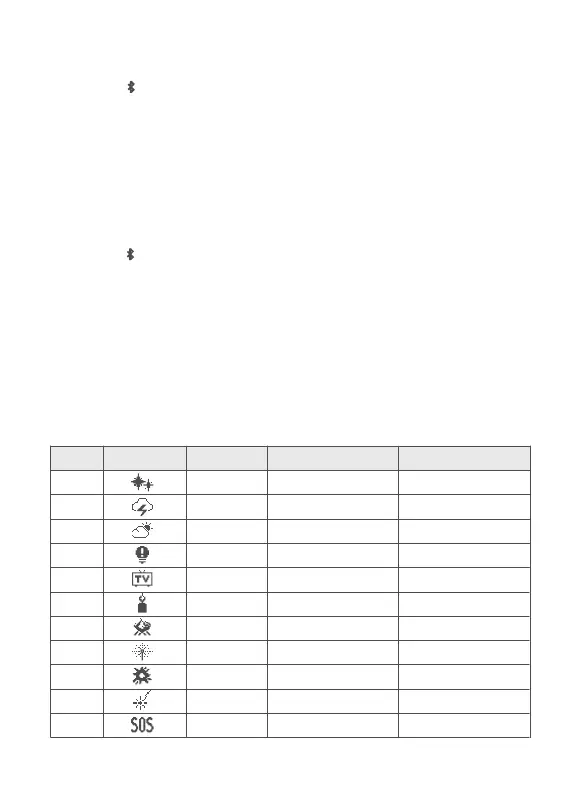
When selecting lighting effects, scroll the select dial to choose from the 11 available lighting effect types.
When selecting lighting effect parameters, scroll the select dial to adjust specic lighting effect parameters
within the range specied in the table below.
When selecting brightness, scroll the select dial to adjust the brightness value. Scroll up once to increase the
brightness by 1%, and scroll down once to decrease the brightness by 1%
.
The brightness range is from 0% to
100%.
FX Table
No.
1
2
3
4
5
6
7
8
9
10
11
FX Icon
FX Type
FLASH
LIGHTNING
CLOUDY
BROKEN BULB
TV
CANDLE
FIRE
FIREWORKS
EXPLOSION
WELDING
SOS
Option
SPD
FREQ
SPD
SPD
SPD
SPD
SPD
SPD
SPD
SPD
CCT
Adjustable Range
1-100
RANDOM/2-20
RANDOM/1-100
1-100
1-100
1-100
1-100
1-100
1-100
1-100
2800K-6500K


 To Next Page
 Loading...