20
Bluetooth Settings
Low Battery Warning
High Temperature Warning
Continuously press the MODE/ button to enter the Bluetooth settings. Scroll the select dial to select
Bluetooth Reset (RESET)/Bluetooth On (ON)/ Bluetooth Off (OFF).
Bluetooth Reset (RESET): Select Bluetooth Reset (RESET), then press the MODE/ button briefly to perform a
Bluetooth reset. After the reset is complete, it will automatically return to the main interface.
Bluetooth On (ON): After Bluetooth is turned on, you can use the "Godox Light" app to connect to the light
body.
Bluetooth Off (OFF): After Bluetooth is turned off, the "Godox Light" app cannot connect to the light body.
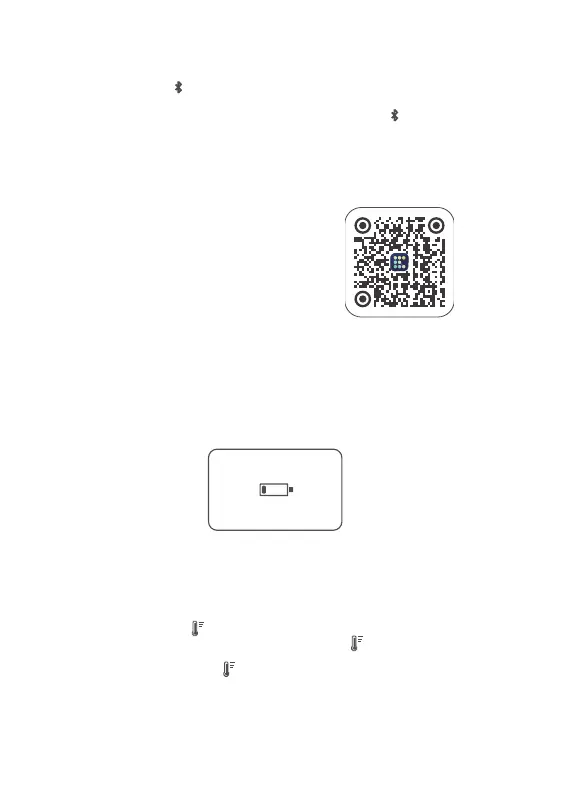
Scan the QR code below to download the "Godox Light" app (compatible with both Android and iOS systems).
Please power the device with a power bank. When the battery level is below one green bar, the display screen
will automatically show a low battery symbol.
When the top of the display shows , it indicates that the lamp bead temperature is too high. It is
recommended to pause usage until the display screen no longer shows , and then you can resume using
the light.
When the full screen of the display shows , it indicates that the light body temperature is too high. The light
xture will automatically activate the light-off function. Once the temperature of the light beads returns to
normal, the light xture will resume normal operation.
Note: The rst mobile device (phone or tablet) can directly
control the light body using the app. When switching to
another mobile device, the light body needs to be Bluetooth
reset before the app can be used. The app needs to be
upgraded to version 3.0 or above.


 To Next Page