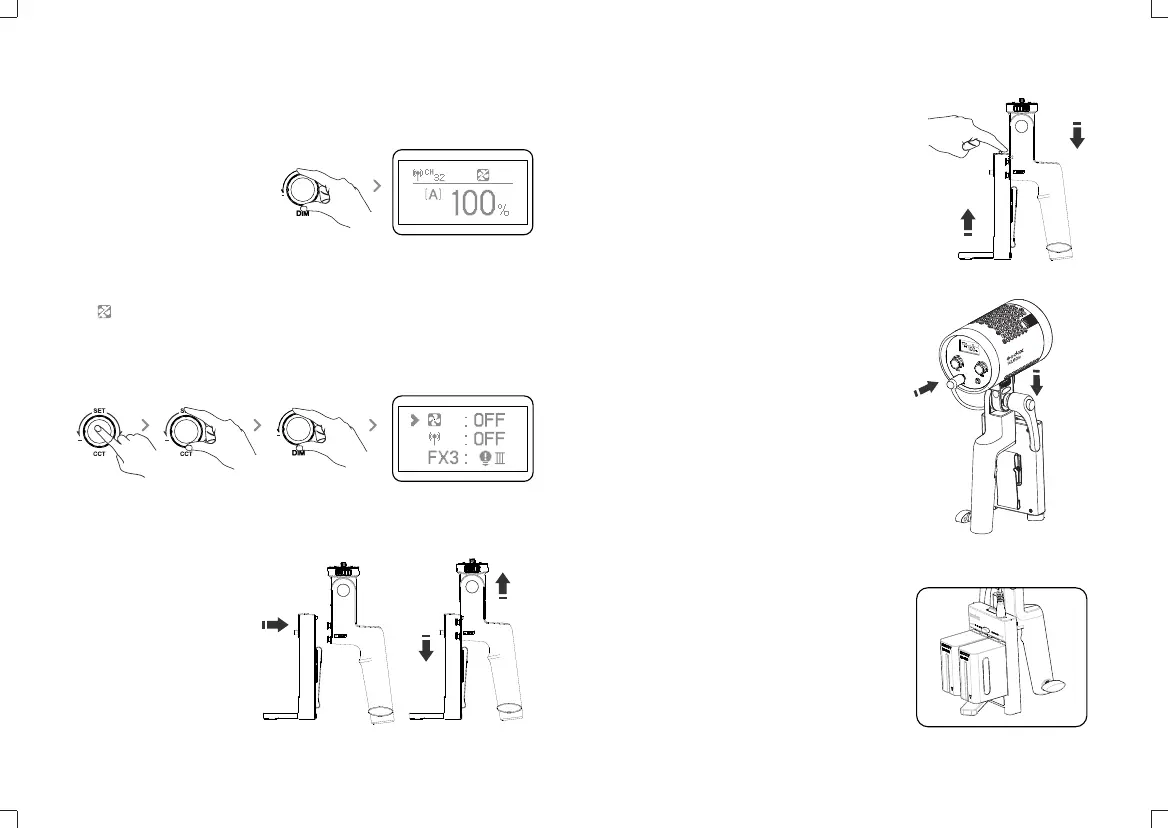
4. Brightness adjustment: Rotate DIM to adjust brightness, normally
rotate 1 unit value, and quickly rotate 10 unit value.
5. Silent mode:
When is displayed, the silent mode is turned on.
Turn on the silent mode: press CCT/SET button to enter the menu. Then, screw
the DIM select dial to turn on or off the fan. Set it to on to enter non-silent mode
while set it to off to enter silent mode. In silent mode, the brightness adjustment
range is from 0% to 50%.
6.2 Detach battery case: push the battery case’
locking ring and push the battery case upwards
to take it out.
6. Install and detach battery case
6.1 Install battery case: Aim the handle’s
fixing buckles into the battery case’s fixing
holes, pull the batter case downwards until
being tightened.
6.3 Connect the battery case with light head:
Insert one end of the power cord into the battery
box and the other end into the DC socket of the
lamp cap.
6.4 Insert two FP970 batteries, and the LED light
can be put into usage.
Note: Press the DIM select dial to
turn off brightness, and then press
dim to restore the brightness of the
last time it was turned off.
- 19 - - 20 -
6500K


 To Next Page