Need help?
Do you have a question about the Godox LC500 and is the answer not in the manual?
Long press power switch to turn LED light on/off.
Press MODE button to switch between 5600K and 3300K color temperatures.
Press CH/GRP to select channel/group, use +/- to change value.
Short press +/- for 1% change, long press for 10% change.
Press CH/GRP to select group (A-F) or channel (1-16).
Press CH/GRP to select group (A-F) or channel (1-16) on remote.
Use +/- for brightness, SET then +/- for color temperature.
Warranty period implemented according to Product Maintenance Information.
Contact distributor or Godox after-sale service for maintenance.
Lists conditions under which guarantee and service are not applicable.
Details warranty period and service types for parts.
The Godox LC500 LED Light Stick is a versatile and portable continuous light source designed for a wide range of photographic and videographic applications. This device offers a blend of high performance and user-friendly features, making it suitable for both professional and amateur use in various scenarios, including live streaming, outdoor camping, self-portraits, still life photography, makeup lighting, video recording, wedding photography, and children's photography. Its design emphasizes ease of use, portability, and efficient lighting in confined spaces.
The LC500 LED Light Stick provides continuous illumination with adjustable color temperature and brightness. It features a dual-color temperature system, allowing users to switch between warm light (3300K) and cold light (5600K) to match different ambient lighting conditions or creative preferences. The light output is characterized by high brightness and excellent color rendering, ensuring accurate and vibrant colors in your shots.
A key feature of the LC500 is its wireless control capability. Utilizing 433MHz wireless technology, the light stick can be remotely adjusted without line-of-sight restrictions, offering a wide range and strong anti-interference performance. This allows for convenient control of up to 6 groups of LED lights across 16 channels, making it ideal for complex lighting setups. The remote control (purchased separately) enables adjustments to light brightness and color temperature, providing flexibility during shoots.
The device is powered by a built-in lithium polymer battery, which offers approximately 2 hours of continuous lighting at 100% brightness on a full charge. This integrated power source enhances portability and eliminates the need for external power cables during operation, making it suitable for on-location shoots. The battery can be fully recharged in about 2.5 hours using the provided charger.
The LC500 also incorporates an intellectual memory function, which retains the last used settings, allowing for quick setup and consistent lighting in recurring scenarios.
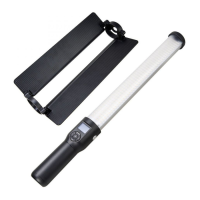
The LC500 LED Light Stick is designed for flexible and intuitive operation. Power On/Off: The device is turned on or off by a long press of the power switch. Mode Selection: Users can easily switch between cold color temperature (5600K) and warm color temperature (3300K) by pressing the MODE button. Channel/Group Selection: For wireless control, the CH/GRP button allows selection of channel values (1-16) or group values (A-F). These values can then be adjusted using the “-” or “+” buttons. This ensures that the light stick can be synchronized with a remote control for coordinated lighting. Brightness Adjustment: Light brightness can be precisely adjusted from 10% to 100%. A short press of the “-” or “+” button changes the brightness by 1%, while a long press adjusts it by 10%, offering both fine-tuning and rapid changes. Physical Handling: The light stick can be used handheld for dynamic lighting effects or mounted on a tripod via its bracket mounting hole for stable, static illumination. This versatility makes it adaptable to various shooting styles and environments. Reflector Attachment: The LC500 comes with a reflector that can be easily installed or detached. The reflector helps to direct and shape the light, providing more control over the lighting effect. Installation involves aligning the reflector's handle ring with the groove on the light stick's handle and sliding it into place. Detachment is achieved by pushing the reflector upwards from the bottom.
The LC500 is built with durability in mind, but proper care is essential for its longevity and optimal performance. Environmental Protection: The device is not waterproof, so it is crucial to keep it dry and avoid exposure to rain, damp conditions, or immersion in water. Users should take precautions in wet environments. Handling: Avoid using wet hands to operate the product. Do not use the light stick in the presence of flammable gases, chemicals, or other sensitive materials, as this could lead to fire or electromagnetic interference. Battery Care: The built-in lithium battery should not be disassembled, impacted, squeezed, or thrown into fire. If the battery shows signs of swelling, discontinue use immediately. The product should not be stored or used in ambient temperatures exceeding 50°C. Always use the specialized charger provided and adhere to the specified voltage and temperature ranges during charging. Repair and Disassembly: Users should not attempt to disassemble the product. In case of malfunction or damage, the device must be sent to an authorized maintenance center for inspection and repair. Only the manufacturer or a qualified service agent should replace the light source. Reset Function: The LC500 includes a reset button (accessible by inserting a needle) that allows users to restore the parameters to factory settings, which can be useful for troubleshooting or resetting custom configurations. Remote Control Maintenance: If using a remote control (sold separately), it is recommended to remove the batteries if the remote will not be used for an extended period to prevent potential battery leakage or damage. The remote control also features an auto-off function after four hours of idle operation to conserve battery life.
 General
| Type | LED Light Stick |
|---|---|
| Color Temperature | 3200K - 5600K |
| CRI | ≥95 |
| TLCI | ≥95 |
| Power | 30W |
| Battery Life | approximately 2 hours at full power |
| Dimming Range | 10%-100% |
| Accessories | carrying bag, power adapter |

 To Next Page