42
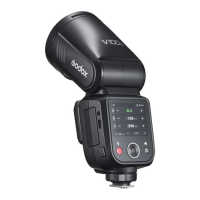
Installation: Mount SU-1 directly to the external flash interface of V100 C, a
"click" sound means it’s properly installed.
SUB: Detachable Sub Flash SU-1
With detachable sub flash SU-1 attached to the external flash interface,
better lling light effects can be achieved in M (manual) flash/TTL auto
flash mode, this is helpful for portrait shooting.
1. SU-1 is not useable in sender or receiver mode.
2. The flash head need to be uplifted in order to use SU-1 properly.
3.External flash do not support HSS.
Flash Power Range: From 1/128 to 1/1 or from 3.0 to 10 in 8 steps, with
+1/3 increment each step.
Touch Screen: Click the “SUB” icon to adjust its flash power by pressing "-"
or "+" icon or sliding the progress bar. Turn on or off the sub flash by clicking
the on/off icon down the screen.
Buttons and Select Dial: Rotate the select dial and press the set button to
choose “SUB” icon, then rotate and press it again to adjust its flash power
or turn it on/off.
If you set the flash coverage manually, make sure it covers the lens focal length so
that the picture will not have a dark periphery.


 To Next Page