1. In main interface, slide the screen down from the
top to display <Setting>, press <Setting> to enter
C.Fn. menu. Or you can press the <M/ > button to
display <Setting> on the panel, then press
<Setting> to enter C.Fn. menu.
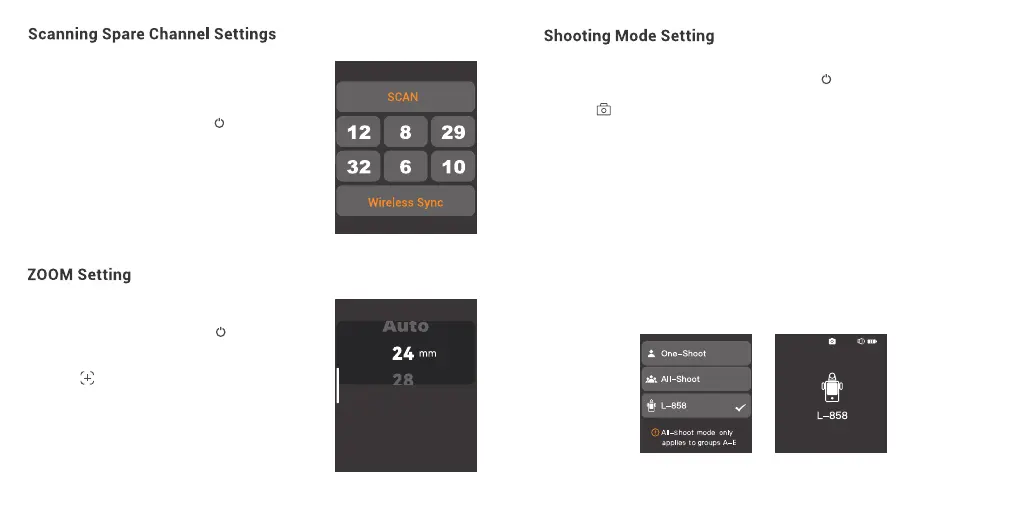
2. Press < > to enter ZOOM setting, slide the
zoom value to adjust among Auto and 24mm to
200mm.
Scanning spare channel function is useful to avoid
interference from others' using the same channel.
1. In main interface, slide the screen down from the
top to display <Setting>, press <Setting> to enter
C.Fn. menu. Or you can press the <M/ > button to
display <Setting> on the panel, then press
<Setting> to enter C.Fn. menu.
2. Press <Wireless> to enter wireless settings.
Press <SCAN> to start scanning, then six spare
channels are displayed on the panel. Click the
desired channel, the flash trigger will be set to that
channel automatically.
57 58
1. In main interface, slide the screen down from the top to display <Setting>, press
<Setting> to enter C.Fn. menu. Or you can press the <M/ > button to display <Setting>
on the panel, then press <Setting> to enter C.Fn. menu.
2. Press < > to enter shooting mode setting, you can select between one-shoot mode /
all-shoot mode/L-858 mode.
L-858: The flash parameters can be adjusted directly on Sekonic L-858 Light Meter when
collocating with it, and the transmitter only transmits SYNC signal.The main interface will
only display L-858 when it's turned on, all the parameters are unavailable to adjust since
only the flash triggering function is available.
Note: All-Shoot mode is not available when the flash trigger is set as legacy hot shoe.
One-shoot Mode: In the M and Multi mode, the lead unit only sends triggering signals to
the follow unit, which is suitable for one person photography for the advantage of power
saving.
All-shoot Mode: The lead unit will send parameters and triggering signals to the follow
unit, which is suitable for multi person photography. However, this function consumes
power quickly.
CH12


 To Next Page