EN - 17
EN
ON DEVICE CONTROLS / INPUTS
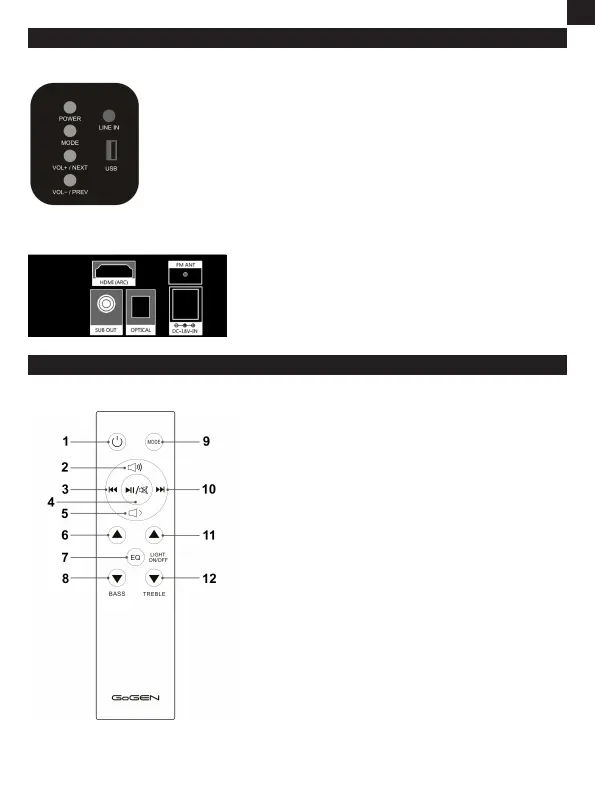
SIDE CONTROL PANEL
POWER - Press to switch on/off the unit.
MODE - Press repeatedly to switch among FM TUNER, HDMI ARC, LINE IN,
USB, BLUETOOTH, OPTICAL mode.
VOL+/NEXT - Short press to skip to the next track.
Long press to turn up the volume.
VOL-/PREV - Short press to skip to the previous track.
Long press to turn down the volume.
LINE IN input
USB input
REAR PANEL
FM ANT - antenna cable
HDMI ARC (CEC) - HDMI input
OPTICAL - Digital audio input
SUB OUT - Subwoofer output
DC IN - Connect DC adapter to power on the device
REMOTE CONTROL
1. Power on/off
2. Volume up
3. Previous song
4. Play/Pause or Mute
5. Volume down
6. Increase bass
7. Short press to enter EQ mode
Long press to power on/off LED display
8. Decrease bass
9. Mode
10. Next song
11. Increase treble
12. Decrease treble


 To Next Page