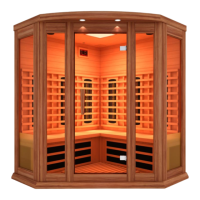
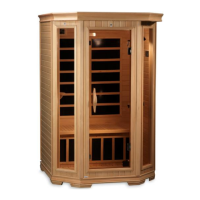
This document is an instruction manual for Maxxus Infrared Saunas, specifically models MX-M206-01 (SJ-8223) and MX-M306-01 (SJ-8323), which are 2-person and 3-person infrared saunas, respectively.
Function Description
The Maxxus Infrared Sauna is designed to provide therapeutic benefits through far infrared heat. It allows users to experience calorie burning, toxin reduction, pain relief, and improved complexions within the privacy of their home. The sauna operates by emitting infrared rays that accelerate blood circulation, diminish inflammation, and promote perspiration to expel toxins and heavy metals from the body. It also offers features for relaxation, such as a built-in CD player (or Bluetooth functionality in newer models) for music.
Important Technical Specifications
- Models: MX-M206-01 (SJ-8223) for 2 persons, MX-M306-01 (SJ-8323) for 3 persons.
- Power Requirements:
- MX-M206-01 (SJ-8223): 120V/15AMP dedicated circuit required. Total power layout is 1700W.
- MX-M306-01 (SJ-8323): 120V/20AMP dedicated circuit required. Total power layout is 2100W.
- Heating Elements: Infrared carbon heat emitter panels.
- MX-M206-01 (SJ-8223) includes: Left wall panel (300W), Right wall panel (300W), Rear wall panel (NIR heater 625*18mm=2PCS, 300W), Heater bench panel (200W), Floor heater (300W).
- MX-M306-01 (SJ-8323) includes: Left wall panel (300W), Right wall panel (300W), Rear wall panel (NIR heater 625*18mm=3PCS, 300W), Heater bench panel (300W), Floor heater (300W).
- Electronic Components: Power supply, LED DC exterior lights, Speakers, Big color light, MP3 Jack, Temp Sensor, Control panel with BT (Bluetooth).
- Temperature Range: Average used temperature range is between 118°F – 122°F. Normal body temperature should not rise above 103°F (39°C) to avoid hyperthermia.
- Construction Material: Red Cedar models for carbon model saunas.
- Usage Environment: For indoor use only.
Usage Features
- Control Panel: Equipped with a digital sensor and thermometer, timer, and buzzer. The buzzer sounds 5 minutes before the end of a session.
- Temperature Setting: Users can set the desired temperature using up/down buttons. The "Heat" light indicates when the temperature setting is increasing. The Fahrenheit and Centigrade display can be switched.
- Timer Setting: The timer can be set from 5 to 60 minutes.
- Lighting: Includes interior and exterior lights. Some models are equipped with reading and roof lamps.
- Color Light Therapy System: Available by pressing and holding the light button. Users can scroll through different colors or select "white" for a sequence of shades or continuous white light.
- Audio System: Features an MP3 Jack for connecting musical devices via AUX wire and Bluetooth functionality (BT-AUDIO) for wireless device pairing. Volume and music selection are controlled via the connected device.
- Ventilation: A ceiling vent can be opened or closed during use to regulate temperature.
- Pre-heating: The sauna room must be pre-heated to the desired temperature before entering. Pre-heating takes longer if the ambient temperature is below 72°F; not recommended for use below 60°F ambient temperature.
- Session Duration: Average sauna session is approximately 20 – 30 minutes.
- Safety Features: No locking devices on the door to prevent entrapment. Automatic thermostat for constant temperature.
- Recommendations for Use:
- Drink water before, during, and after sessions.
- Use two towels: one on the bench for perspiration absorption and comfort, and another to wipe perspiration. A third towel can be used to drape over legs to trap heat.
- Consider a hot/warm shower or bath before use to enhance perspiration.
- Elevate ankles and feet closer to heat emitters for deep heating.
- Apply oil/treatment to hair and wrap with a towel for heat therapy.
- Cool down inside the sauna with the door slightly open after a session before showering.
Maintenance Features
- Cleaning: Use plain water and a soft, damp cloth for cleaning. Do not use liquid cleaners, aerosol cleansers, benzene, alcohol, or strong cleaning chemicals on or in the sauna, as they can damage the wood. Unplug the sauna from the wall outlet before cleaning.
- Storage: Avoid exposure to rain, snow, or other strong weather elements. Do not store in damp environments.
- Troubleshooting: The manual provides a detailed troubleshooting guide for common issues such as indicator lights not working, heaters not heating, odor, light bulb issues, power problems, temperature display errors ("EP" or "H"), and speaker/Bluetooth connection problems.
- Power Supply: The Roof Dust Cover is optional; not installing it allows the power supply to cool faster, potentially extending its life.
- Repairs: Unauthorized repair attempts will void the manufacturer's warranty. Contact the manufacturer or agent for any technical problems or damaged power cords.
- Inspection: The sauna room should be inspected for correct operation before each session. Discontinue use and contact Customer Service if it's not operating properly.
- Circuit Breaker: Ensure the wall outlet meets specifications and is in good working order. A dedicated circuit is required. Check the circuit breaker if there's no power.
- Continuous Use: After 2 hours of continuous use, the sauna needs to be shut down for one hour to cool down. For non-commercial saunas, turn off for one hour after every three hours ON.
- Energy Conservation: Unplug the sauna when not in use, especially for extended periods.
Safety Guidelines
- Read and follow all instructions carefully.
- Ensure hands are dry before plugging/unplugging cords.
- Do not operate with wet hands or feet.
- Do not install receptacles on sauna walls.
- Do not use drugs, medications, or alcohol before or during sessions.
- Consult a physician if you have health conditions, are pregnant, or have surgical implants.
- Do not allow children to use the sauna unless closely supervised by an adult and prescribed by a physician.
- Do not pour water or liquids on infrared emitters.
- Do not place combustible materials near heaters.
- Do not bump, hit, or break heating elements.
- Do not sleep inside the sauna.
- Do not stack or store objects on top of or inside the sauna.
- Do not use during an electrical storm.
- Do not touch lamps for at least 20 minutes after power off.
- Do not make modifications to the sauna structure or components.
- Exit immediately if feeling dizzy, sleepy, or uncomfortable.
- Wait at least 30 minutes after strenuous exercise before using.
- Avoid continuous ON/OFF switching to preserve electrical components.
- Ensure power supply cord is routed to avoid being walked on or pinched.
- If the power cord is too hot or damaged, contact the manufacturer.
- Do not use wall receptacle adapters or extension cords unless a certified electrician makes a short, properly routed one.


 To Next Page
 General