EasyManua.ls Logo

Golden Designs MX-M356-01 - User Manual

Golden Designs MX-M356-01
25 pages
Print Icon
To Next Page IconTo Next Page
Loading...
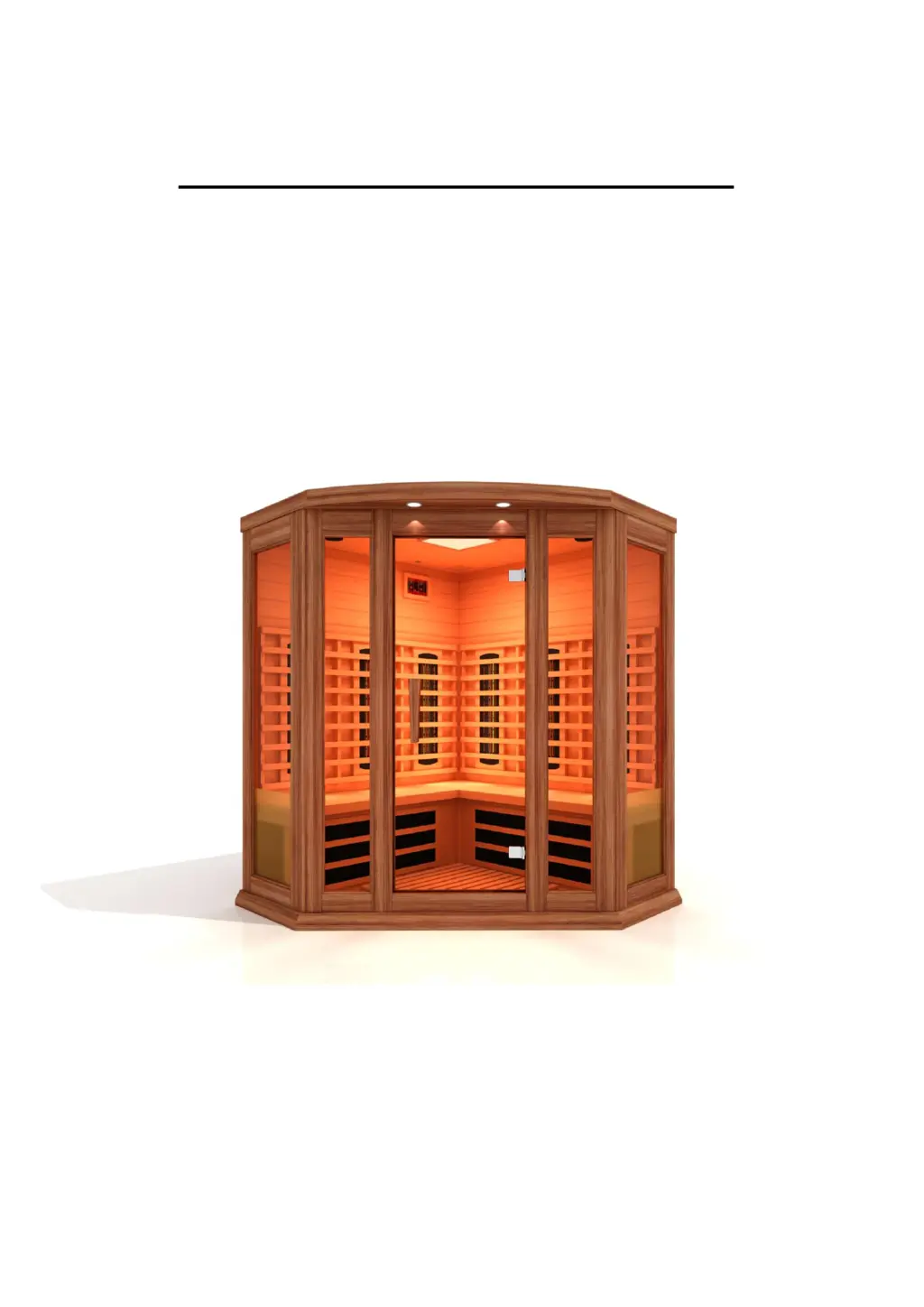
Infrared Sauna Instruction Manual
Models MX-M356-01 (SJ-8323)
3 Person Corner Infrared Sauna
FOR INFRARED MODEL SAUNAS
RED CEDAR MODELS
FOR INDOOR USE ONLY
120V/20AMP DEDICATED CIRCUIT REQUIRED

Questions and Answers

  • M
    Miguel ThomasSep 3, 2025
    What does it mean when the temperature display shows "H" on my Golden Designs Plumbing Product?
    • D
      Dr. Julia Christian MDSep 3, 2025
      If the temperature display on your Golden Designs Plumbing Product shows "H", it means the temperature inside the sauna room is too high. Turn off the unit.
  • L
    Lauren CruzSep 18, 2025
    Why does my Golden Designs Plumbing Product speaker does not work?
    • S
      Sheila RossSep 18, 2025
      If the speaker isn't working, it might be broken and need replacement with a new one of the same specifications. Check if the speaker wire is loose, and if so, disconnect and reconnect the speaker connections. Finally, if the power indicator light for the CD is off, turn on the switch to start work.
  • S
    Stacey LaraSep 16, 2025
    What to do if the indicator light for function is not working in my Golden Designs Plumbing Product?
    • E
      erika84Sep 16, 2025
      If the indicator light for function isn't working, the heating indicator light might be broken, requiring replacement of the relevant control panel. Alternatively, the circuit board or components could be broken, necessitating replacement of the circuit board. It's also possible that the temperature sensor is broken; in this case, check the connection of the temperature sensor.
  • T
    tylersmithSep 14, 2025
    What does it mean if the temperature display shows "H" on my Golden Designs Plumbing Product?
    • G
      guzmandavidSep 14, 2025
      If the temperature display shows "H", it means the temperature inside the sauna room is too high. Turn off the unit, and contact the manufacturer.
  • D
    Dale PachecoSep 12, 2025
    What to do if the temperature display shows "EP" on my Golden Designs Plumbing Product?
    • D
      dustinmurraySep 12, 2025
      If the temperature display shows "EP", the connector of the temperature sensor might be loose, not connected, or the sensor itself could be damaged. Try disconnecting and reconnecting the connector of the temperature sensor or replacing it with a new one.
  • J
    Jeffrey FoxSep 12, 2025
    What to do if Golden Designs Plumbing Product device will not connect to Bluetooth?
    • M
      maryjohnsonSep 12, 2025
      If your device won't connect to Bluetooth, ensure that you do not have any other device connected, as only a single device can be connected at a time. If that’s not the issue, reset the control panel by disconnecting the sauna’s power cord from the wall outlet for 15 minutes.
  • M
    Maxwell SchmidtSep 9, 2025
    How to replace a light bulb in Golden Designs Plumbing Product?
    • U
      uschaeferSep 9, 2025
      If the light bulb in your unit isn't working, start by removing the burned-out light bulb and replacing it with a new one. If that doesn't solve the problem, check the light bulb wiring for looseness and either tighten the connection or replace the lamp assembly. If problems persist, replace the relevant control panel.
  • B
    Brandi NorrisSep 7, 2025
    What to do if the indicator light for power supply is not working in my Golden Designs Plumbing Product?
    • S
      Stacy BakerSep 7, 2025
      If the indicator light for the power supply isn't working, check that the connector is properly connected, or replace it. Also, verify that there is power at the wall outlet by checking your circuit breaker. If those aren't the issue, the indicator light itself might be broken, requiring replacement of the circuit panel.
  • D
    Daniel FrederickSep 5, 2025
    How to fix Golden Designs Plumbing Product infrared heater that is not heating up?
    • J
      Jordan EstradaSep 5, 2025
      If your infrared heater isn't heating up, there are several things you can check. First, the heater itself may be broken and need to be replaced. Also, ensure the wire junctions or the heater's wire are securely connected. Check the connection of the temperature sensor. Finally, the circuit board or the relay might not be working, requiring replacement of the circuit board.
  • D
    David GayAug 20, 2025
    What to do if my Golden Designs Plumbing Product sauna is not powering up?
    • L
      Leslie LawsonAug 21, 2025
      If your Golden Designs sauna isn't powering up, first, ensure the power cord is securely plugged into the wall outlet. Next, check your circuit breaker to confirm the outlet has power. If the issue persists, the power supply or circuit panel may be broken, requiring replacement.

Overview

This document is an instruction manual for the Infrared Sauna Models MX-M356-01 (SJ-8323), specifically a 3-person corner infrared sauna.

Function Description

The infrared sauna is designed to provide therapeutic benefits through far infrared heat. It aims to help users burn calories, reduce toxins, relieve pain, and improve complexions by accelerating blood circulation and activating sweat glands in a lower temperature environment compared to traditional saunas. The sauna uses infrared carbon heat emitter panels to warm the body directly without significantly heating the surrounding air, a process known as conversion. It is intended for indoor use only.

Important Technical Specifications

  • Model Numbers: MX-M356-01 (SJ-8323)
  • Capacity: 3 Person
  • Type: Corner Infrared Sauna
  • Wood Type: Red Cedar Models
  • Power Requirements: 120V/20AMP Dedicated Circuit Required
  • Heater Type: Infrared Carbon Heat Emitter Panels
  • Infrared Wavelengths:
    • Near Infrared: 0.76-1.5 microns
    • Middle Infrared: 1.5-5.6 microns
    • Far Infrared: 5.6-1000 microns (penetrates organic substances 2-3 inches for uniform warming)
  • EMF Levels (Low EMF carbon heater panels):
    • Average: 5mG-10mG at about two inches from the heater panel
    • Ultra Low EMF models: 3mG-5mG
    • Near Zero EMF models: less than 3mG (NIR heaters range at about 5mG-7mG at 2 inches)
  • Electronic Components (MX-M356-01 (SJ-8323) specific):
    • Speakers (1)
    • Sensor (1)
    • DC LED light (Color light) (1)
    • MP3 Jack (1)
    • Exterior lights (1)
    • Power supply (1)
    • Control panel with BT (1)
  • Power Layout (MX-M356-01 (SJ-8323) specific):
    • Left rear wall panel: NIR HEATER 300W*2=2PCS (600W)
    • Left rear wall panel: NIR HEATER 200W*2=1PCS (200W)
    • Right rear wall panel: NIR HEATER 300W*2=2PCS (600W)
    • Right rear wall panel: NIR HEATER 200W*2=1PCS (200W)
    • Left heater bench panel: 700*300mm=1PCS (200W)
    • Right heater bench panel: 700*300mm=1PCS (200W)
    • Floor heater: 600(600)*198(198)*569=1PCS (200W)
    • Total Power: 2200W
  • Operating Temperature Range: Recommended between 118°F – 122°F. Normal body temperature should not rise above 103°F (39°C) to avoid hyperthermia.
  • Session Duration: Approximately 20 – 30 minutes.
  • Continuous Use Limit: After 2 hours of continuous use, the sauna needs to be shut down for one hour.

Usage Features

  • Control Panel: Equipped with a digital sensor and thermometer, automatic thermostat for constant temperature, timer with a buzzer that sounds 5 minutes before the end of the session, and controls for temperature, time, and lighting.
  • Temperature Setting: Adjustable via up/down buttons. The "Heat" light indicates when the temperature is increasing.
  • Timer Setting: Adjustable from 5 to 60 minutes using up/down buttons. Quick adjustment by holding buttons for three seconds.
  • Color Light Therapy System: Features a DC LED light with color light functionality. Users can scroll through different colors, including two "white" selections (one for a sequence of shades, one for continuous white light).
  • Bluetooth Function: Built into the control panel, allowing users to pair their device (named "BT-SAUNA") to control music and volume.
  • MP3 Jack: An AUX wire connection at the ceiling for musical devices. Disconnecting the AUX wire automatically returns the sound system to Bluetooth mode.
  • Ceiling Vent: Can be operated in the open or closed position to regulate internal temperature.
  • Pre-heating: The sauna room must be pre-heated to the desired temperature before entering. Pre-heating takes longer if ambient temperature is below 72°F; not recommended for use below 60°F ambient temperature.
  • Hydration: Users are advised to drink water before, during, and after sessions to replenish body fluids.
  • Towel Use: Recommended to use two towels: one folded on the bench to absorb perspiration and add comfort, and a second to wipe perspiration and prevent it from dripping onto the floor heater. A third towel can be used to drape over legs if they become cold.
  • Post-Session Cooling: After a session, users should sit in the sauna with the door slightly open to cool down gradually before showering or bathing.
  • Energy Conservation: Unplug the sauna when not in use for extended periods.
  • Safety Features:
    • No locking devices on the door to prevent entrapment.
    • Warning against using drugs, medications, or alcohol before or during sessions.
    • Hands must be dry when plugging/unplugging cords to avoid electric shock.
    • Do not pour water or liquids on infrared emitters.
    • Do not place combustible materials near heaters.
    • Do not bump, hit, or break heating elements.
    • Children must be closely supervised by an adult or have medical prescription for use.
    • Power supply cord damage requires immediate replacement by manufacturer/agent.
    • Consult physician if pregnant, have health conditions (obesity, heart disease, blood pressure issues, diabetes), or surgical implants.
    • Do not sleep inside the sauna.
    • Do not stack or store objects on top or inside the sauna.
    • Avoid use during electrical storms.
    • Do not make modifications to the sauna or its components.
    • Ensure wall outlet meets specifications.
    • Roof/reading lamps become very hot; avoid touching for at least 20 minutes after power off.
    • Exit sauna immediately if feeling dizzy, sleepy, or discomfort.

Maintenance Features

  • Cleaning:
    • Unplug the sauna from the wall outlet before cleaning.
    • Use plain water and a soft damp cloth for cleaning.
    • Do not use liquid cleaners, aerosol cleansers, benzene, alcohol, or strong cleaning chemicals inside or on the sauna, as they can damage or be absorbed into the wood.
  • Storage:
    • Avoid exposure to rain, snow, or other strong weather elements.
    • Do not store in damp environments.
  • Troubleshooting Guide: The manual includes a comprehensive troubleshooting section covering issues such as indicator lights not working, infrared heater not heating, odor, light bulb issues, sauna not powering up, temperature display errors ("EP" or "H"), speaker malfunctions, and Bluetooth connection problems. It provides possible reasons and countermeasures for each issue.
  • Warranty:
    • Limited Lifetime Warranty: Covers heating elements and electronics against defects in material and workmanship for the life of the product from the original date of purchase (specifically, 5 years on heating elements and electronics from the date of purchase for sauna products).
    • Conditions: Valid for INDOOR use only. Outdoor placement voids warranty. Damage from outdoor elements, modifications, or unauthorized repairs voids warranty.
    • Coverage: Covers parts only, not labor.
    • Exclusions: Full commercial use, negligence, alteration, misuse, abuse, inappropriate installations, use of lacquer or paints, accessories on non-approved surfaces, normal wear and tear, weathering, use not in accordance with instructions. Surface cracks due to wood expansion/contraction are not considered defects.
    • Warranty Validation: Requires mailing back a completed warranty card with proof of purchase within 60 days of purchase. Serial number is located on the front panel, rear panel, or carton.
  • Customer Service: Contact authorized dealer or email info@goldendesignsinc.com or call (909) 212-5555 for assistance.

Golden Designs MX-M356-01 Specifications

General IconGeneral
BrandGolden Designs
ModelMX-M356-01
CategoryPlumbing Product
LanguageEnglish

Related product manuals