10
User‘s Manual
67140:
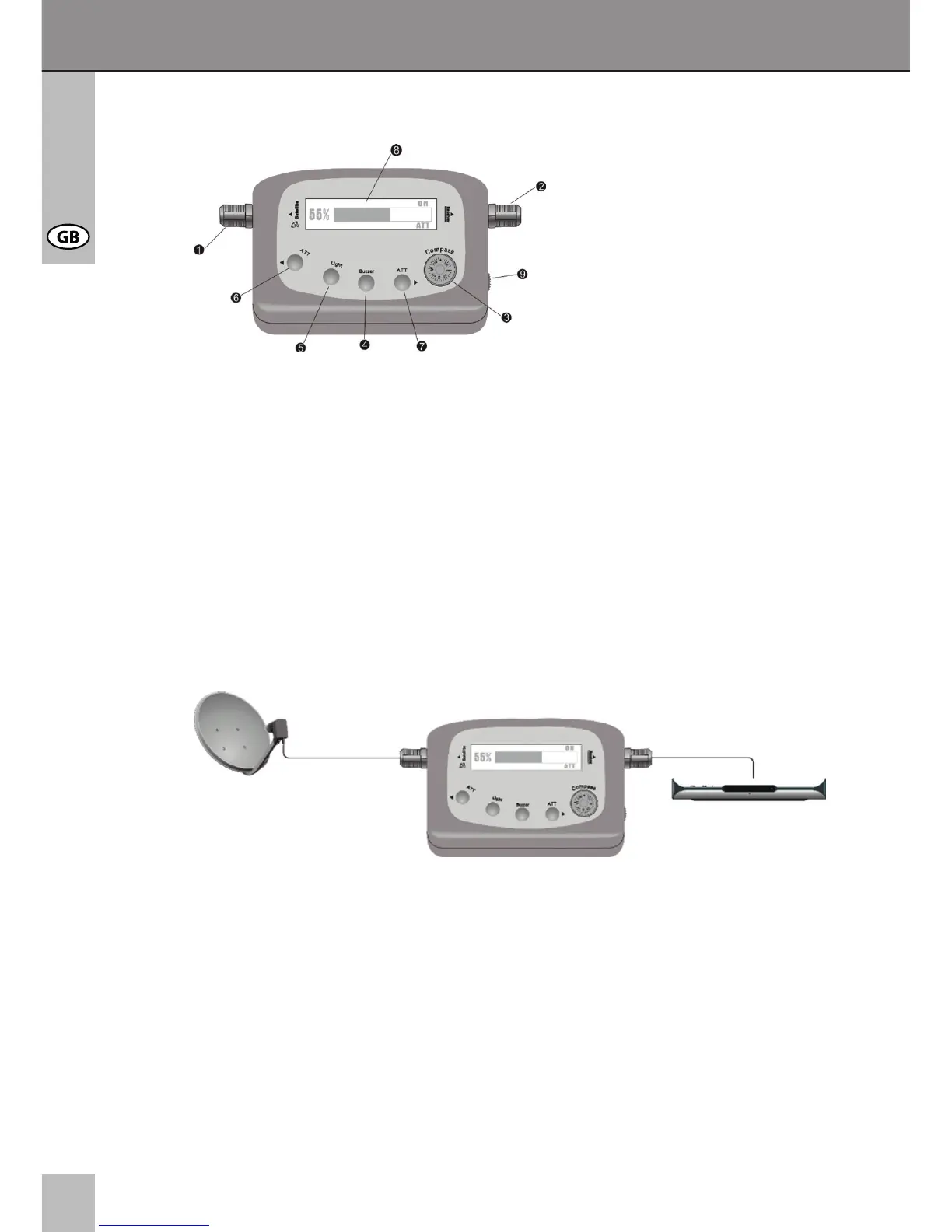
1 Satellite: Connection to LNB
2 Receiver: Connection to SAT Receiver
3 Compass: to nd the azimuth
4 BUZZER control key (OFF is displayed when switched off)
5 Light: LED backlight control key
6 3ATT Reduction key: reduces the incoming signal when too strong (4
steps) In case of the thermometer scale shows max and the signal strength
value shows 99. ATT is displayed at the left side of the display.
7 4 ATT Increasing key: increases the incoming signal in a contrary way to No. 6.
ATT is displayed at the right side of the display.
8 LCD graphic display
9 adjustable volume key and additional attenuator
6 Connecting:
1. Connect the coaxial cable from LNB (satellite dish) to the LNB connection of
the SAT FINDER (1).
2. Connect the coaxial cable of the receiver input to the receiver connection (2) of
the SAT FINDER.
7 Operating:
1. Switch on the satellite receiver. The SAT FINDER starts automatically. It is
powered by your satellite receiver.
2. Set your satellite dish to the proper azimuth and elevation setting. (Therefor
read the manual of your satellite dish.)


 To Next Page