This document is a user manual for the Goodmans High Power Bass Bluetooth Blaster, model number 359780. It provides instructions for setup, operation, troubleshooting, and technical specifications for the device.
Function Description:
The Goodmans High Power Bass Bluetooth Blaster is a portable audio device designed for wireless music playback via Bluetooth, as well as wired connections and local media playback. It features a built-in rechargeable battery, allowing for use anywhere without being tethered to a power outlet. The blaster is equipped with a speaker and LED lights that enhance the audio-visual experience. It supports multiple input modes including Bluetooth, USB, TF card, and AUX IN, offering versatile options for playing music from various sources. The device is designed to deliver high-power bass, suggesting a focus on robust low-frequency audio output.
Important Technical Specifications:
- Model Number: 359780
- Bluetooth Specification: Bluetooth V 5.0, ensuring a stable and efficient wireless connection.
- Operating Distance: Up to 10 meters (max.) for Bluetooth connectivity, providing flexibility in device placement.
- Speaker Output: 4Ω 12W, indicating a decent power output for a portable speaker, capable of producing clear and impactful sound.
- Built-in Battery: 3.7V / 1500mAh, a rechargeable battery that allows for portable use. The capacity suggests a reasonable playback time, though specific duration is not mentioned.
- Power Supply: DC 5.0V 1000mA, indicating the charging input requirements.
- Frequency Response: 130Hz - 13KHz, outlining the range of audio frequencies the speaker can reproduce. This range suggests a focus on mid-range and bass frequencies, consistent with the "High Power Bass" designation, while still covering a good portion of the audible spectrum.
Usage Features:
The device offers a straightforward user experience with several key features:
- Power ON/OFF: A dedicated button to turn the device on or off by holding it.
- Play/Pause: A button to control music playback, allowing users to start or pause tracks with a single press.
- Mode Selection: A "Mode" button enables users to switch between different input sources: Bluetooth, USB, TF card, and AUX mode.
- Track Navigation and Volume Control: Separate buttons for "Previous Track / Decrease Volume" and "Next Track / Increase Volume." A single press navigates tracks, while holding the button adjusts the volume.
- Bluetooth Pairing: The blaster automatically enters Bluetooth pairing mode upon power-on, indicated by a flashing blue light and a voice prompt. It remembers previously paired devices and attempts to reconnect automatically. A pass code "0000" is used for pairing if prompted.
- AUX IN Connection: For non-Bluetooth devices, a 3.5mm AUX IN cable can be used to connect directly to the speaker. When an AUX cable is connected, the Bluetooth connection is automatically disconnected.
- USB / TF Card Function: The device includes a USB port and a TF card slot, allowing for direct playback of music files from these storage media. Inserting a USB or TF card automatically disconnects any active Bluetooth connection and begins playback.
- LED Lights: The device features LED lights that turn on automatically with the power and contribute to the aesthetic.
- Charging: The device is charged via a Micro USB charging cable connected to a USB port on a computer or a 5V 1A USB wall charger (not included). An indicator light shows charging status, turning off when fully charged. A low battery warning alert sounds when the battery is low, prompting the user to recharge.
- Handle: A handle is integrated into the design for easy portability.
Maintenance Features:
The manual provides troubleshooting steps for common issues:
- Low Sound Level: Suggests increasing the volume on both the speaker and the input device.
- Sound Distorted: Advises decreasing the volume on the speaker and the input device.
- No Sound: Recommends checking if the speaker or input device is turned off, increasing volume if too low, pressing the Play button if audio is paused, or recharging the battery if power is low.
The manual also includes an EC Declaration, stating that the product complies with relevant EU directives regarding electromagnetic compatibility, restriction of hazardous substances, and waste batteries & accumulators. It also notes that "Bluetooth®" is a registered trademark of Bluetooth SIG Inc. The device is made in China and imported by B&M Retail Ltd. Information on Waste Disposal for Consumers of Electrical & Electronic Equipment (WEEE) is provided, emphasizing the importance of separate collection and proper recycling of the product at the end of its life.

 Need help?
 General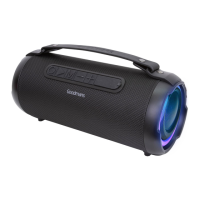

 To Next Page