HELPLINE PHONE NUMBER 0870 873 0080
- 4 -
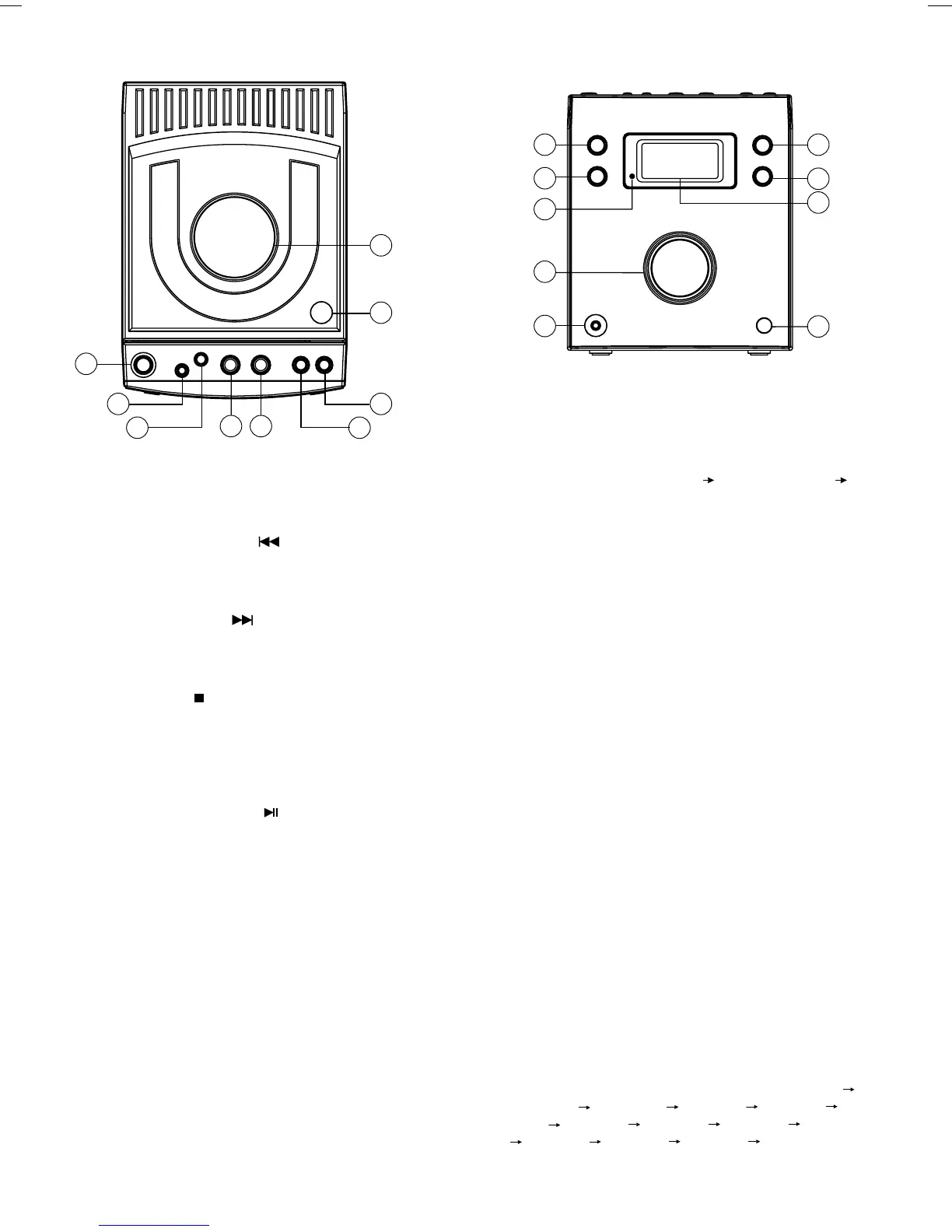
LOCATION OF CONTROLS
1
2
4 5
3
18
11
10
17
14
15
16
12
13
6
7
8
9
1. STANDBY / ON Button
To toggle the system between Power on and Stand-
by status.
2. SKIP/PRESET DOWN
button
CD: skip to the previous track.
DAB: Select a preset station.
3. SKIP/PRESET UP
button
CD: skip to the next track.
DAB: Select a preset station.
4. SCAN/STOP
button
CD: To stop CD playback. In CD stop mode, clear
the programme memories during “Programme”
function.
DAB: Starts auto scanning.
5. SELECT/PLAY/PAUSE
button
CD: To start or pause CD playback.
DAB: Select the desired station.
6. SCROLL/SEARCH DOWN button
CD: To search backward or skip to the previous
track in CD mode.
DAB: Station selection and navigating services.
7. SCROLL/SEARCH UP button
CD: To search forward or skip to the next track in
CD mode.
DAB: Station selection and navigating services.
8. OPEN/CLOSE button
To open or close the disc tray
9. CD DOOR
10. SOURCE button
Switches unit between DAB, CD or AUX mode.
11. REPEAT button
CD: Cycles Repeat 1 track
Repeat all track
Repeat off .
12. POWER/STANDBY LED indicator
13. VOLUME UP + / - control
Increase the volume.
Decrease the volume.
14. HEADPHONE SOCKET
To listen to the unit with headphones (not included)
Note :
When headphones are connected the sound to the
speakers is automatically muted.
15. IR SENSOR
To receive signals from the remote control.
16. DISPLAY
17. DISPLAY/REMAIN button
CD: To select remain time or total time.
DAB: Cycles the information displayed:
Scrolling DLS; Programme Type; Service Type;
Time & date; Channel & Frequency; Bitrate
Mode; Signal Error Rate;
18. CLOCK/SLEEP button
To press once will display/close the clock
information. When unit at the power on status press
and hold the key beyond 2 second will enter into
view sleep time mode about 7 seconds; and press
the key again will set the sleep time “120 mins
110 mins 100 mins 90 mins 80 mins 70
mins 60 mins 50 mins 40 mins 30 mins
20 mins 10 mins sleep off 120 mins
cyclically.


 To Next Page