HELPLINE PHONE NUMBER 0870 873 0080
- 5 -
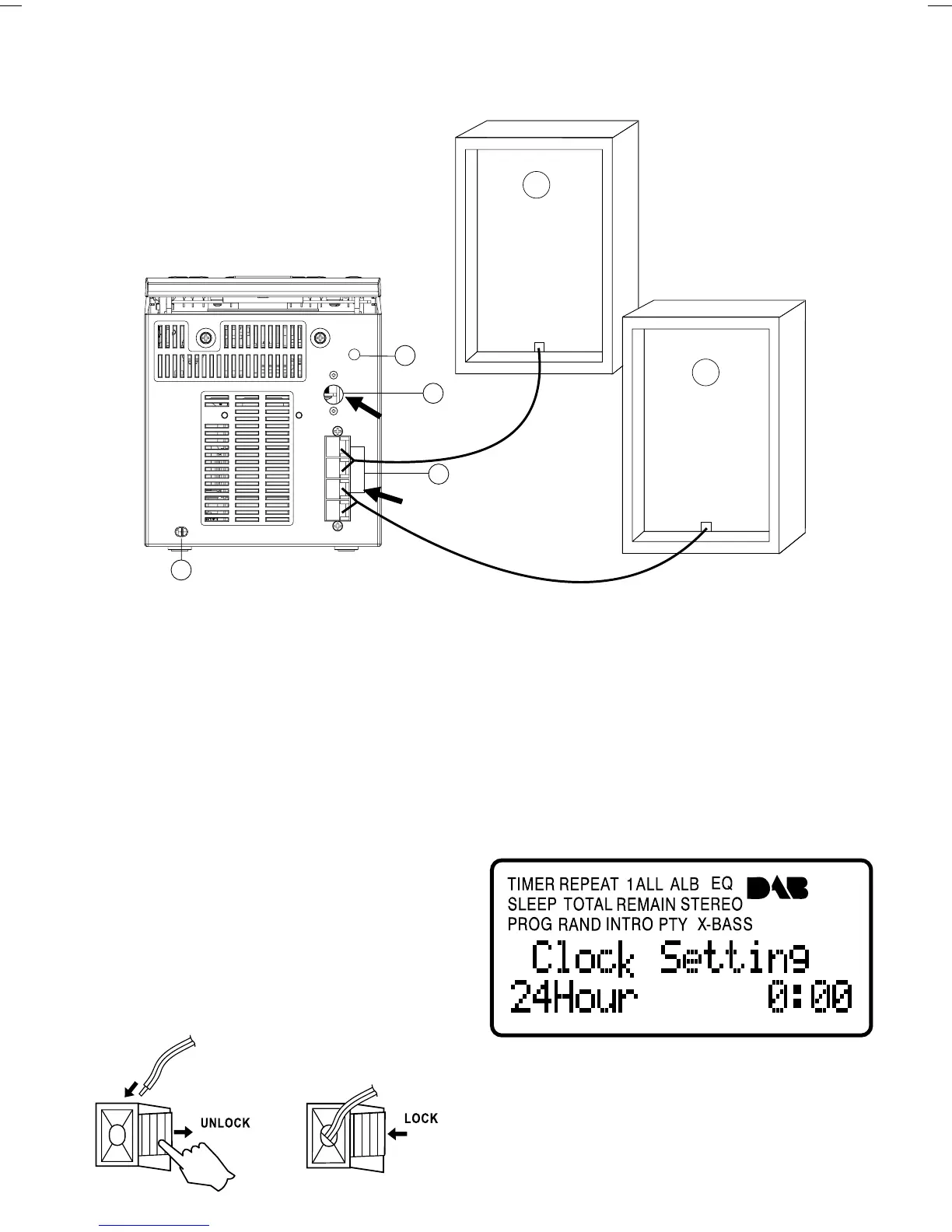
CONNECTING THE UNIT AND SPEAKERS
DAB ANTENNA
SOCKET
SPEAKER BOX
SPEAKER BOX
SPEAKER SOCKET
19
21
22
20
19. AC POWER cord
20. AUX in
21. DAB antenna socket
22. SPEAKER socket
CONNECTIONS
CONNECT THE DAB ANTENNA
Connect the supplied DAB antenna to the DAB ANT input on
back of the system. Adjust the position of the DAB antenna for
best reception and ensure the screw connection is fully tightened.
SPEAKERS CONNECTION
• Connect the right speaker to terminal marked “R”, with
the red wire to
+
and the black wire to –.
• Connect the left speaker to terminal marked “L”, with
the red wire to
+
and the black wire to –.
• Clip the stripped portion of the speaker wire as shown.
Notes:
For optimal sound performance, it is recommended to use
the supplied speakers.
Do not connect more than one speaker to any one pair of
+/– speaker terminal.
DISPLAY INFORMATION


 To Next Page