GoodMeasure Integrator Installation Guide v3.1 www.goodmeasure.net Page 4
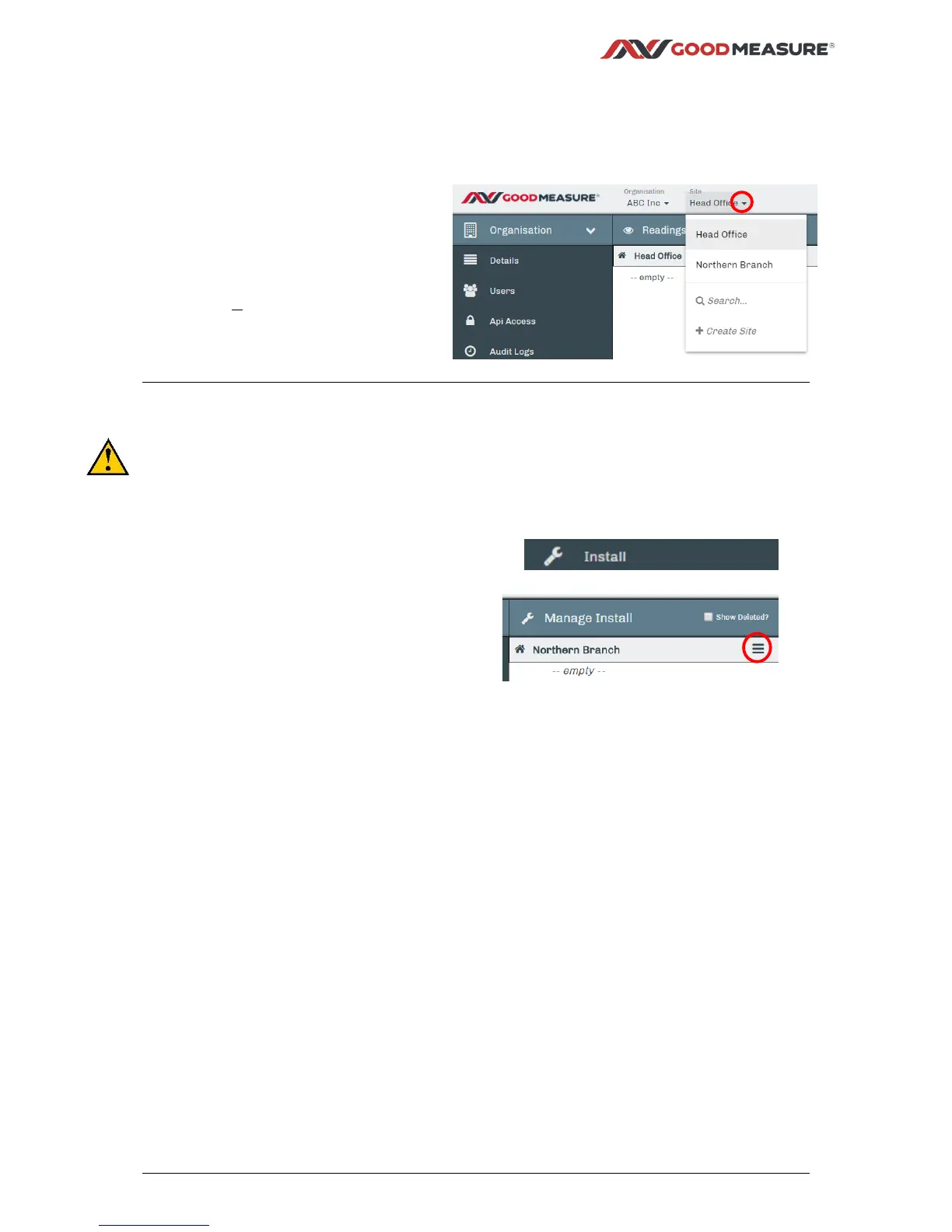
Step 5: Creating or selecting a Site in GoodMeasure
When a new Integrator is installed, it must be added to a Site to enable data collection from
devices connected to it. Follow the steps below to select the site or add a new site.
1. Click the down arrow for the site
menu.
2. Click the site name if it already
exists or click + Create Site.
3. For a new site, enter the site
name and location details and
click Save. (top right)
Step 6: Integrator configuration
This step requires an Integrator to be powered on and able to communicate with the Internet
through a local tethering point such as a smart phone hotspot that has the GoodMeasure
default SSID and Password already setup. For details of these settings see Step 1 and check
the status lights as per Step 3.
1. Select or create the appropriate site as described in the previous section.
2. Click the Install tab.
3. Click the site menu symbol then
click Install New Gateway.
4. Enter the 16-digit Integrator Serial Number found on the side label of the
GoodMeasure Integrator.
5. Click Scan for and add Gateway.
6. Enter a name for the new Integrator e.g. “Main Meter Integrator” in the
Location/Name field.



 To Next Page
 Loading...