
 Need help?
Do you have a question about the Goosky T8 and is the answer not in the manual?
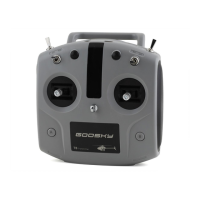
Details the remote control power light and the two operational modes (MODE 1 and MODE 2).
Explains the functions of throttle, orientation, flying ring, D/R, and HOLD controls.
Identifies POWER-1 (A) and POWER-2 (B) buttons and front/back orientation labels.
Lists product model (T8) and physical dimensions (L153*W93*H154).
Covers radio frequency, transmit power, working voltage, and remote distance.
Details charge interface (TYPE-C), low voltage alarm, battery type, and capacity.
Instructions on opening the battery compartment cover to access the battery.
Guidance on properly installing the 18650 lithium battery into the compartment.
Caution to install the battery with the correct polarity (+/-) as indicated.
Ensures the throttle stick is at the lowest position before turning on the remote.
Instructs to move toggle switches to the bottom in the arrow direction before powering on.
How to turn the remote control on and off using POWER-1 and POWER-2 buttons.
Steps to bind the transmitter to the helicopter using the BIND button.
Explains the meaning of indicator lights for battery level and usage status.
Recommendations for battery storage and periodic charging to prevent over-discharge.
Steps for disassembling, unplugging, and reassembling control stick assemblies.
Adjusts MODE1/MODE2 switches to match left/right hand preferences.
Procedure to recalibrate control sticks after assembly for correct operation.
Guides on turning off the remote, setting sticks, and powering on to enter calibration.
Detailed steps for moving sticks in circles and placing them for successful calibration.
Confirms successful calibration via sound and explains how to exit the mode.

 To Next Page
 General