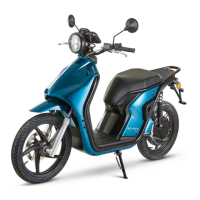
For your Schwalbe there is also a smartphone app (
Android & iOs). Search for "uDrive Connect app" in the
Playstore / App Store.
This is how it works: To pair the app, switch your
Schwalbe in Neutral mode. Activate Bluetooth under the
menu item "Smartphone". Now select the "Find vehicle"
function in the Schwalbe app. If the search is successful,
a safety code will now appear on the scooter's display.
As soon as you have activated this on your smartphone
the two are connected to each other. Please note that
Bluetooth has a range of about 10 meters.
Charging reminder: If you haven't driven for a long time.
Charge preview: If you have to move again in a short
time, the app shows you how much additional range
you can charge in each driving mode in 30, 60 or 90
minutes.
Create a personal profile for your Schwalbe.
Tutorials on battery care and much more.
•
•
•
•
Display setting of date, time, km/h or mph and menu
language.
Last location of your Schwalbe and navigation to get
there.
Status indicator on how your Schwalbe is doing.
Range: Here you can see at a glance how far you can
still drive in each driving mode.
•
•
•
•
THE APP OFFERS YOU THE FOLLOWING FUNCTIONS:
EN
YOUR SCHWALBE
71


 To Next Page