Need help?
Do you have a question about the GOVECS Schwalbe and is the answer not in the manual?
Adhere to traffic rules, carry documents, and ensure license plate is visible.
Avoid alcohol, drugs, or medication affecting consciousness while riding.
Wearing a helmet is required for safety and a positive riding experience.
Inspect batteries, mirrors, lights, horn, brakes, and tire pressure before departure.
Ensure correct footwear and that total weight does not exceed 150 kg.
Drive carefully on varied surfaces and check battery charge before parking.
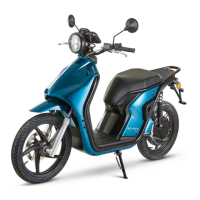
Labels key parts of the Schwalbe from the side view.
Identifies controls and features from front and rear perspectives.
Details mirrors, light switch, indicators, brake lever, horn, and UP/DOWN switch.
Details mirrors, emergency stop, GO button, and throttle grip.
Explains operation of indicator, beam, UP/DOWN, GO, throttle, and emergency switches.
Lists key information displayed: Time, Driving Mode, Trip Data, Consumption, Speed, Battery Status, Range.
Explains the meaning of various status lights and icons on the display.
Details NEUTRAL, GO (Eco), CRUISE (City), BOOST (Race), and CRAWL (Maneuvering) modes.
Adjust display settings and use the uDrive Connect app for customization.
Guides users on selecting modes and navigating menus using display buttons.
View driving data, set time, and change display language.
Information on connecting to the uDrive Connect app via Bluetooth.
Steps for starting the Schwalbe, including ignition and brake lever operation.
Procedure to lock the handlebars for parking security.
Explains scooter states in Neutral, Start, and Handlebar Lock modes.
Steps to pair the smartphone app with the Schwalbe via Bluetooth.
Lists app features like display settings, last location, status, and range preview.
Details the 5-liter storage space and the rear cargo rack with its weight limit.
Explains the BOSCH lithium-ion battery and the external charger connection.
Details charging times for Bosch/Powerland chargers and overnight charging safety.
Key points about connecting/disconnecting the charger and charging conditions.
Steps and LED indicators for charging with a BOSCH charger.
Details the external Powerland charger and its connection process.
Steps and LED indicators for charging with a Powerland charger.
Advice on battery usage, storage, temperature, and electronics protection.
Guidance on disc brake care and the initial bedding-in period for new brakes.
Information on the main stand sensor and pre-ride light checks.
Recommended tyre pressure, all-season tyres, and checking tyre profile.
How to clean the Schwalbe using soft sponges, water, and appropriate cleaners.
Recommendations for periodic checks and the first service after 500 km.
Information on brake checks, CBS system, and pad thickness.
Detailed technical data including model, speed, range, battery, and dimensions.
GOVECS service hotline, email, and warranty details.

 To Next Page
 General