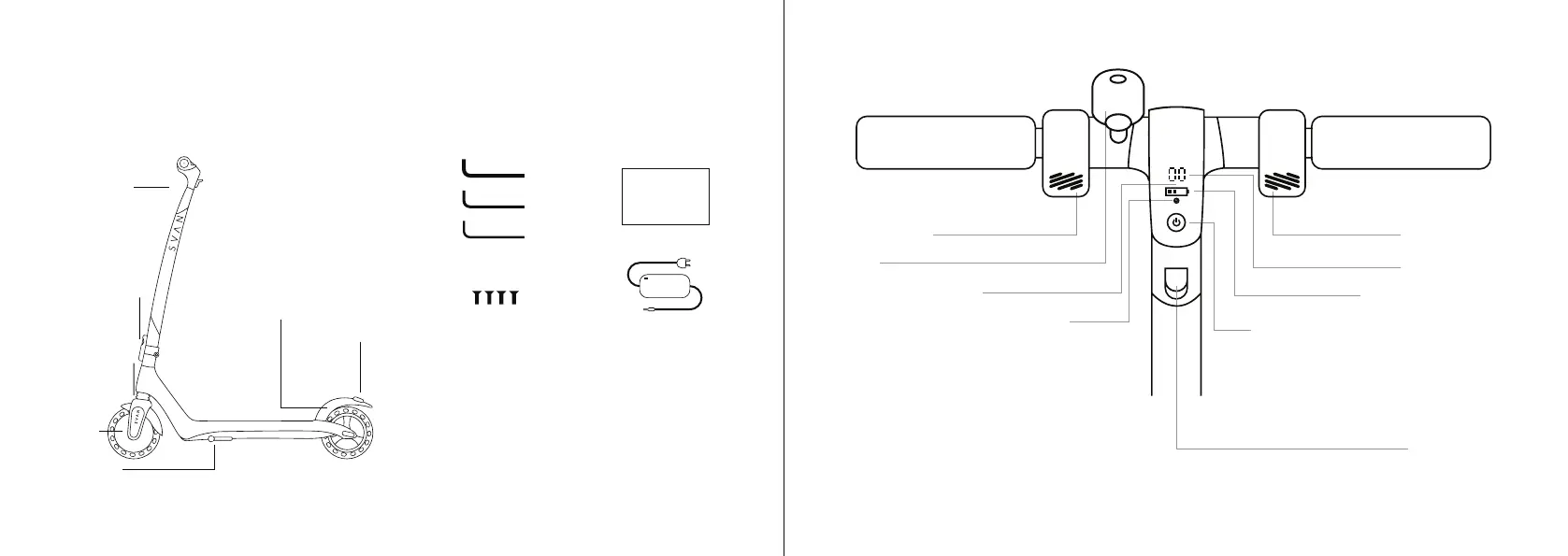
Please check that all of the items listed above are included. If any items missing, please contact the seller.
1. Package Contents and Product Diagram
GPad SVAN
The cardboard packaging is
recyclable. When disposing it,
follow your local regulaons.
Save the trees - 1 ton of new
cardboard requires 17 trees
Manual
Charger
Tools
3mm
4mm
USER MANUAL
2.5mm
Screws
3mm
2. Dashboard
Folding Latch
Rear Foot Brake
Front
Suspension
Front Light
Kickstand
Motor
Rear Light
3 (ENG) 4
Addional sengs are available in the GPad® Mobility smartphone App. Get it on Google Play or
the App Store.
km/h
Power buon: Press for 3 seconds to
turn the scooter on or off.
Press the buon briefly to switch
between speed modes.
Double press the buon to turn the
lights on or off.
Indicaon of your current speed
mode.
Red S - Sports mode (up to 25km/h)
White S - Eco mode (up to 15km/h)
No S - walking mode (up to 10km/h)
Folding hook
Speedometer
Baery charge level
Throle leverBrake lever
Bell
Units: km/h or mph
GPad scooters arrive in a cardboard box. Setting up the scooter is very simple. Please refer to the section
“Initial Setup and Folding”. You may choose to let the dealer or service-provider do the initial setup for you.
In the box, you'll nd:



 To Next Page