12
EN
Remove Pump From Tank
1. Turn the pump OFF and disconnect from power.
2. Unthread spin collar and lift the pump from the tank adapter.
3. Elevate the nozzle and hose to allow excess fuel to drain into the tank.
4. Wipe the entire system with a clean cloth.
REPAIR
(
CONTINUED
)
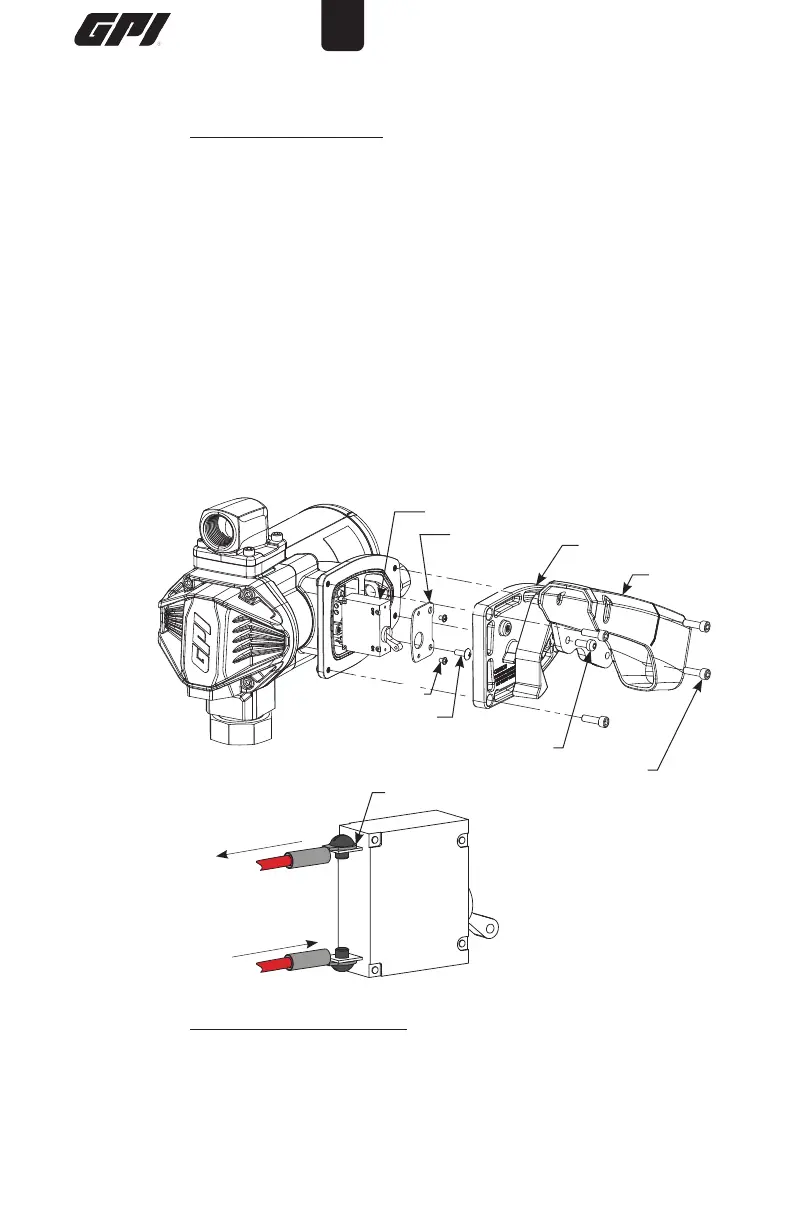
Figure 5
Figure 6
Replace Power Switch
1. Turn the pump OFF and disconnect from power.
2 Using a 4mm Hex wrench remove the M6 BHCS and nozzle cover.
4. Remove the (4) M6 SHCS and electrical coverplate from the motor
housing.
5. Remove the (1) #10 truss head screw and switch bracket with switch
assembly (see Figure 5).
6. Unscrew both #6 machine screws and remove the switch assembly
from the switch bracket.
7. Unscrew both blade terminals and remove red pump wires from the
back of the switch (see Figures 5 and 6). Take note of which wire
is attached to each blade terminal for reinstallation.
8. Install a new switch by reversing the above procedure. Insert the switch
assembly into the pump cavity. Reinstall all components.
Switch Assembly
Blade Terminals
ON
OFF
From Battery
To Motor
Switch Bracket
Nozzle
Cover
Electrical Coverplate
M6 BHCS
M6 SHCS
#10 Screw
#6 Screw


 To Next Page