Powering the Unit
5
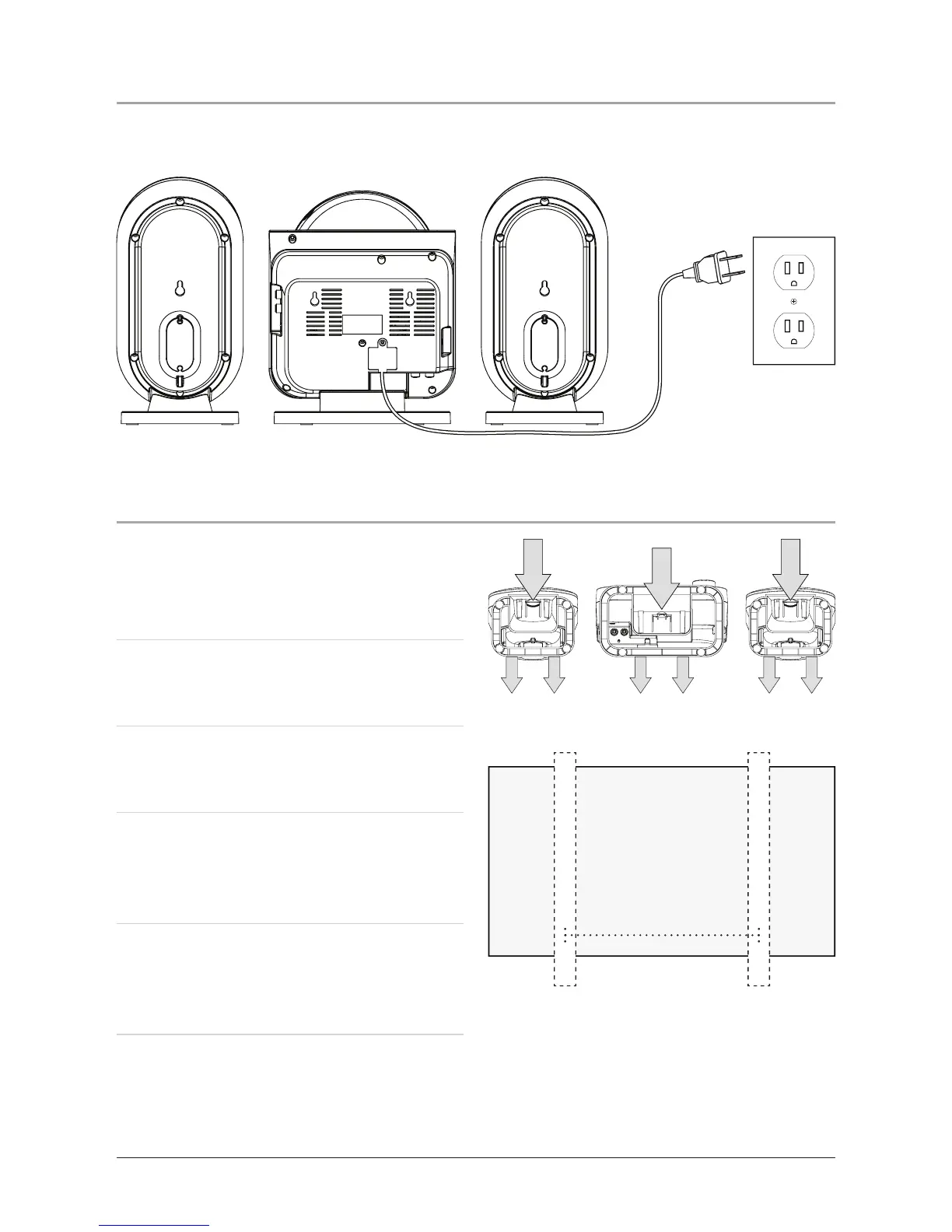
The unit is powered by connecting the attached AC Cord
to a standard AC Outlet (120V~60Hz)
(120V~60Hz)
Mounting the Unit to a Wall
1. Remove the table stand from the unit
by pulling the tabs, located on the
bottom of the unit and speakers, away
from and towards the back of the unit.
2. After the stands are removed from the
speakers and the main unit, designate
a location for the unit to hang.
3. The speakers can be held by a single
nail or screw and the main unit is held
by two nails or screws.
Be sure to drill or nail into the studs
of the wall to ensure a rm and sturdy
hold. Most houses have the wall
studs spaced on sixteen inch centers.
To ensure a reliable and sturdy instal-
lation, please consult a professional
installer before mounting the unit to a
wall.
16 inches
WALL
STUD
STUD



 To Next Page