9
SOURCESET UP
EXIT
DISPLAY
ASPECT FREEZE
SLEEP
FAVORITESAUDIO
REPEAT
PREV
CC
GUIDE
ENTER
PICTURE
SOUND
VOL CH
DVD SETUP
DVD MENU
SUBTITLE
PROG
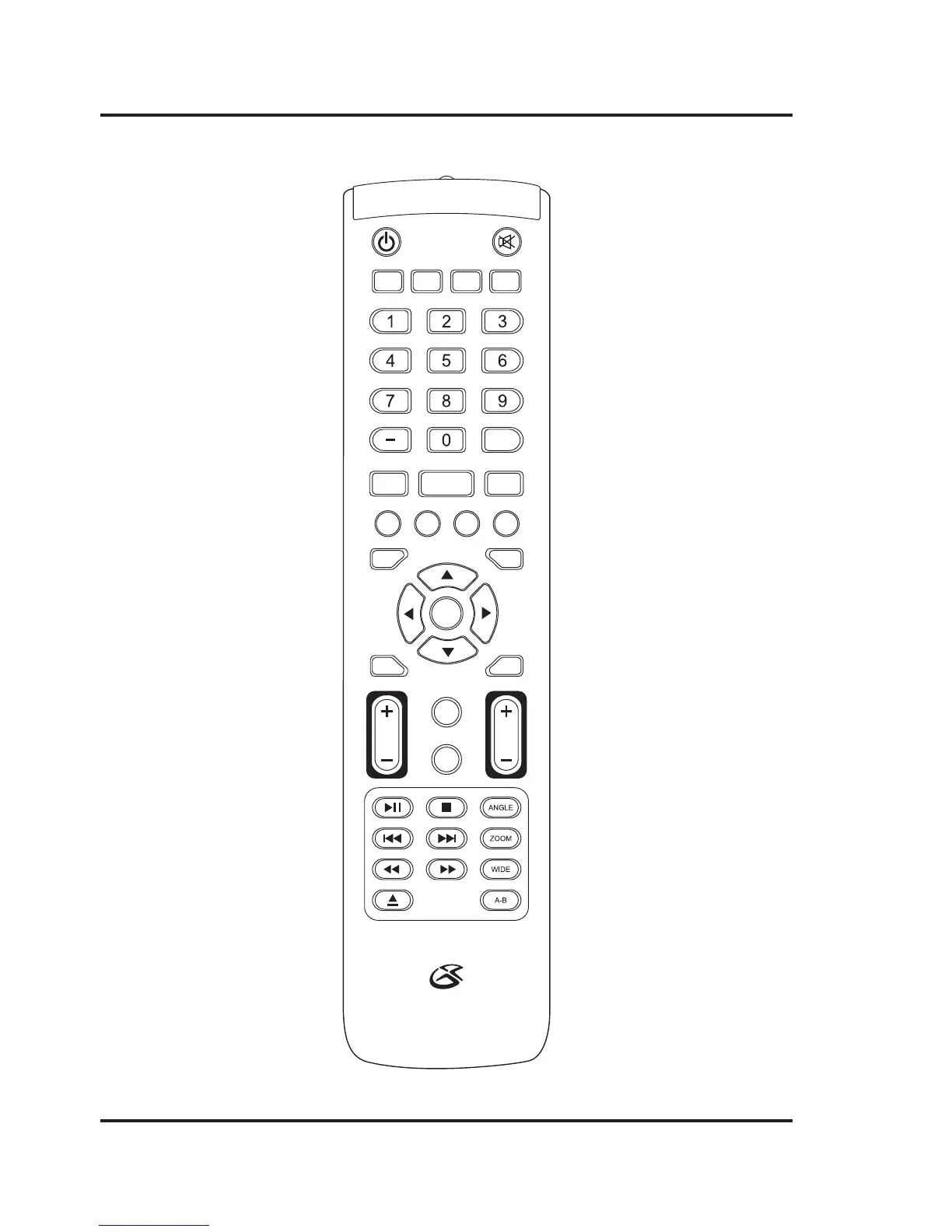
Remote Functions
Power
Press to power the
television off or on.
Display
Press to view the
on-screen display.
Aspect
Press to adjust the aspect
ratio between ZOOM, WIDE,
CINEMA, and NORMAL.
Number Keypad
Use to enter channel
or track numbers.
Audio/CC
Press to adjust audio
settings for the loaded DVD.
In TV mode, press to turn
closed captioning ON or OFF.
Favorites
Press to access your
saved channels.
DVD Setup
Change the display,
language, screen saver,
memory and audio
settings for the DVD.
DVD Menu
Press to access the
loaded DVD’s menu.
Setup
Press to view the
television setup menu.
Arrows/Enter
Press to make selections
in the on screen menus.
Guide
In TV mode, press to
view the on-screen
television guide.
Volume ±
Press to adjust the
television volume.
Picture
Press to adjust the picture
between STANDARD,
SOFT, USER, and DYNAMIC.
The user mode can be
customized by accessing
Picture Settings in the menu.
Play/Pause
Press to play or pause an
individual chapter or track.
Stop
Press to stop an individual
chapter or track during play.
Skip Back/Forward
Press to skip between
chapters or tracks.
Reverse/Fast Fwd
Press to search through an
individual chapter or track
Eject
Press to eject a loaded disc.
Mute
Press to mute the volume.
Freeze
Press to freeze or
unfreeze the current
frame in TV mode.
Sleep
Press to set the sleep timer.
After the set time has
expired the television will
automatically power off.
Repeat
Press to repeat the current
selection or track.
Prev
In TV mode, press to switch
to the previous channel.
Prog
Press to program a loaded
disc to play titles, chapters,
or tracks in a specified order.
Subtitle
Press to activate subtitles
on a loaded DVD.
Source
Use the Arrow/Enter buttons
to select the source.
Exit
Press to exit the current
on-screen menu.
Sound
Press to adjust the sound
between STANDARD, MUSIC,
USER, MOVIE, and SPORTS.
The user mode can be
customized by accessing
Sound Settings in the menu.
Channel ±
Press to adjust the
television channel.
Angle
Press to view alternate
angles on supported DVDs.
Zoom
Press to zoom in or out
on a loaded DVD.
Wide
Press to switch between
4:3 LB, 4:3 PS, and 16:9.
A-B
Press to create a repeating
loop on a specified section
of a loaded DVD.


 To Next Page