23
Grace Link User Guide
Pandora Music Service
Enable Pandora Music Service
The Grace Link comes with an Pandora music app. You will need a Pandora account to enable
the Pandora music service on your Grace Link.
To Enable the Pandora music service, follow the steps below:
1. Press Home and turn the Tune Knob to
highlight Audio Services. Press the Tune
Knob to select.
2. Turn the Tune Knob to highlight
Pandora. Press the Tune Knob to select.
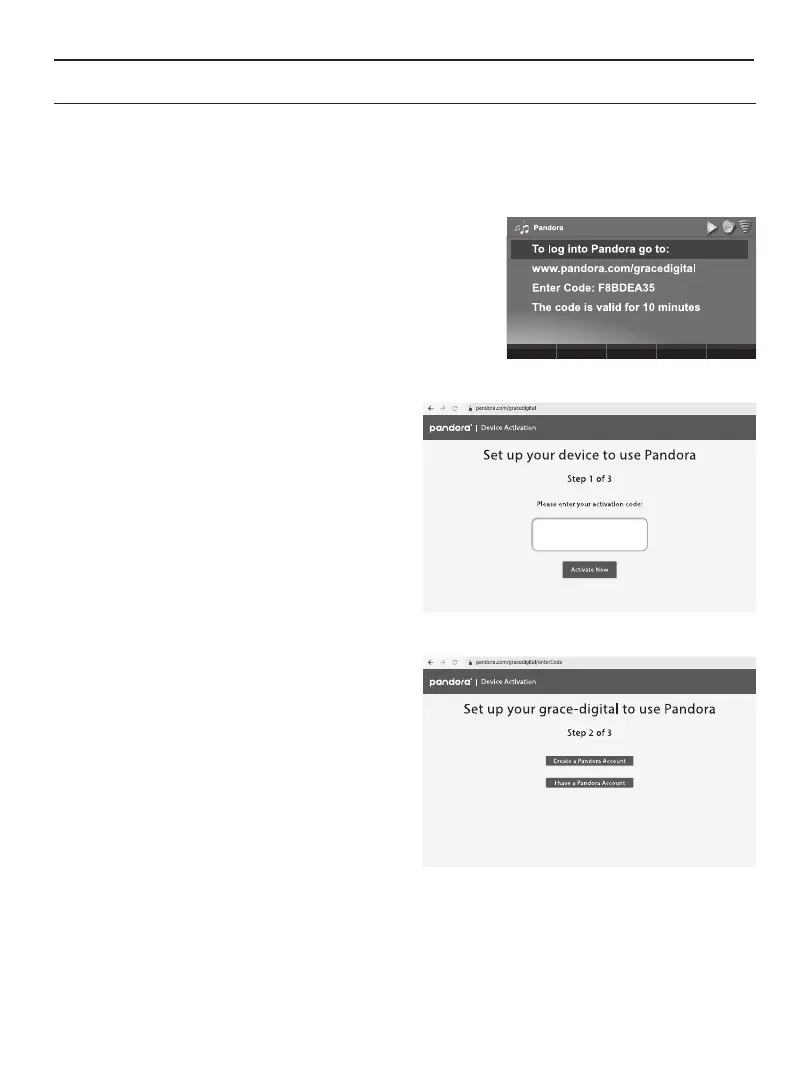
Take note of the code that appears on
your screen. The code will remain valid
for 10 minutes.
3. On your computer or smartphone,
type www.pandora.com/gracedigital
into your web browser. It will take you
through a 3-step, setup process.
4. Enter the code displayed on your radio
(e.g. F8BDEA35). Note that the code
is case sensitive. Click, "Activate Now."
This will bring you to second step.
5. If you have a Pandora account, click, “I
have a Pandora Account.” (If you don't,
click, "Create a Pandora Account" and
follow the prompts.) This will bring you
to the third step.


 To Next Page