22
USERGUIDE
Master Section
1
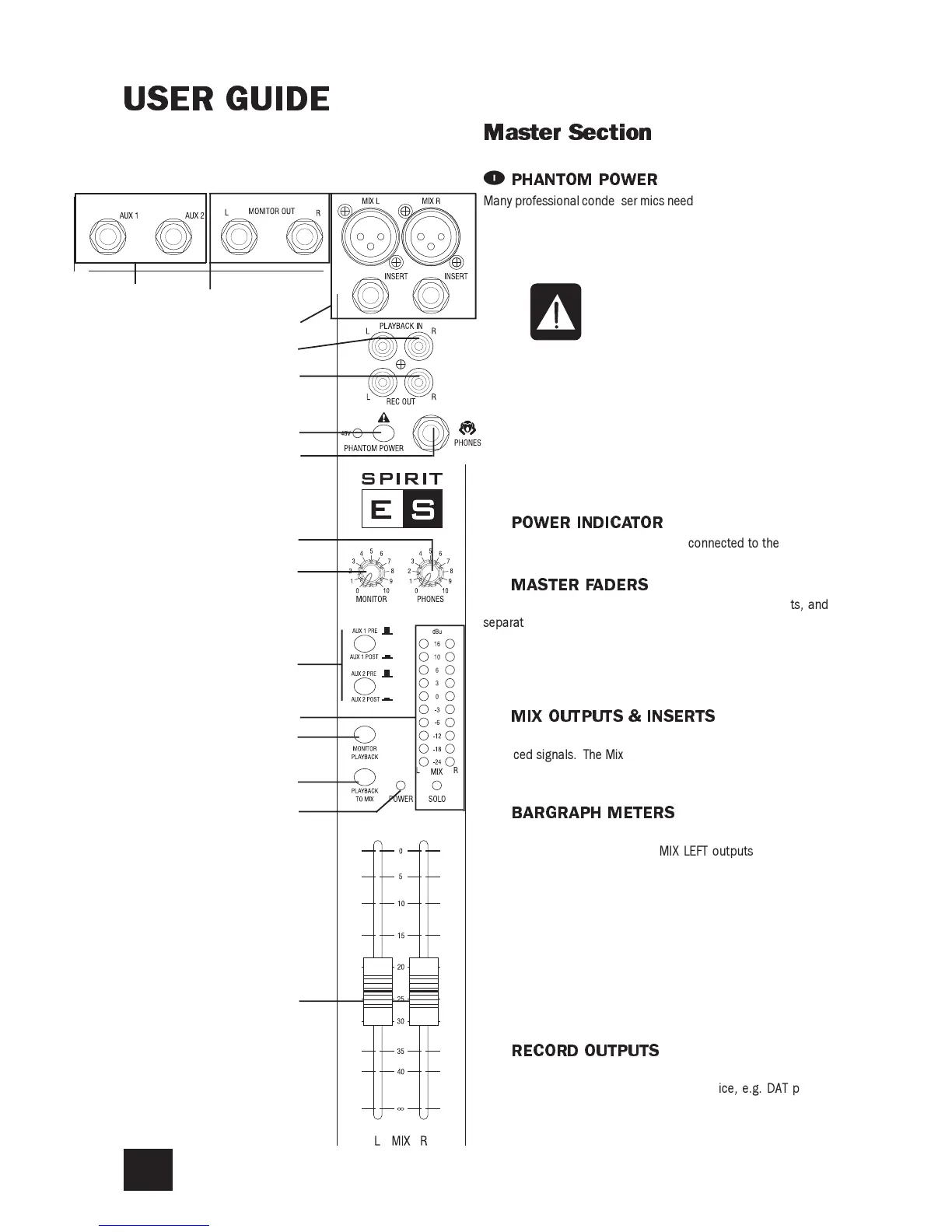
PHANTOMPOWER
Many professional condenser mics need PHANTOM POWER, which
is a method of sending a powering voltage down the same wires
as the mic signal. Press the switch to enable the +48V power to
all of the MIC inputs. The adjacent LED illuminates when the
power is active.
WARNING: TAKE CARE when using unbalanced mics which
may be damaged by the phantom power voltage. Bal-
anced dynamic mics can normally be used with phantom
power switched on (contact your microphone manufac-
turer for guidance).
Mics should always be plugged in, and all output faders
set to minimum before switching the Phantom Power ON
to avoid damage to external equipment
2
POWERINDICATOR
This LED lights to show when power is connected to the console.
3
MASTERFADERS
The MASTER FADERS set the final level of the MIX outputs, and
separate faders are provided for each output. These should nor-
mally be set close to the 0 mark if the input GAIN settings have
been correctly set, to give maximum travel on the faders for
smoothest control.
4
MIXOUTPUTS&INSERTS
The Mix LEFT and RIGHT outputs are sent from the XLR sockets as
balanced signals. The Mix INSERT points are on 3-pole A gauge
jacks and are unbalanced.
5
BARGRAPHMETERS
The three-colour peak reading BARGRAPH METERS normally show
the level of the MIX RIGHT and MIX LEFT outputs, giving you a
constant warning of excessive peaks in the signal which might
cause overloading. Aim to keep the signal within the amber seg-
ments at peak levels for best performance.
Similarly, if the output level is too low and hardly registering at all
on the meters, the level of background noise may become signifi-
cant. Take care to set up the input levels for best performance.
When any SOLO switch is pressed, the meters switch to show the
selected SOLO signal on both meters, in mono; the SOLO LED
also lights.
6
RECORDOUTPUTS
These two RCA outputs carry a copy of the MIX L and MIX R sig-
nals. They allow the use of a recording device, e.g. DAT player,
Minidisc, Cassette tape recorder etc.
7
1
2
3
4
5
6
8
9
0
q
w
e
r
t



 To Next Page