29
DE
EN
FR
NL
IT
2 4
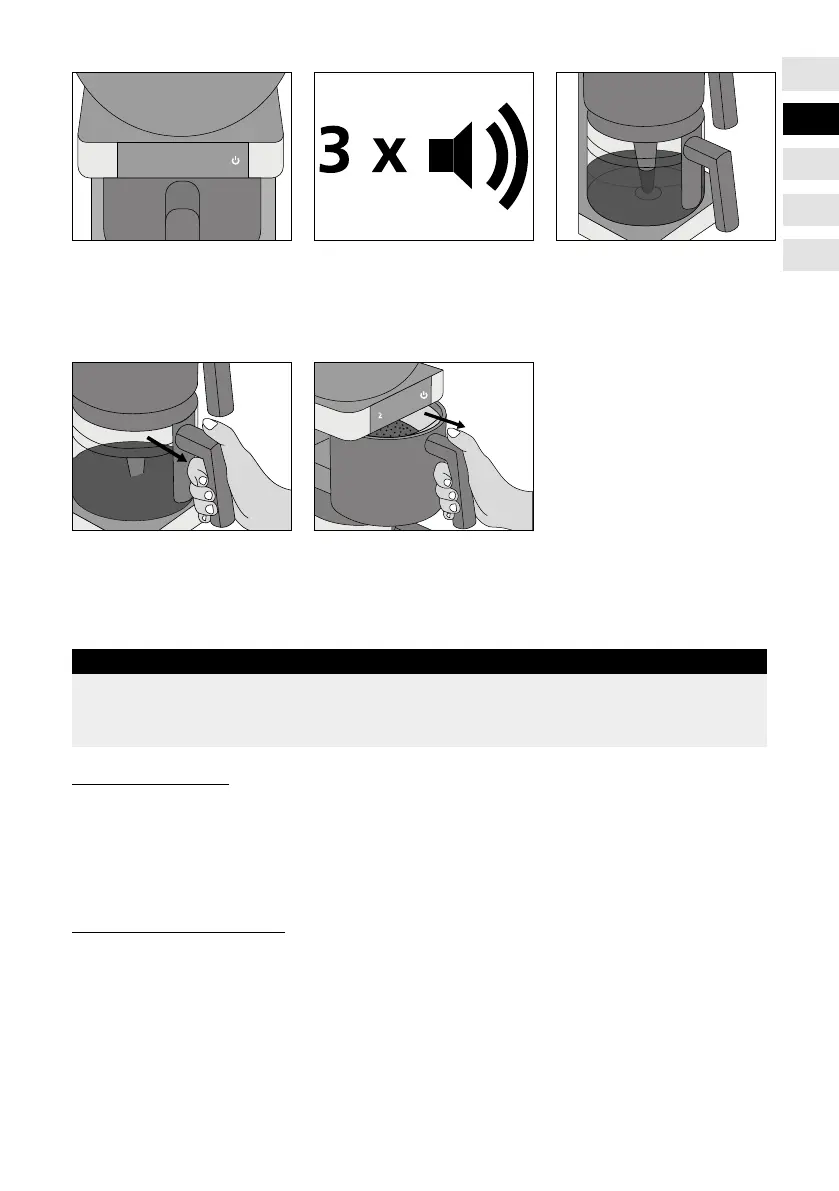
● The brewing operation
starts.
● After the brewing
operation has been
nished, you will hear
3 beeps.
● Wait for a moment
until the coffee has
own through.
● Remove the coffee pot
and pour the coffee
into a cup.
● Immediately after the brewing operation, remove
the paper lter together with the coffee grounds.
Before you can start another brewing operation,
you must remove the coffee lter once.
IMPORTANT!
If there is remaining quantity of water in the tank, this will be shown to you by
indicator lights showing the corresponding number of cups. If there is less water
than for 2 cups in the tank, there will only ash the 2 on the display.
TANK EMPTYING
In order to empty the tank, please touch the number of cups display 2, for about
5 seconds until it beeps twice.
Make sure that the empty coffee lter has been inserted and the coffee pot with
lid stand on the hotplate.
DESCALING REMINDER
If you touch the number of cups display 2 - 10 after 60 cycles, the numbers from
2 to 10 will illuminate one by one. The process is repeated twice. The unit will
indicate that it should be descaled.
After 70 cycles, the device must be descaled. The display 4 will ash fast; coffee
cannot be prepared any longer.


 To Next Page