76-504-0656 17
The switch on the panel screen does not cut off power to all components in the
appliance. It is therefore highly dangerous to switch off only at the panel screen if
electrical parts are exposed. Therefore, further isolate the cabinet by pulling out the
plug.
To ensure that no water penetrates electrical parts, ensure that while cleaning no
water is sprayed directly onto the panel screen and refrigerating system of the
appliance.
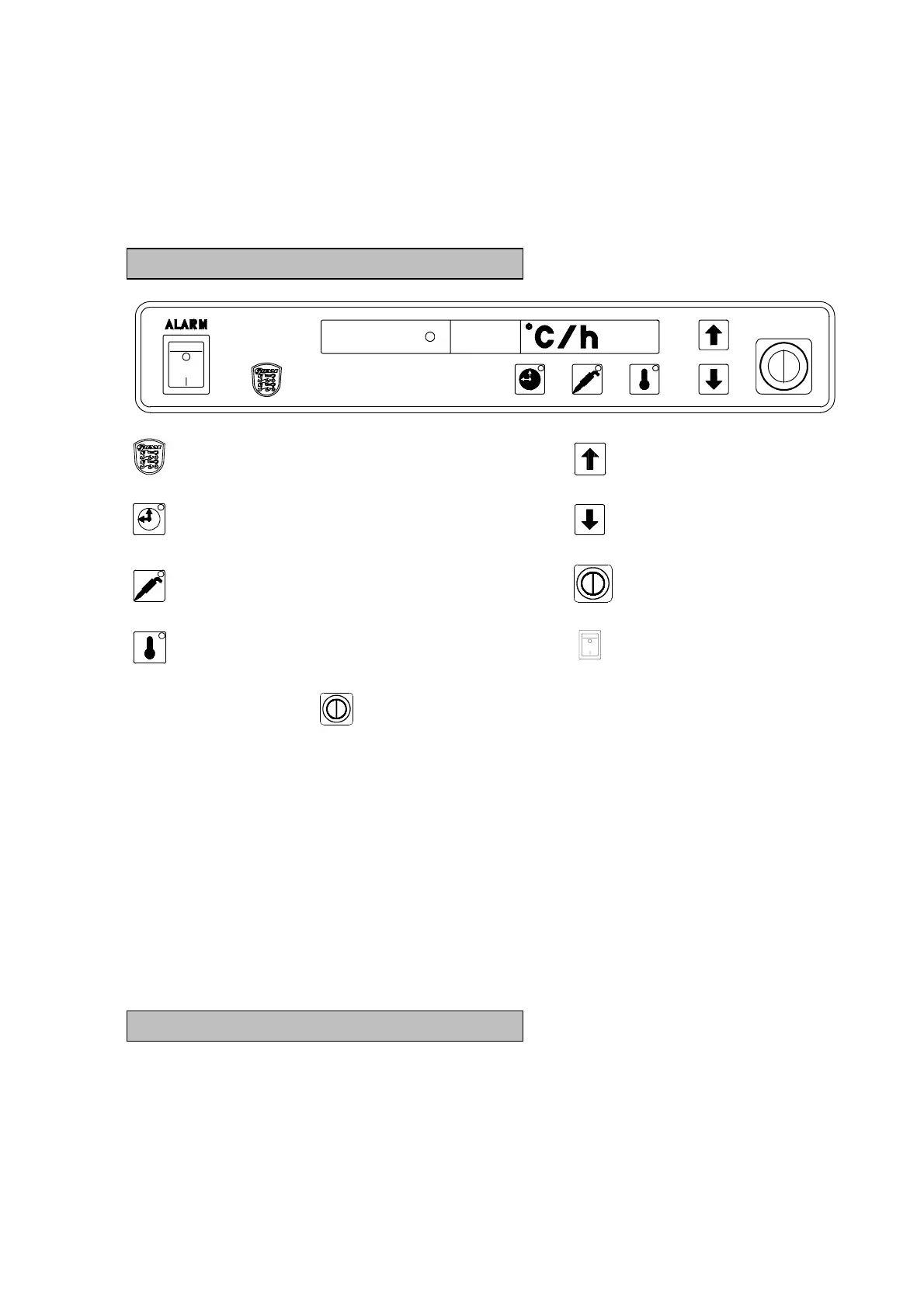
Starting up
Hidden key Arrow key up
Time setting Arrow key down
Chilling temperature with probe Main switch
Storage temperature Alarm ON/OFF
Press the main switch to start.
The figures now displayed give the actual temperature in the cabinet and at the
same time confirm that power is on.
The cabinet is now ready for programming and/or starting up. See section on
programming and program sequence.
NOTE:
Servicing
Make sure the appliance is switched off at the socket before service is performed on
electrical parts. It is not sufficient to switch off the cabinet by the ON/OFF key as
there will still be voltage to some electrical parts of the cabinet.
Program variants
The cabinet offers the following program possibilities:
1: Storage program.
2: Time-controlled chilling.
3: Temperature-controlled chilling with probe.


 To Next Page