■
HOLIDAY PROGRAM
An “8th day”, or Holiday program schedule may be entered for use
on holidays or vacation periods. More than one ON or OFF time may be
entered for the Holiday program.
A typical Holiday schedule may be to turn OFF at 12:01AM dur-
ing the holiday period.
1. Press Prog. key to first free program
2. Press key twice; OFF symbol appears
3. Press h key once to 12AM
4. Press m key twice to 01
5. Press key once
Enter additional ON or OFF schedules as above, followed by
the key.
6. Press key to enter Run Mode
■
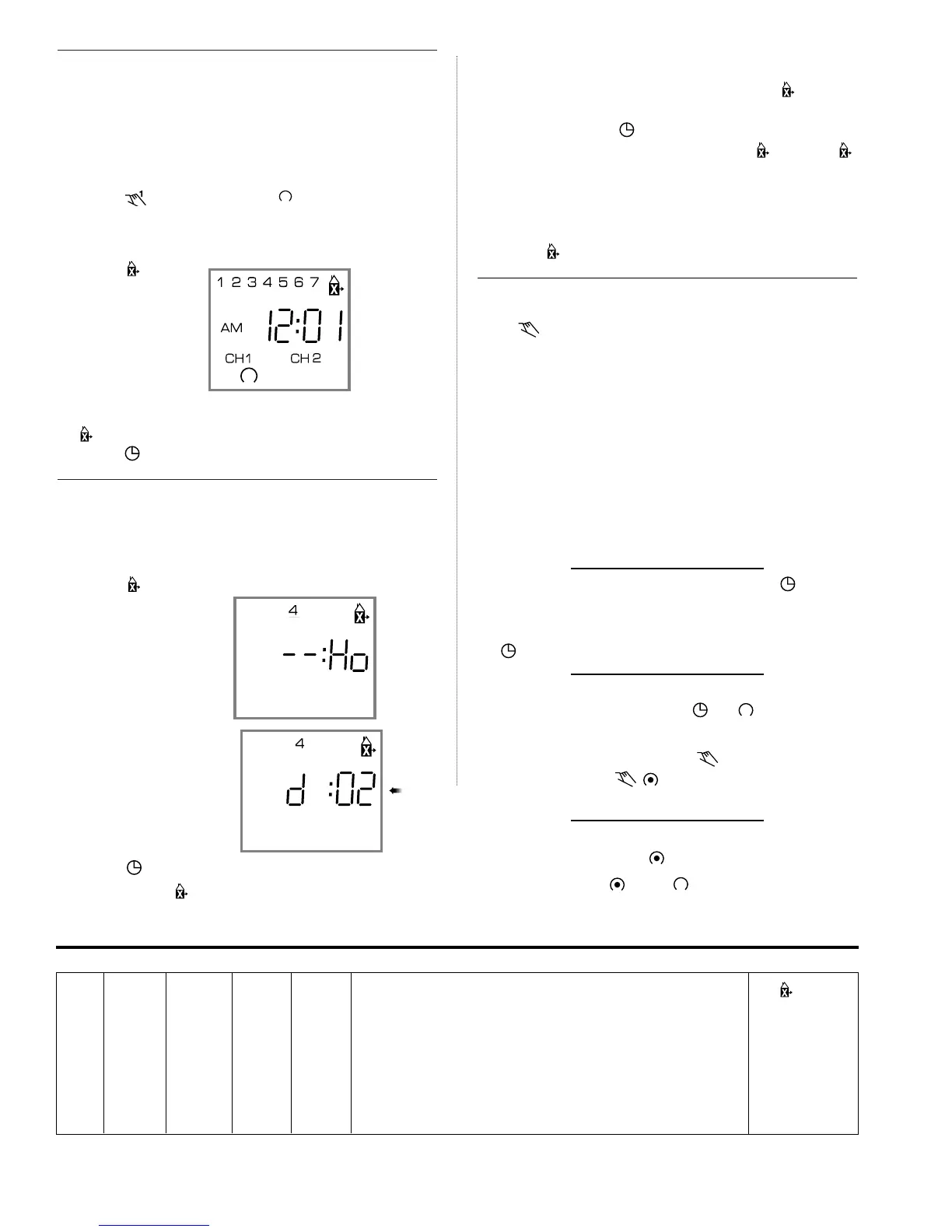
IMPLEMENTING HOLIDAY PROGRAM
Up to 6 days in advance of the Holiday, the “8th day” or Holiday
schedule may be selected to begin on a certain day of the week, and
continue from 1 to 99 days.
Example: Thursday and Friday will be Holidays
1. Press key once
2. Press Day key to 4 (Th)
3. Press Sel. key twice to 02
4. Press key to enter Run Mode
Display will show symbol above current time
8th day schedule will be implemented on Thursday and run for 2
days and then timer will revert back to normal programs.
NOTE: If Sel. key is held down, it will scroll rapidly to 99 and back
to 01
To review the implementation scheduled, press key once.
Display shows day of implementation and number of days holiday pro-
gram will be active. Press key.
To delete the implementation scheduled, press key twice.
symbol disappears from display.
On the day the Holiday Program is selected to begin, the 8th day
program will be implemented. The display will show the Holiday symbol
and number of days remaining in the holiday period. To cancel at this
point, press once.
■ TROUBLESHOOTING
PROBLEM: Days are flashing, pressing any key does nothing
except key turns output ON and OFF.
SOLUTION: Time of Day and Day of Week have not been set. See
“SETTING THE TIME”
NOTE: This is the condition after a reset. If the timer is found in this
condition after it has been installed, programmed and operating for a
while, it may indicate that electrical noise or voltage transients have dis-
rupted the microprocessor causing a loss of program information. Call 1-
800-272-1115 and request that a no-charge “Snubber Filter” be sent to
you to place across the input to the timer, which may solve the problem.
A second, but very unlikely cause of loss of program is a power fail-
ure with the backup battery low or dead. Check by disconnecting power
and monitoring how long the battery keeps the time of day in the display.
PROBLEM: Time of day was set while holding the key down,
but days are still flashing.
SOLUTION: Current day of week was not set while holding down
the key. See “SETTING THE TIME”
PROBLEM: It is 10AM and a ON program for 8AM was entered, but
the output is not ON. Display shows the and symbols.
SOLUTION: After programming, the timer does not “look back” to
determine if it should be ON. Press the key (temporary override)
to turn the output ON; appears in display. The timer will
assume automatic operation at the next programmed event.
PROBLEM: A program for 8AM Monday thru Friday was entered,
but it will not accept it and CH1
is flashing.
SOLUTION: The ON or OFF was not entered as part of the
program. ON or OFF must be selected.
Printed in USA 082US 010.97
_____________________________________________________________________________________________________________________________________________________________________________
_____________________________________________________________________________________________________________________________________________________________________________
_____________________________________________________________________________________________________________________________________________________________________________
_____________________________________________________________________________________________________________________________________________________________________________
_____________________________________________________________________________________________________________________________________________________________________________
CH1 CH2 Holiday
Prog ON/OFF ON/OFF h m Day(s) Program
1 On 7 am 30 Mon., Tue., Wed., Thurs, Fri. No
Digi 42/2 Program Schedules
GRÄSSLIN GmbH & Co. KG is ISO 9001 Certified
GRASSLIN CONTROLS CORPORATION
31 Industrial Ave. • Mahwah, New Jersey 07430 • Tel.: 201-825-9696 • Fax: 201-825-8694
E-mail: GCCsales@grasslin.com • www.grasslin.com


 To Previous Page
 Loading...