EasyManua.ls Logo

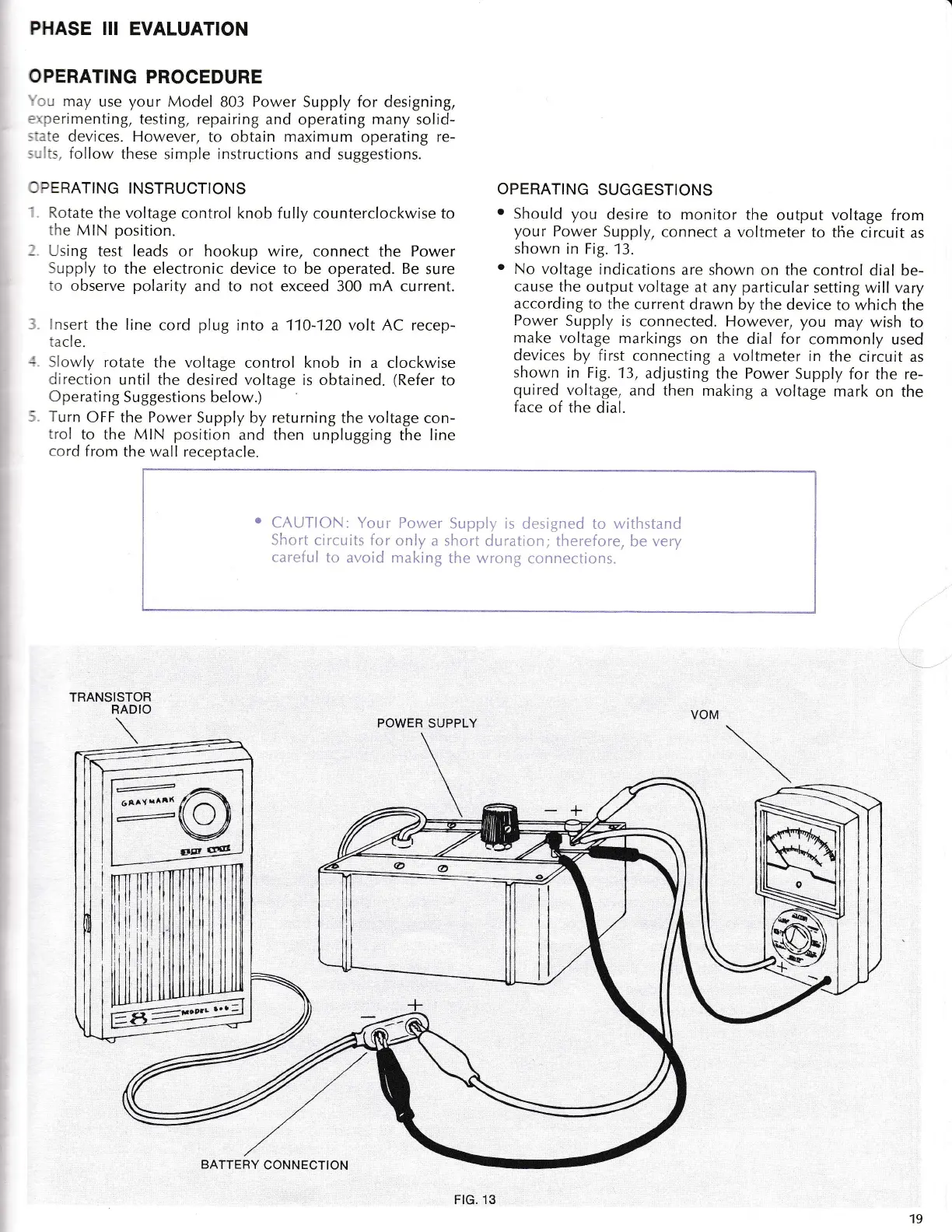
Graymark 803 - PHASE III: EVALUATION AND OPERATION; Operating Instructions and Suggestions; Safety Warning: Short Circuits

Default Icon
24 pages
Print Icon
To Next Page IconTo Next Page
To Previous Page IconTo Previous Page
Loading...
PHASE
III EVALUATION
OPERATING
PROCEDURE
.r
may
use
your
Model
803
Power
Supply for designing,
=,:erimenting,
testing, repairing
and operating
many
solid-
, ...:e
devices. However,
to obtain
maximum
operating
re-
.-
., follow
these simple instructions and
suggestions.
:
DERATING
INSTRUCTIONS
.
Rotate
the voltage
control knob fully
counterclockwise
to
.ne
MiN
position.
-
r-sinB
test leads
or
hookup
wire, connect the Power
iupply
to the electronic device to be operated. Be
sure
:o
observe
polarity
and to
not
exceed 300
mA
current.
:
rsert
the line
cord
plug
into
a
110-120 volt AC recep-
:acl
e.
-
Slorvl;r
rotate
the voltage
control
knob in
a clockwise
r-lirection
until the
desired
voltage
is obtained.
(Refer
to
C
perati
ng
Suggestions below.)
Turn
OFF the Power
Supply by returning
the
voltage
con-
tr-ol
to
the MIN
position
and then unplugging
the line
cord
from
the wall receptacle.
TRAN
POWER SUPPLY
OPERATING
SUGGESTIONS
o
Should
you
desire to monitor
the
output voltage
from
your
Power
Supply,
connect
a
voltmeter
to
the circuit
as
shown
in Fig. 13.
.
No voltage
indications
are
shown on
the control dial
be-
cause
the output voltage
at
any
particular
setting will vary
according
to the current
drawn by the
device to which
the
Power
Supply is
connected.
However,
you
may wish
to
make
voltage
markings
on the
dial
for
commonly
used
devices
by first
connecting
a
voltmeter
in the
circuit
as
shown in
Fig. 13,
adjusting
the Power
Supply for
the re-
quired
voltage,
and
then making
a voltage mark
on the
face
of the
dial.
SISTOR
RADIO
CAUTION: Your
Power
Short
circuits for
only a
careful
to
avoid making
Supply is
designed to withstand
short duration;
therefore, be very
the wrong
connections.
6)
V
frg
gd
6aaY
uAlt(
-4
BATTERY
CONNECTION
FtG. 13
19

Related product manuals