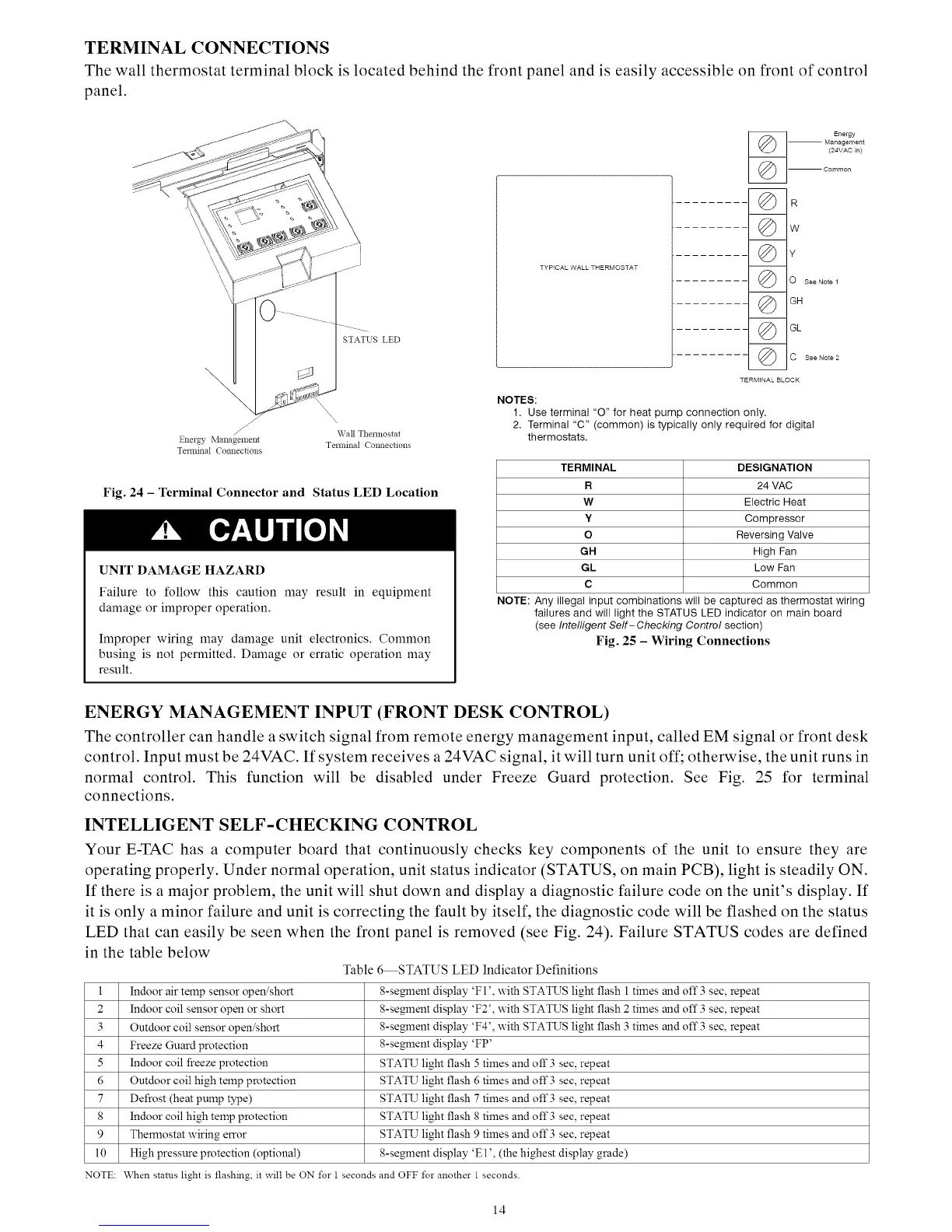
TERMINAL CONNECTIONS
The wall thermostat terminal block is located behind the front panel and is easily accessible on front of control
panel.
STATUS LED
/
/
Mana2ememg Wall Themlostat
Energy
Temfinal Connections
Tmminal Connections
Fig. 24 - Terminal Connector and Status LED Location
UNIT DAMAGE HAZARD
Failure to follow this caution may result in equipment
damage or improper operation,
Improper wiring may damage unit electronics. Common
busing is not permitted, Damage or erratic operation may
result,
Energy
-- Management
(24VAC in)
(_ -- Common
©w
©¥
O See Note 1
© G.
© G,
C See Note 2
TERMINAL BLOCK
NOTES:
1. Use terminal "O" for heat pump connection only.
2. Terminal "C" (common) is typically only required for digital
thermostats.
TERMINAL DESIGNATION
R 24 VAC
W Electric Heat
Y Compressor
O Reversing Valve
GH High Fan
GL Low Fan
C Common
NOTE: Any illegal input combinations will be captured as thermostat wiring
failures and will light the STATUS LED indicator on main board
(see Intelligent Self-Checking Control section)
Fig. 25 - Wiring Connections
ENERGY MANAGEMENT INPUT (FRONT DESK CONTROL)
The controller can handle a switch signal from remote energy management input, called EM signal or front desk
control. Input must be 24VAC. If system receives a 24VAC signal, it will turn unit off; otherwise, the unit runs in
normal control. This function will be disabled under Freeze Guard protection. See Fig. 25 for terminal
connections.
INTELLIGENT SELF-CHECKING CONTROL
Your E-TAC has a computer board that continuously checks key components of the unit to ensure they are
operating properly. Under normal operation, unit status indicator (STATUS, on main PCB), light is steadily ON.
If there is a major problem, the unit will shut down and display a diagnostic failure code on the unit's display. If
it is only a minor failure and unit is correcting the fault by itself, the diagnostic code will be flashed on the status
LED that can easily be seen when the front panel is removed (see Fig. 24). Failure STATUS codes are defined
in the table below
Table 6 STATUS LED Indicator Definitions
l Indoor air temp sensor open/short 8-s%m'nent display 'FI ', with STATUS light flash 1 times and off 3 sec, repeat
2 Indoor coil sensor open or short 8-s%mnent display 'F2', with STATUS light flash 2 times and off 3 sec, repeat
3 Outdoor coil sensor open/short 8-s%mnent display 'F4', with STATUS light flash 3 times and off 3 sec, repeat
4 Freeze Guard protection 8-s%mnent display 'FP'
5 Indoor coil freeze protection STATU light flash 5 times and off"3 see, repeat
6 Outdoor coil high temp protection STATU light flash 6 times and off 3 sec, repeat
7 Defrost (heat pump type) STATU light flash 7 times and off 3 sec, repeat
8 Indoor coil high temp protection STATU light flash 8 times and off 3 sec, repeat
9 Thermostat wiring error STATU light flash 9 times and off 3 see, repeat
tO High pressure protection (optional) 8-s%mnent display 'El ', (the highest display grade)
NOTE: When stares light is flashing, it will be ON for 1seconds and OFF tbr another 1 seconds.
14



 To Next Page