10
Using the Features
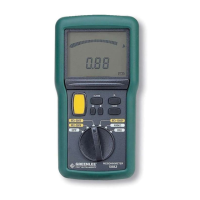
Insulation Resistance Measurement Test Button (Yellow Button)
Press to apply the test voltage to the item to be tested. Release to terminate the test.
• While the yellow insulation resistance test button is pressed, the will appear on the
display.
• See the Indicator Table for results of the insulation test.
Alarm (Models 5880 and 5882 only)
Press ALARM to turn the alarm on and review the setpoints. Press again to turn the alarm off.
Note: When the alarm function is active, a continuous tone and flashing ALARM on the display
indicate that the measured value matches the alarm setpoint.
Alarm Setpoints (Models 5880 and 5882 only)
1. Press and hold ALARM to review the setpoints.
2. Press and to change the setpoints. Press and hold ALARM to save the settings.
• Default settings are:
> 0.25 MΩ (MΩ – 250 V position)
> 0.50 MΩ (MΩ – 500 V position)
> 1.00 MΩ (MΩ – 1000 V position)
< 20.00 kΩ (400 kΩ position)
< 2.00 Ω (20 Ω position)
• Minimum/Maximum settings are:
< or > 0.05 MΩ / 2000 MΩ (MΩ – 250 V position)
< or > 0.10 MΩ / 2000 MΩ (MΩ – 500 V position)
< or > 0.2 MΩ / 2000 MΩ (MΩ – 1000 V position)
< or > 0 Ω / 399.9 kΩ (400 kΩ position)
< or > 0 Ω /19.99 Ω (20 Ω position)
Note: The megohmmeter will correct any setting that is entered improperly.
Timed Insulation Resistance Test (Model 5882 only)
1. Press TIMER. The icon and a timekeeper (0:00) will appear on the display.
2. Press and release the yellow test button to start the timer and initiate the test voltage.
The will appear on the display and the timekeeper will show the elapsed time.
3. Make a note of the reading on the display when the speaker sounds
(after 30 seconds, 1 minute and 10 minutes).
4. Press the yellow test button to terminate the test.


 To Next Page