6
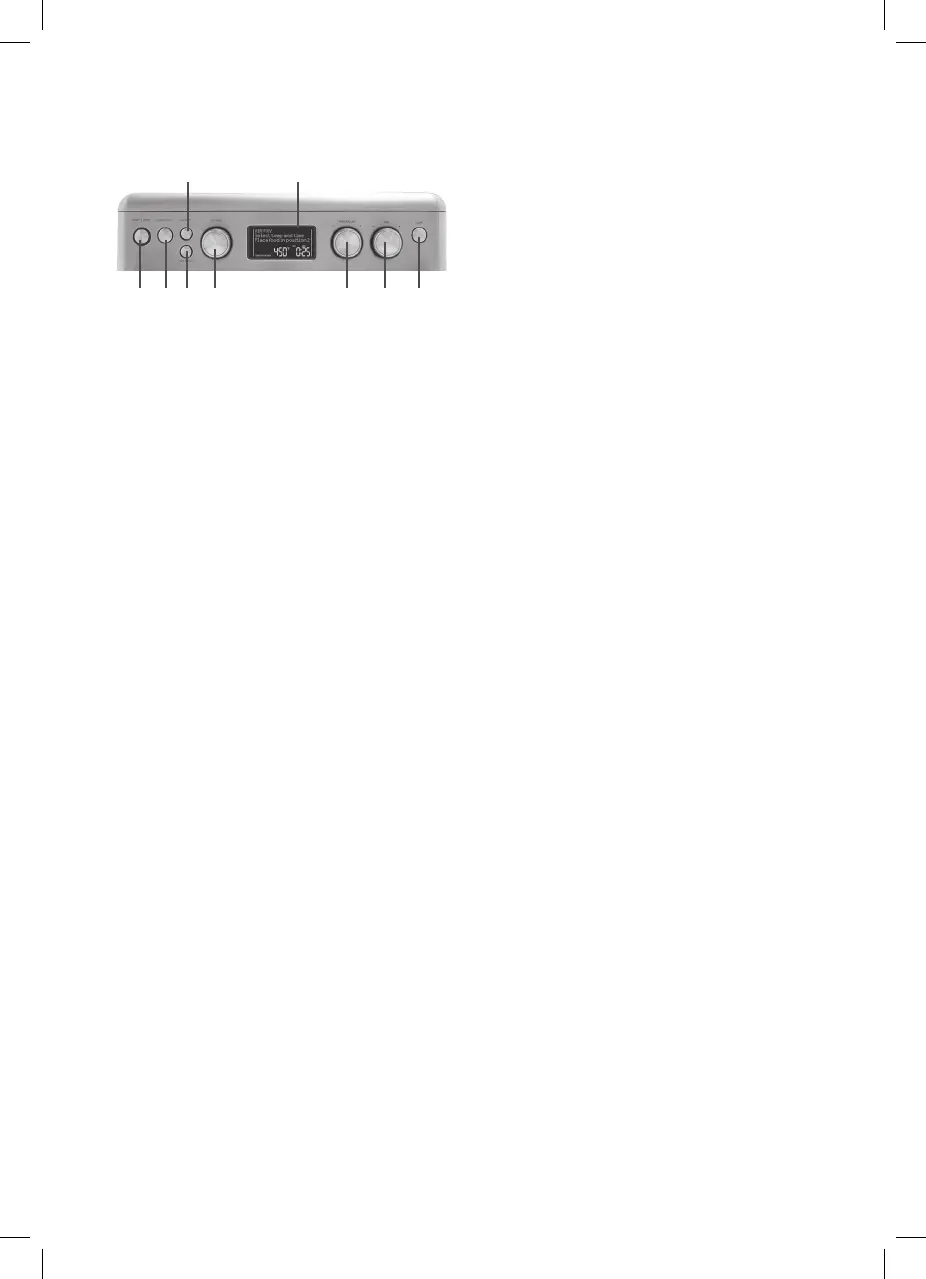
A. Start/Stop Button with
Indicator Light
Use to start and stop cooking. Indicator will
illuminate when cooking
B. Convection
Use the Convection button to change from
Convection (low) to Convection Plus (high)
or turn it off.
NOTE: Convection can only be turned
“OFF” in the following settings: warm,
proof, slow cook, reheat, and dehydrate.
C. Defrost
Use the Defrost button for Toast, Bagel,
Pizza, and Air Fry presets.
D. Duo Cook Button
Use to program two-step cooking operations.
E. Settings Dial
Turn Settings Dial to scroll through the
functions on the LCD screen.
F. Temperature Dial
Turn Temperature Dial to scroll through
temperature and slice selections.
G. Time Dial
Turn Time Dial to scroll through time and
shade selections. Use Time Dial to set
the clock.
H. Light Button
Press the Light button to turn on/off the
interior oven light. Interior light will turn off
automatically after 60 seconds.
I. LCD Screen
Displays cooking functions, toast shade and
slices, temperature, cooking/countdown
timer, clock time, convection, defrost, and
turn & switch.
BEFORE FIRST USE
1. Place your Convection Air Fry Oven on a
flat, level surface.
2. Move oven 2 to 4 inches away from the wall
or any objects on the countertop. Do not use
on or near heat-sensitive surfaces.
NOTE: OBJECTS SHOULD NOT BE STORED
ON THE TOP OF THE OVEN. IF THEY ARE,
REMOVE ALL OBJECTS BEFORE YOU TURN
ON YOUR OVEN. THE EXTERIOR WALLS
GET VERY HOT WHEN IN USE. KEEP OUT
OF REACH OF CHILDREN.
3. Check that the Crumb Tray is in place and that
there is nothing in the oven.
4. Plug power cord into the wall outlet.
5. Run the oven empty for 20 minutes. Ensure the
area is well ventilated as the oven may emit
vapors.
Setting the Clock
The clock can only be set when the oven is not
cooking, and the time is displayed on the screen.
To set the clock:
1. If LCD is not displaying the clock, scroll through
the function menu until clock is displayed.
2. Press and hold the Time Dial for 3 seconds.
3. The clock hour will flash. Turn the knob to set
hour, then press Time Dial to confirm.
4. The clock minutes will flash. Turn the knob to
set minutes, then press Time Dial to confirm.
NOTE: If nothing is pressed, clock will
automatically set to currently displayed time.
NOTE: Once the LCD screen displays the
clock, press any button or turn any dial to go
back to the main screen.
OVEN SOUND
VOLUME
1. Press “Start/Stop” and “Convection” buttons
simultaneously for 2 seconds.
2. The number 1 (default setting) or currently
selected setting will display.
3. Turn the Setting Dial to set preferred tone level:
0 (off/tones deactivated), 1 (low), or 2 (high).
4. Once your selection is displayed, press Time
Dial to confirm.
Temperature Unit
To change Temperature Unit between degree “F”
and “C”:
Press “Defrost” and “Convection” buttons
simultaneously for 2 seconds, the display icon
on the LCD display will change to the other unit.
CONTROL PANEL
A.
B.
C.
D.
E. F. G. H.
I.


 To Next Page