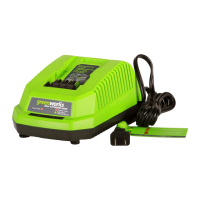
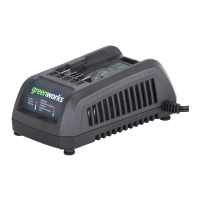
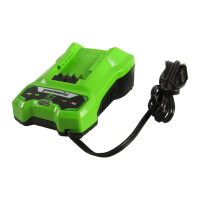
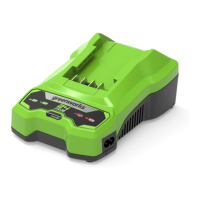
This document describes the Greenworks 24V Charger, a device designed to recharge Greenworks 24V series batteries. The manual provides essential safety instructions, operational procedures, maintenance guidelines, technical specifications, and warranty information in English, French, and Spanish.
Function Description:
The Greenworks 24V Charger is a diagnostic charger used to recharge Greenworks 24V series lithium-ion battery packs. It is designed for indoor use only and features LED indicators to display the current battery status, including charging, fully charged, battery too warm, and defective battery. The charger ensures that the battery pack receives the maximum run time by fully charging it. It is compatible with various Greenworks 24V battery models and charger models, including 29972, CAG801, CAG813, 2903102, 29862, 2978602, CAG812, and CAG817.
Important Technical Specifications:
Charger Models:
- Model 29972:
- Voltage: 24 V
- Input: 120V AC 50/60Hz, 0.5A Max
- Output: 24V DC 0.5A
- Model CAG817:
- Voltage: 24 V
- Input: 120V AC 50/60Hz, 2A Max
- Output: 24V DC 4A
- Model CAG801 / CAG812 / 2903102 / 29862:
- Voltage: 24 V
- Input: 120V AC 50/60Hz, 1A Max
- Output: 24V DC 2A
- Model 2978602:
- Voltage: 24 V
- Input: 120V AC 50/60Hz, 1.5A Max
- Output: 24V DC 2A
Compatible Battery Pack Models (24V MAX):
- Model 29842 / LB24A020:
- Battery: 21.6V 2.0AH, 43.2Wh
- Cell number: 6
- Model 29852 / LB24A040:
- Battery: 21.6V 4.0AH, 86.4Wh
- Cell number: 12
- Model BAG711:
- Battery: 21.6V 1.5AH, 32.4Wh
- Cell number: 6
- Model BAG708:
- Battery: 21.6V 2.0AH, 43.2Wh
- Cell number: 6
- Model BAG709:
- Battery: 21.6V 4.0AH, 86.4Wh
- Cell number: 12
- Model BAG710:
- Battery: 21.6V 5.0AH, 108Wh
- Cell number: 12
Usage Features:
- Charging Procedure:
- Connect the charger plug to an AC power outlet.
- Insert the battery pack into the charger.
- The Charger LED Light (3) illuminates in a specified order to show the current battery status:
- Green Blinking: Battery is charging.
- Green Solid: Fully charged.
- Red Solid: Battery is too warm (remove for approx. 30 minutes to allow to cool).
- Red Blinking: Defective battery (remove and replace with a new battery).
- Diagnostic Features: The charger is diagnostic, providing visual cues for various battery conditions. If the battery is too warm, the LED will be solid red, indicating the need for cooling. If the battery is defective, the LED will blink red.
- Mounting the Charger: The charger can be mounted on a wall using two wood screws for wood studs or wall anchors and screws for drywall.
- For charger models CAG801/2903102/29862, drill two parallel holes 5" (127 mm) on center.
- For charger models CAG817/CAG812, drill two parallel holes 4.4" (112 mm) on center.
- Safety Instructions:
- Do not cover ventilation slots.
- Confirm voltage availability before use.
- Use an attachment plug adaptor if the plug shape does not fit the power outlet.
- Do not allow liquid inside the charger.
- Do not use the charger for purposes other than those specified in the manual.
- Unplug the charger and remove the battery pack before cleaning.
- Do not connect two chargers together.
- Ensure output polarity matches load polarity.
- For indoor use only.
- Keep battery pack at normal room temperature (6 °C to 40°C).
- Do not allow small metal items or foreign particles into the charger cavity.
- Do not attempt to recharge non-rechargeable batteries.
- Use only approved LB24A020 or Greenworks 24V series replacement batteries to reduce the risk of injury.
- The appliance can be used by children 8 years and older and individuals with reduced capabilities under supervision.
- If the cord set is damaged, it must be replaced by a special cord set from the manufacturer or service agent.
Maintenance Features:
- Cleaning:
- Keep the air vent free of blockage, saw dust, and wood dust.
- Do not spray, wash, or submerge the charger in water.
- Clear unwanted material from the air vent with a vacuum.
- Clean the housing and plastic components with a soft, dry cloth.
- Do not use strong solvents or detergents on the plastic housing or components.
- Storage: Remove the battery pack before storing or disconnecting the charger for long periods.
- Troubleshooting:
- Charger doesn't work, shows defective mode (LED flashes Red):
- Possible Cause: Battery pack or charger is defective, or there is a bad connection.
- Solution: Try reinserting the battery, try a different battery, or unplug the charger, wait for the red LED to go out, then reconnect.
- Charger doesn't work, shows evaluation mode (LED indicates Red solid ON):
- Possible Cause: Battery is either too hot or too cold.
- Solution: Allow the battery pack to reach normal temperature (3°C-47°C).
Warranty:
Greenworks provides a three (3) year limited warranty to the original purchaser against defects in materials, parts, or workmanship under normal use. The warranty is valid for personal use only and requires maintenance according to the owner's manual. Items not covered include misuse, commercial use, neglect, accidents, improper maintenance, normal wear, routine maintenance items (lubricants, blade sharpening), and normal deterioration of the exterior finish. A helpline is available at 1-888-909-6757 for warranty service. Transportation charges for warranty returns are the responsibility of the purchaser unless requested in writing by Greenworks.

 Need help?
 General

 To Next Page