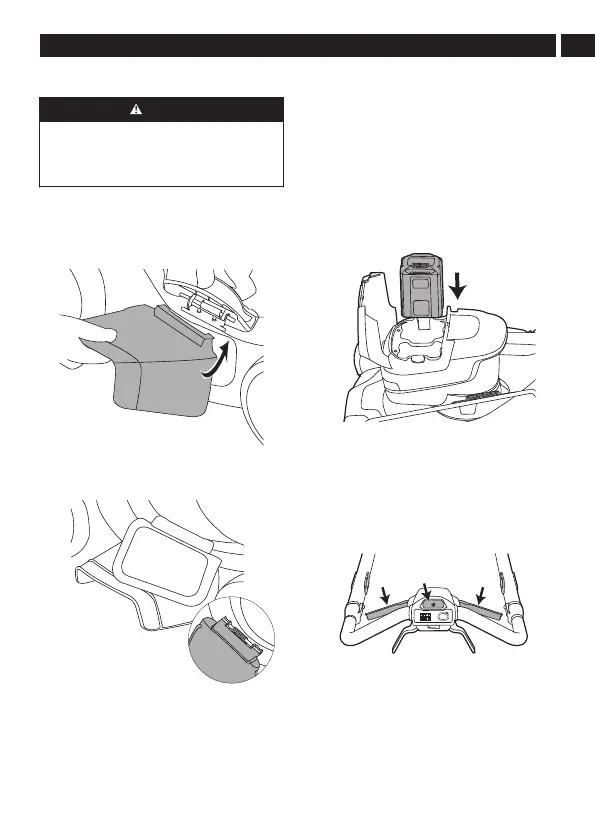
4.6 SWITCH TO SIDE DISCHARGING MODE
CAUTION
WHEN USING THE SIDE DISCHARGE CHUTE:
• DO NOT ATTACH THE GRASS CATCHER.
• ENSURE THAT THE MULCH PLUG IS
INSTALLED.
1. Locate the side discharge door and lift it open
with one hand.
2. With another hand, attach the side discharge
chute by lining up the grooves on the side
discharge chute with the pivot located on the
underside of the cover.
3. Lower the chute until the hooks on the mower
deck are secured in the openings of the chute.
4. Close the side discharge cover.
4.7 MOWING WITHOUT A GRASS CATCHER
OR MULCH PLUG
• Examine the rear door to make sure that there are
no damages, such as cracks.
• If a mulch plug is attached, remove it.
• Close the rear door before you operate the product.
When you operate the product, the grass clippings will
discharge below the rear cover.
4.8 CONNECT THE BATTERY TO THE
PRODUCT
Note: The product features an automatic switch
function that enables the other battery to operate
when the power level of the first battery is low.
1. Open the battery door.
2. Align the ribs on the battery with the grooves in
the battery compartment.
3. Push the battery into the battery compartment
until the battery locks into place.
4. When you hear a click, the battery is installed.
5. Close the battery door.
4.9 START THE PRODUCT
1. Press and hold the power button. Then, grasp
either of the blade activation levers towards the
handle bar to engage the blades.
Note: Complete the two consecutive actions within
5 seconds.
2. Once the product has started, you can release
the power button.
11
English
EN





 To Next Page