8.2 PAIRING YOUR DEVICE
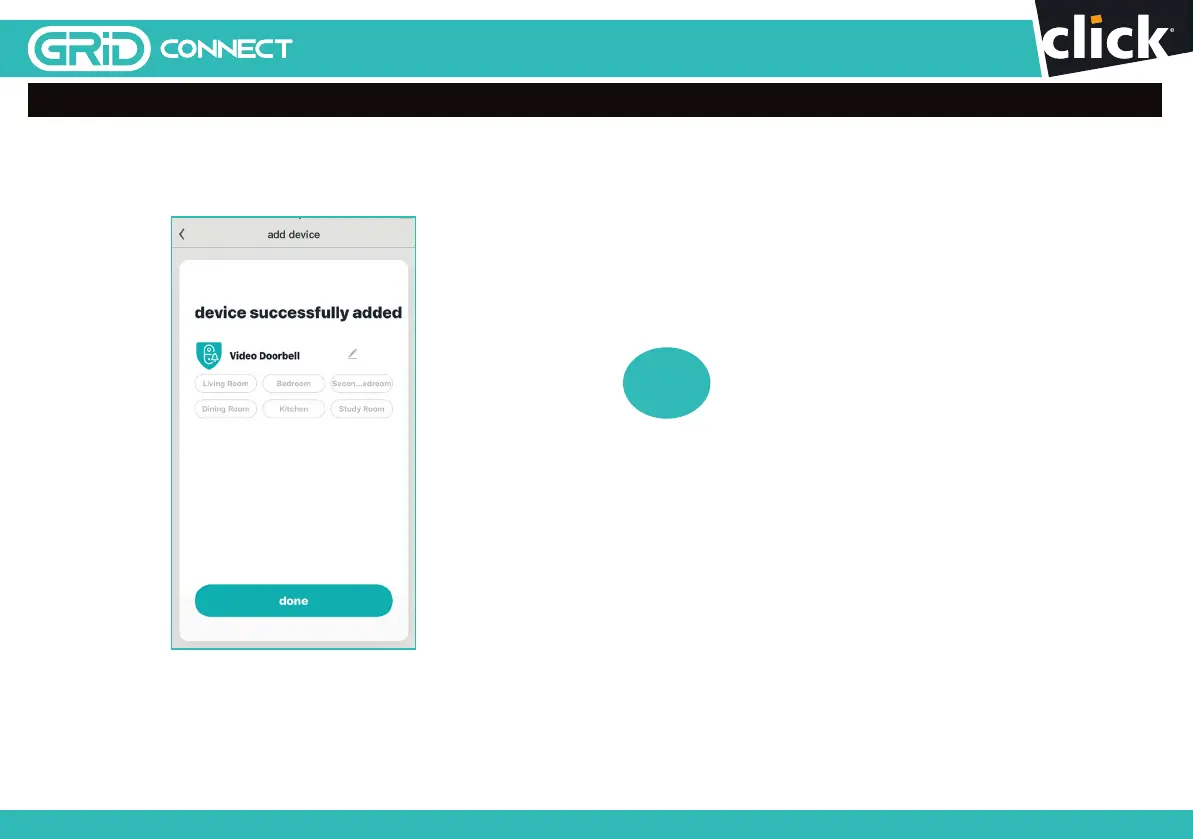
Once the pairing process is complete a page showing
device added
successfully
will appear.
You may choose to edit the device name or assign the device to a
dedicated room before tapping
done
to finish the pairing process.
Once your doorbell is paired to your Wi-Fi network, your doorbell is
able to view when the doorbell is pressed or motion is detected (if set)
from your smartphone as long as there is internet access.
If no device is found and the pairing process
is not successful, check below and repeat from Step 8
1
Wi-Fi network is 2.4GHz.
2
Wi-Fi password entered is correct and
the same Wi-Fi network is used on the mobile device.
3
Grid Connect device is in pairing mode.
4
Check your Wi-Fi for network activity.
5
Trouble shooting guide on page 18.
?
1110
24 pages 105mm x 148mm (A6) 160gsm Gloss Art Stock 4 colour process double sidedDC60HA - CPIN005634
SMART HOME


 To Next Page