10 PAIRING YOUR INDOOR CHIME UNIT
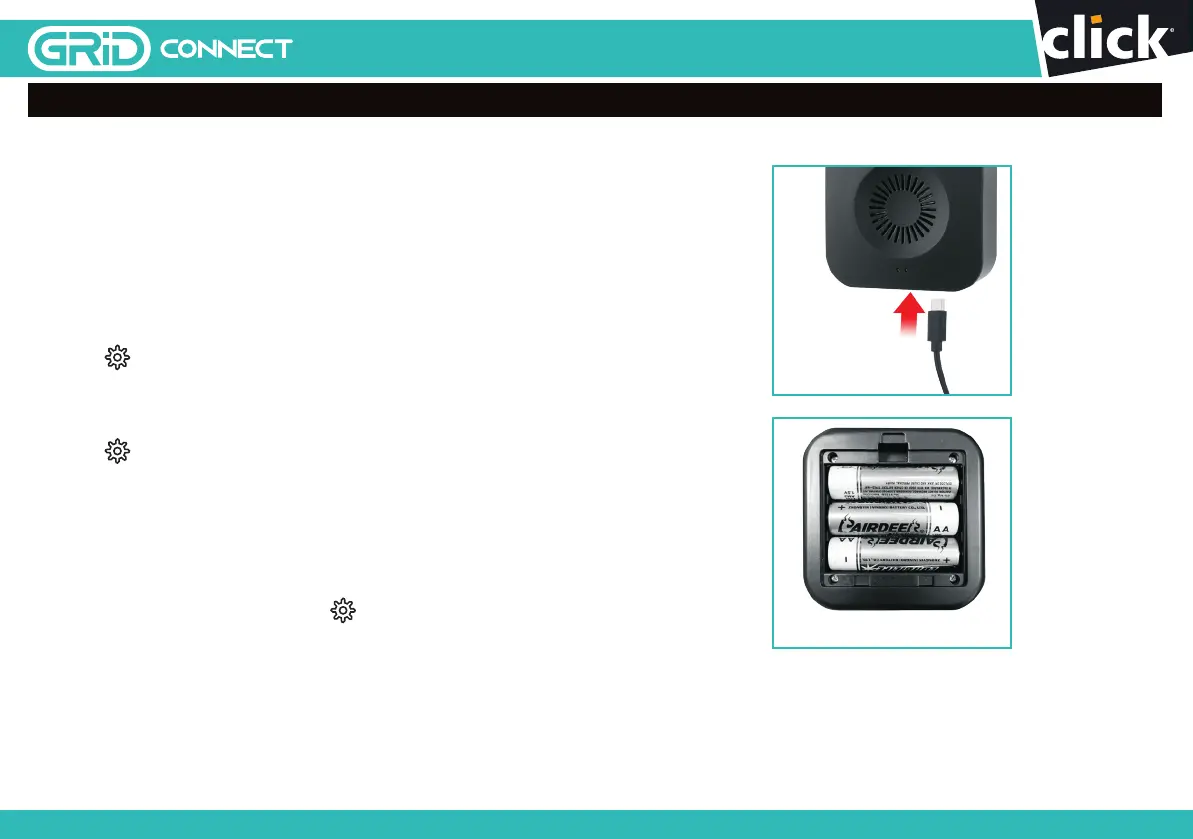
Power on your indoor chime unit with
either a standard USB-A port or 3 x 1.5V “AA” type
batteries, ideally somewhere near your door.
Your indoor chime unit should have been paired with
your video doorbell. Please press the push button on
the video doorbell to test the indoor chime unit. If the
indoor chime does not react, please try it closer to the
doorbell. Otherwise, please follow step 1-3:
1. Press
on the side of the chime unit for 5 seconds
to reset the chime unit. The indicator should
flash red quickly for 2 seconds then stop flashing,
proceed to step 2.
2. Press
once for 1 second and indicator starts
flashing red rapidly.
3. Press the video doorbell’s push button once to
complete indoor chime unit setup.
NOTE: Indoor chime unit indicator should
flash blue when pressing the video doorbell
push button.
4. For unbind the chime unit, press for 5 seconds,
the indicator should flash red quickly and unbinds.
USB Port
3 x 1.5V AA Batteries
1514
24 pages 105mm x 148mm (A6) 160gsm Gloss Art Stock 4 colour process double sidedDC60HA - CPIN005634
SMART HOME


 To Next Page