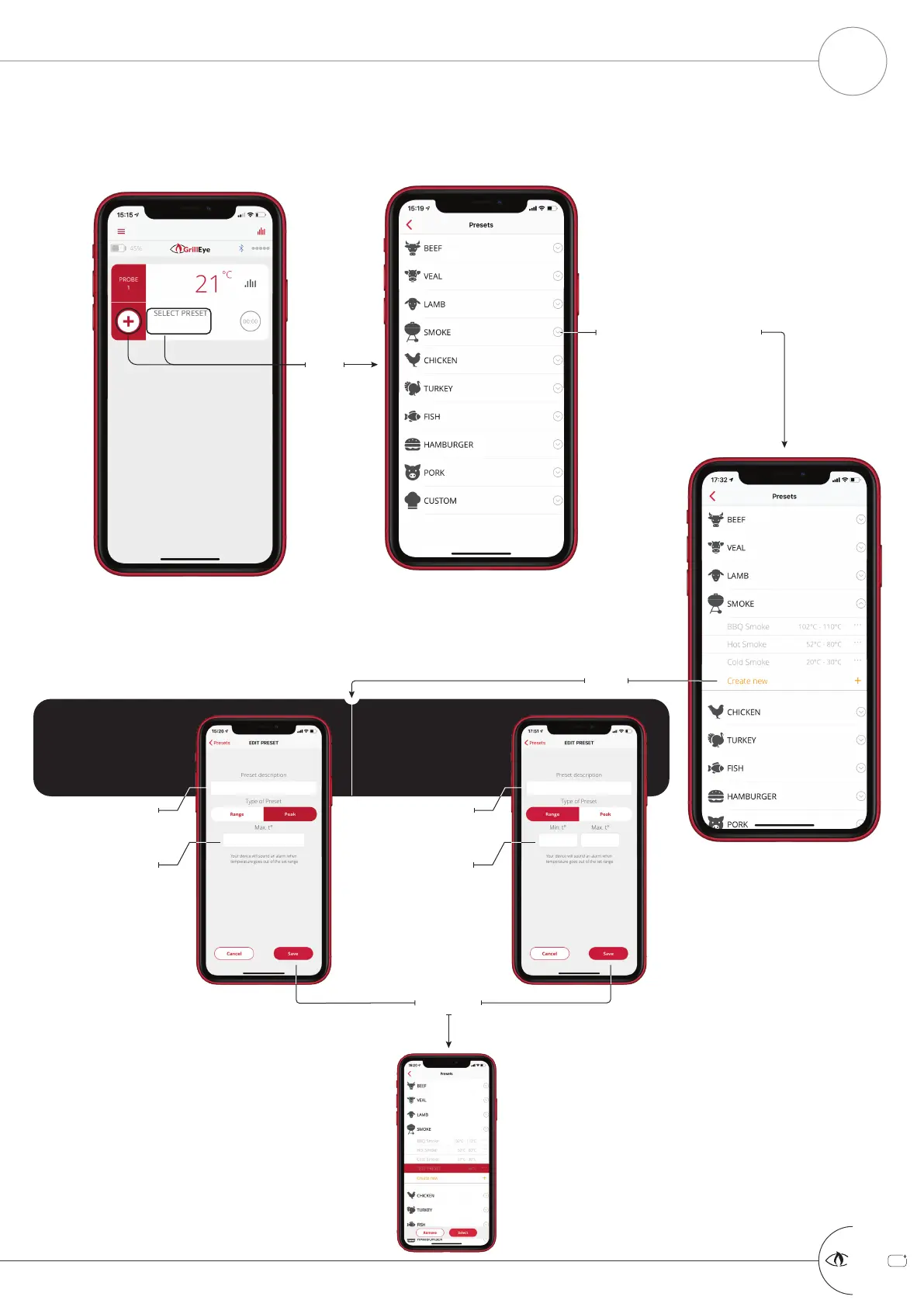
Press
+
GrillEye Pro
®
MANAGE PRESETS PART 2 OF 3: CREATE PRESET
START GRILLING & COOKING
9
Expand the category of the
preset where you wish to assign
your own preset
PEAK PRESET
Use this preset option when you are
looking to grill/cook up to a specific
temperature. When this temperature
is reached, the GrillEye will notify
you that your food is ready.
Fill-in the description
Set the target
temperature
RANGE PRESET
Use this preset option when you are
looking to grill/cook within a specific
temperature range (e.g. in smoking
sessions). If temperature goes out of
range, the GrillEye will notify you.
Select
Save
Fill-in the description
Set the lower & upper
temperature bounds
The created preset will
appear inside the selected
category, highlighted and
ready to be selected/applied



 To Next Page