Need help?
Do you have a question about the Growatt ShineWiFi-X2 and is the answer not in the manual?
Overview of LED status and corresponding working conditions for the ShineWiFi-X2 module.
Steps to configure the network using the standard mode via the Shine Phone App.
Steps to configure the network using Bluetooth mode via the Shine Phone App.
Details LED status indications and their corresponding troubleshooting steps for the ShineWiFi-X2.
Description of button operations and their effects on the ShineWiFi-X2 module.
Procedure to reset the datalogger and reconfigure network settings.
Steps to take when the router or its password is changed.
Information on supported characters for router names and passwords.
Guidance on how to handle a datalogger that already exists.
Specifies that only 2.4 GHz WiFi bands are supported by Shine WiFi-X2.
Troubleshooting steps based on WiFi-X2 indicator status when disconnected.
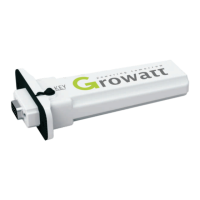
The Growatt ShineWiFi-X2 is a wireless communication module designed to facilitate the configuration and monitoring of Growatt inverters. It enables users to connect their inverter to a local network and the Growatt server, allowing for remote monitoring and management via the ShinePhone APP.
The ShineWiFi-X2 module serves as a bridge between the Growatt inverter and the internet. Once connected, it transmits data from the inverter to the Growatt server, which can then be accessed and visualized through the ShinePhone APP on a smartphone or tablet. This allows users to monitor their plant's performance, view energy generation data, and manage their system remotely.
The module supports two primary configuration modes:
Key functionalities include:
While specific numerical technical specifications like operating voltage or power consumption are not explicitly detailed in the provided document, the following can be inferred:
The ShineWiFi-X2 is designed for user-friendly setup and operation:
The device incorporates several features to assist with troubleshooting and maintenance:
 General
| Brand | Growatt |
|---|---|
| Model | ShineWiFi-X2 |
| Category | Control Unit |
| Language | English |

 To Next Page