EasyManua.ls Logo

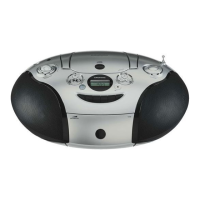
Grundig BEEZZ RRCD 4101 - User Manual

Grundig BEEZZ RRCD 4101
16 pages
Print Icon
To Next Page IconTo Next Page
Loading...
RADIO CASSETTE RECORDER
WITH CD
BEEZZ
RRCD 4101

Questions and Answers

  • C
    Carlos StaffordAug 2, 2025
    How to fix poor cassette playback sound quality on Grundig Cassette Player?
    • T
      Tonya TaylorAug 2, 2025
      To fix poor cassette playback sound quality on your Grundig Cassette Player, clean the magnetic heads, capstan, and idler, as the issue may be due to dust and dirt on these components.
  • P
    Patrick NewtonAug 6, 2025
    Why is there no sound coming from my Grundig Cassette Player?
    • J
      John WebbAug 6, 2025
      If there is no sound from your Grundig Cassette Player, check the following: * Ensure the volume isn't set too low; turn it up. * If headphones are connected, unplug them. * Replace the batteries if they are flat or insert them correctly. * Make sure the mains cable is properly connected.
  • C
    Corey Bishop Jr.Aug 10, 2025
    How to improve radio reception on my Grundig Cassette Player?
    • T
      Tracy PriceAug 11, 2025
      To improve radio reception on your Grundig Cassette Player: * For VHF (FM), adjust the telescopic antenna by tilting and turning it. * Keep the radio recorder away from electrical devices like televisions, video recorders, computers, neon lamps, thermostats, or motors, as they may cause interference.
  • B
    Brandi LeeAug 14, 2025
    What to do if my Grundig Cassette Player doesn't respond to button presses?
    • C
      cranenathanielAug 15, 2025
      If your Grundig Cassette Player is unresponsive to button presses, the issue might be due to static electrical discharge. To resolve this, switch off the radio recorder, disconnect the mains cable, and plug it back in after a few seconds.
  • M
    Michelle RosalesAug 19, 2025
    Why won't my Grundig Cassette Player start CD playback?
    • J
      Jake GarciaSep 12, 2025
      If your Grundig Cassette Player won't start CD playback, the CD might be damaged or dirty. Try replacing or cleaning the CD.
  • J
    Jose FisherAug 23, 2025
    Why does my Grundig Cassette Player CD player skip tracks?
    • A
      Allen JohnsonAug 23, 2025
      If the CD player on your Grundig Cassette Player skips tracks, a stored track memory might be playing. Switch to normal playback or delete the stored memory.
  • D
    David CarrollAug 28, 2025
    Why is my Grundig Cassette Player not recording cassettes?
    • N
      Nicole CrosbyAug 28, 2025
      If your Grundig Cassette Player is not recording cassettes, check if the recording protection tab has been broken off. If it has, cover the opening with adhesive tape.

Summary

Care and Safety

Overview

Controls

Details about device controls, function switches, volume, and connectivity options.

Tape Unit

Instructions and information specific to operating the cassette tape functions.

CD Unit

Information and procedures for using the CD player capabilities.

Display Elements

Explanation of the various indicators and displays on the device.

Power Supply

Mains Operation

Guidance on connecting and operating the device using mains power.

Battery Operation

Instructions for powering the device using batteries, including installation.

Important Notes for UK Users

Specific safety advice and plug connection details for users in the United Kingdom.

Volume and Tone

Adjusting the Volume

How to control the sound level using the VOL knob.

Ultra Bass System

Instructions to activate the feature that boosts bass frequencies.

Listening with Headphones

Guidance on connecting and using headphones with the audio device.

Radio Mode

Antennas

Guidance on using the telescopic and rod antennas for optimal reception.

Radio Reception

Steps for tuning into FM and MW radio stations.

CD Mode

Laser Device Safety

Important safety precautions for devices utilizing laser technology.

Preparation for CD Playback

Steps to prepare the device and insert a CD for playback.

CD Playback Functions

Instructions on starting, pausing, and stopping CD playback.

Track Navigation

How to select different tracks and search within a track.

Repeat and Track Memory

Using repeat functions and creating custom track playback sequences.

Track Memory Operations

Managing track memory: playback, mode switching, adding, replacing, and deleting.

Tape Mode

Tape Mode Preparation

Initial setup steps for operating the tape deck.

Cassette Playback

Instructions for playing audio from a cassette tape.

Cassette Navigation

How to use fast forward and rewind functions for tape management.

Tape Recording

Information on protecting tapes and general recording practices.

Recording Sources

Procedures for recording from radio and CD sources onto tape.

CD Synchro Recording

Method for automatically synchronizing CD tracks to tape.

Information

Tape Drive Cleaning

Procedure for cleaning the tape drive's magnetic heads, capstan, and idler.

Technical Data

Specifications, compliance details, and dimensions of the device.

Troubleshooting

General Information Issues

Solutions for common problems like no sound or device unresponsiveness.

Radio Problems

Troubleshooting steps for poor radio reception or tuning issues.

CD Playback Errors

Solutions for common CD playback issues like skipping or failure to start.

Tape Playback and Recording Issues

Remedies for poor sound quality or no recording on tape.

Grundig BEEZZ RRCD 4101 Specifications

General IconGeneral
ModelRRCD 4101
BrandGrundig
Output Power2 x 1.5 W
BluetoothNo
Media TypeCassette
Tuner BandsFM, AM
Power SourceAC
Recording FunctionYes

Related product manuals