31
ENGLISH
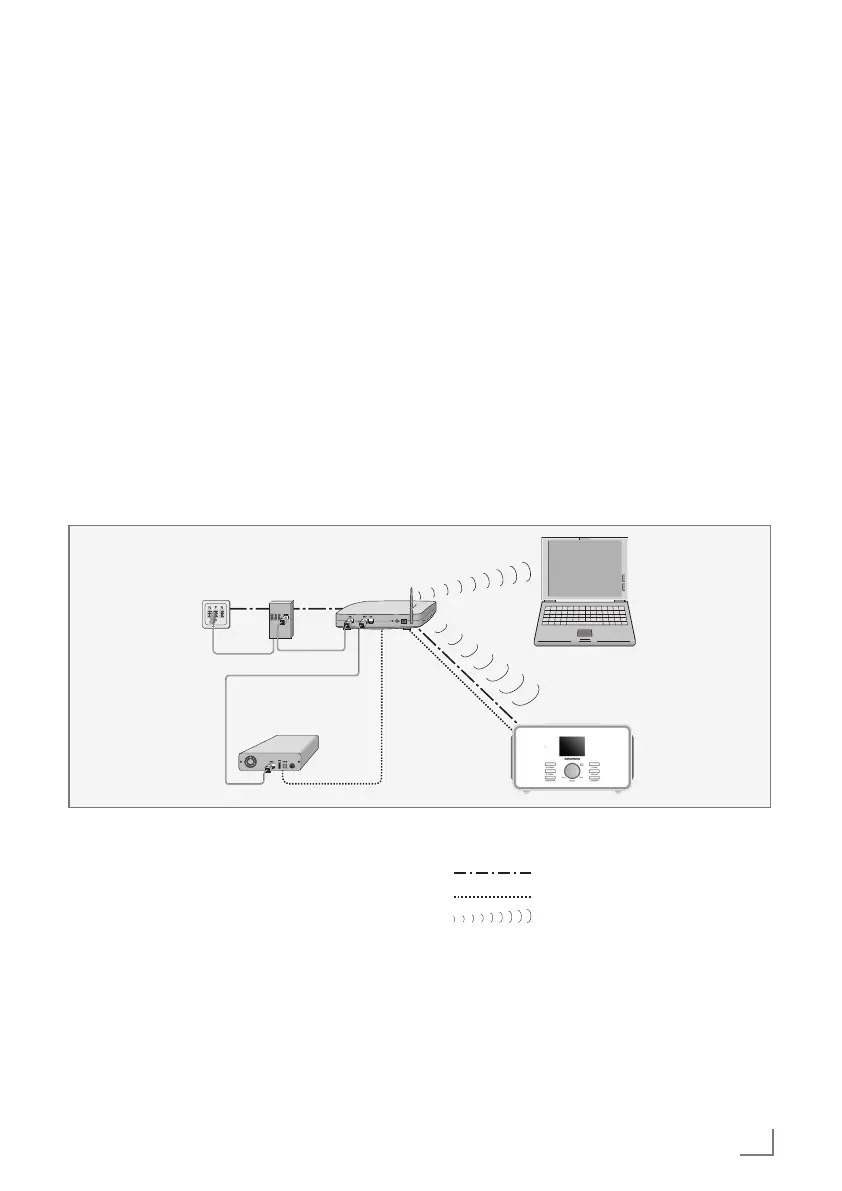
WLAN connection to the internet
Modem/Router
DTR 6000 2.1 BT DAB+ WEB / TR 3350 BT DAB+ WEB
Laptop
SplitterTelephone socket
Media servers on
hard drive (NAS-
Network Attached
Storage)
Notes:
7
The quality of the radio signal depends on
the distance between the device and your
modem/router.
7
The substance of the building at the installa-
tion site can also affect this.
Note:
The lines represent the function.
Internet radio
Music archive (audio streaming)
WLAN
CONNECTION AND PREPARATION
---------------------------------------
Changing the remote control bat-
tery
1 Pull out the battery compartment.
2 Insert the battery (1.5V x 2 AAA/R03/UM-4)
making sure that the polarity is correct.
3 Push in the battery compartment.
Notes:
7
Do not expose the batteries to extreme heat,
caused for example by direct sunlight, heat-
ers or fire.
7
Remove the batteries when they are flat or
when you know that the device will not be
used for a long period of time. The manufac-
turer accepts no liability for damage caused
by leaking batteries.
Environmental note:
7
Batteries, including those which do not con-
tain heavy metal, should not be disposed of
with household waste. Always dispose of
used batteries in accordance with local en-
vironmental regulations.














 To Next Page